EasyManua.ls Logo

Pioneer A-331 - Page 6

Pioneer A-331
12 pages
Print Icon
To Next Page IconTo Next Page
To Previous Page IconTo Previous Page
Loading...
PANEL
FACILITIES
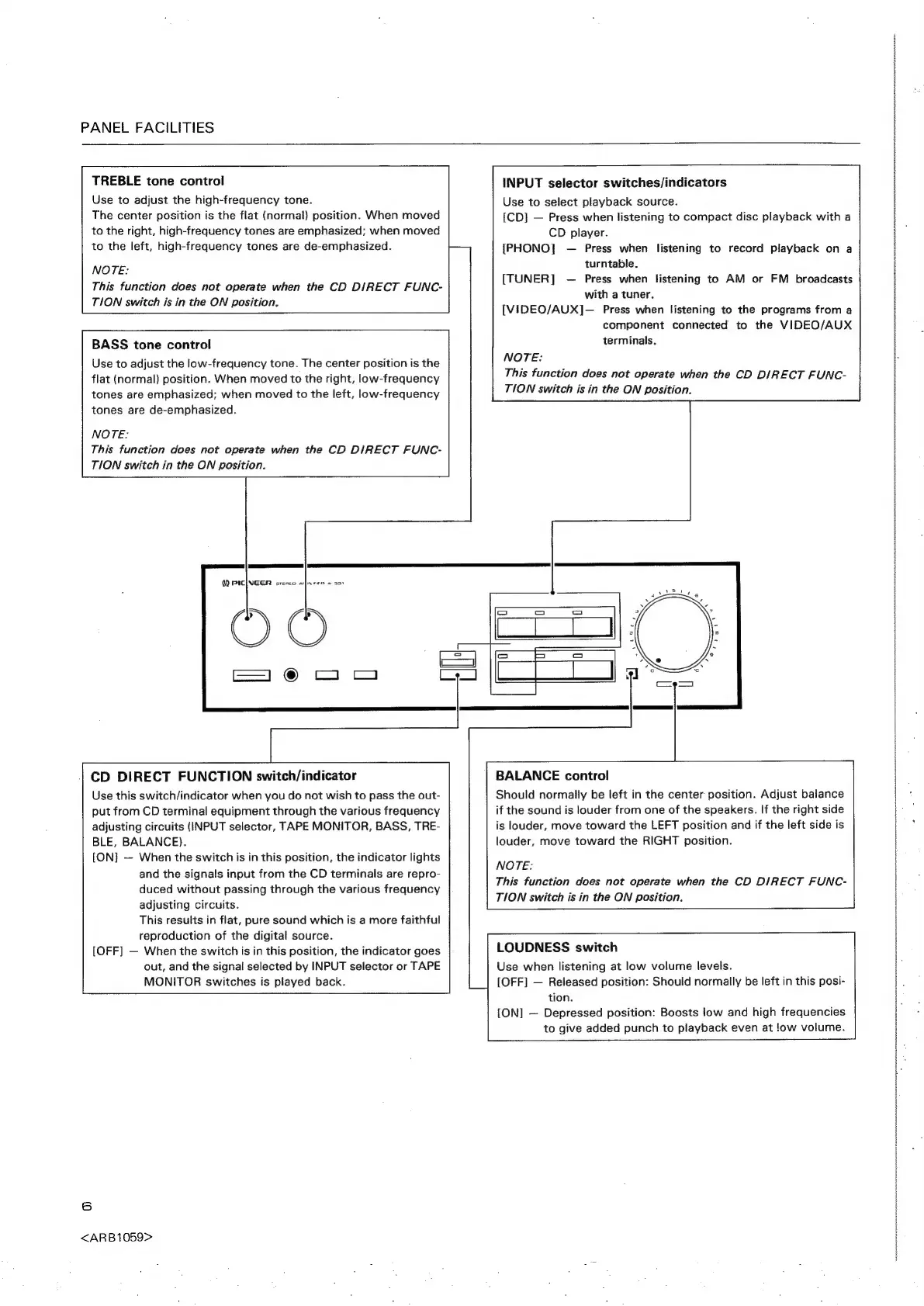
TREBLE
tone
control
Use
to
adjust
the
high-frequency
tone.
The
center
position
is
the
flat
(normal)
position.
When
moved
INPUT
selector
switches/indicators
Use
to
select
playback
source.
{CD]
—
Press
when
listening
to
compact
disc
playback
with
a
to
the
right,
high-frequency
tones
are
emphasized;
when
moved
CD
player.
to
the
left,
high-frequency
tones
are
de-emphasized.
{PHONO}
—
Press
when
listening
to
record
playback
on
a
wore
TUNER
oe
eke
listeni
AM
or
FM
broad
This
function
does
not
operate
when
the
CD
DIRECT
FUNC-
[
1S
Ge
ea:
peng
60
a
eich
TION
switch
is
in
the
ON
ition.
SEE
EO
ROO
[VIDEO/AUX]—
Press
when
listening
to
the
programs
from
a
component
connected
to
the
VIDEO/AUX
terminals.
BASS
tone
control
Use
to
adjust
the
low-frequency
tone.
The
center
position
is
the
flat
(normal)
position.
When
moved
to
the
right,
low-frequency
tones
are
emphasized;
when
moved
to
the
left,
low-frequency
tones
are
de-emphasized.
NOTE:
This
function
does
not
operate
when
the
CD
DIRECT
FUNC-
TION
switch
is
in
the
ON
position.
NOTE:
This
function
does
not
operate
when
the
CD
DIRECT
FUNC-
TION
switch
in
the
ON
position.
W)
PICINGER
sresco
a}asee
a
33s
BALANCE
control
Should
normally
be
left
in
the
center
position.
Adjust
balance
if
the
sound
is
louder
from
one
of
the
speakers.
If
the
right
side
is
louder,
move
toward
the
LEFT
position
and
if
the
left
side
is
louder,
move
toward
the
RIGHT
position.
CD
DIRECT
FUNCTION
switch/indicator
Use
this
switch/indicator
when
you
do
not
wish
to
pass
the
out-
put
from
CD
terminal
equipment
through
the
various
frequency
adjusting
circuits
(INPUT
selector,
TAPE
MONITOR,
BASS,
TRE-
BLE,
BALANCE).
[ON]
—
When
the
switch
is
in
this
position,
the
indicator
lights
and
the
signals
input
from
the
CD
terminals
are
repro-
duced
without
passing
through
the
various
frequency
adjusting
circuits.
This
results
in
flat,
pure
sound
which
is
a
more
faithful
reproduction
of
the
digital
source.
[OFF]
—
When
the
switch
is
in
this
position,
the
indicator
goes
out,
and
the
signal
selected
by
INPUT
selector
or
TAPE
MONITOR
switches
is
played
back.
NOTE:
This
function
does
not
operate
when
the
CD
DIRECT
FUNC-
TION
switch
is
in
the
ON
position.
LOUDNESS
switch
Use
when
listening
at
low
volume
levels.
[OFF]
—
Released
position:
Should
normally
be
left
in
this
posi-
tion.
{ON]
—
Depressed
position:
Boosts
low
and
high
frequencies
to
give
added
punch
to
playback
even
at
!ow
volume.
6
<ARB1059>