EasyManua.ls Logo

Pioneer A-331 - Recording Tapes; Monitoring While Recording

Pioneer A-331
12 pages
Print Icon
To Next Page IconTo Next Page
To Previous Page IconTo Previous Page
Loading...
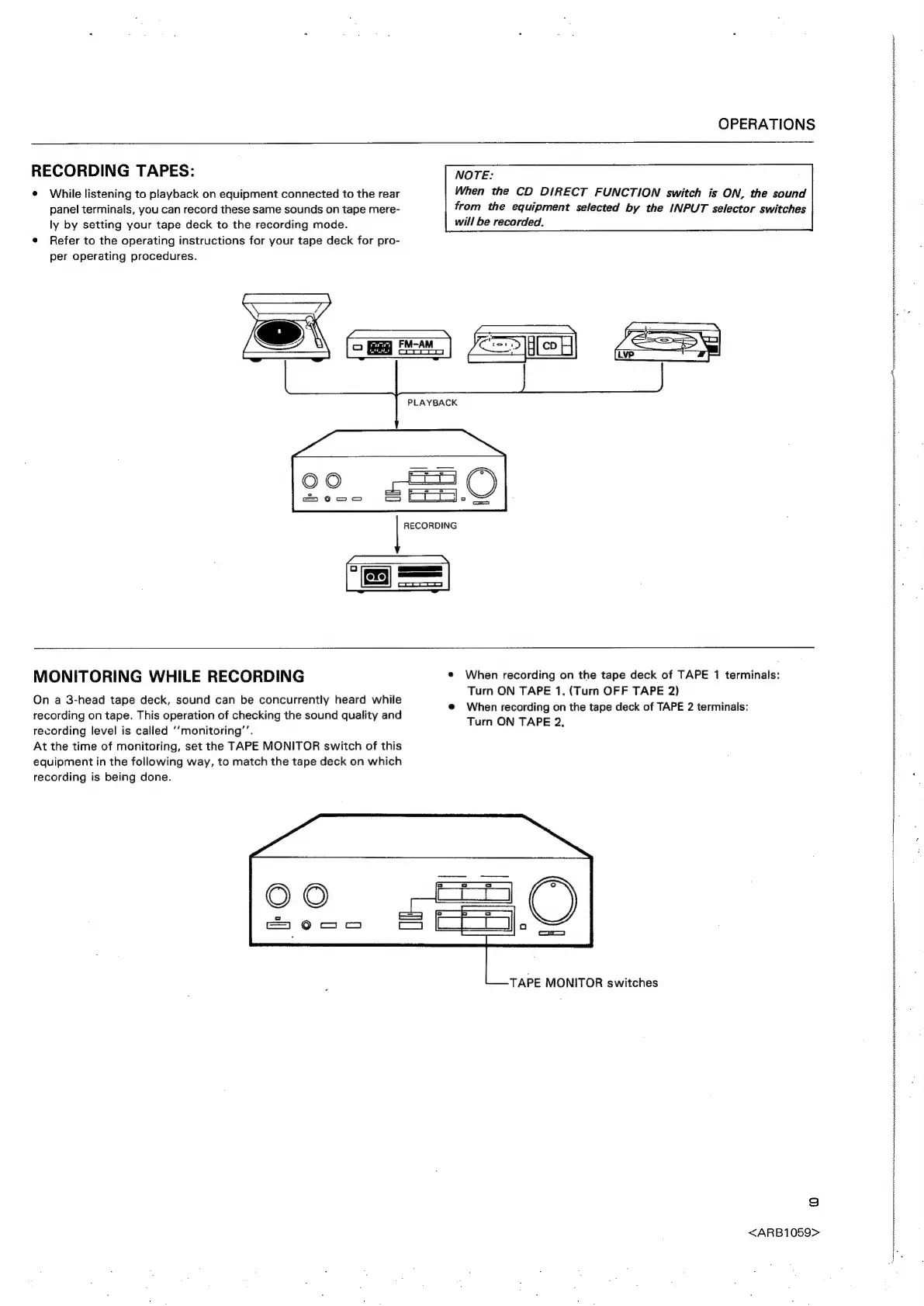
RECORDING
TAPES:
¢
While
listening
to
playback
on
equipment
connected
to
the
rear
panel
terminals,
you
can
record
these
same
sounds
on
tape
mere-
ly
by
setting
your
tape
deck
to
the
recording
mode.
¢
Refer
to
the
operating
instructions
for
your
tape
deck
for
pro-
per
operating
procedures.
OPERATIONS
NOTE:
When
the
CD
DIRECT
FUNCTION
switch
is
ON,
the
sound
from
the
equipment
selected
by
the
INPUT
selector
switches
will
be
recorded.
=,
=
PLAYBACK
|
MONITORING
WHILE
RECORDING
On
a
3-head
tape
deck,
sound
can
be
concurrently
heard
while
recording
on
tape.
This
operation
of
checking
the
sound
quality
and
recording
level
is
called
‘‘monitoring’’.
At
the
time
of
monitoring,
set
the
TAPE
MONITOR
switch
of
this
equipment
in
the
following
way,
to
match
the
tape
deck
on
which
recording
is
being
done.
¢
When
recording
on
the
tape
deck
of
TAPE
1
terminals:
Turn
ON
TAPE
1,
(Turn
OFF
TAPE
2)
@
When
recording
on
the
tape
deck
of
TAPE
2
terminals:
Turn
ON
TAPE
2,
TAPE
MONITOR
switches
9
<ARB1059>
peste
giemstrttrnasesitcion”