EasyManua.ls Logo

Pioneer A-331 - Before Beginning Operations; Playback Procedures

Pioneer A-331
12 pages
Print Icon
To Next Page IconTo Next Page
To Previous Page IconTo Previous Page
Loading...
OPERATIONS
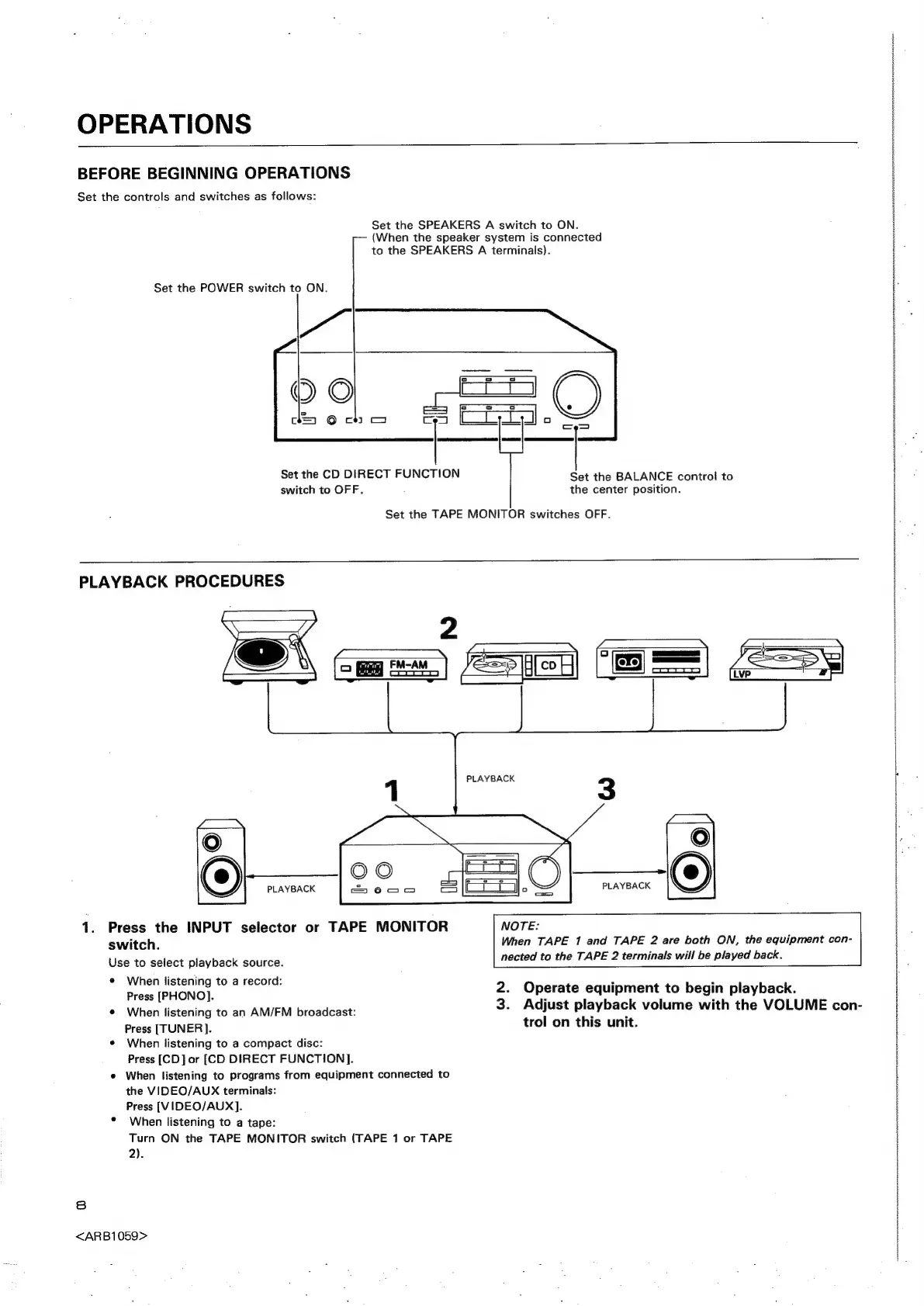
BEFORE
BEGINNING
OPERATIONS
Set
the
controls
and
switches
as
follows:
Set
the
SPEAKERS
A
switch
to
ON.
(When
the
speaker
system
is
connected
to
the
SPEAKERS
A
terminals).
Set
the
POWER
switch
to
ON.
|
|
|
|
|
i
|
|
i
H
|
|
Set
the
CD
DIRECT
FUNCTION
Set
the
BALANCE
control
to
switch
to
OFF.
the
center
position.
Set
the
TAPE
MONITOR
switches
OFF.
PLAYBACK
PROCEDURES
PLAYBACK
1.
Press
the
INPUT
selector
or
TAPE
MONITOR
switch.
When
TAPE
1
and
TAPE
2
are
both
ON,
the
equipment
con-
nected
to
the
TAPE
2
terminals
will
be
played
back.
Use
to
select
playback
source.
¢
When
listening
to
a
record:
Press
[PHONO].
2.
Operate
equipment
to
begin
playback.
©
When
listening
to
an
AM/FM
broadcast:
3.
Adjust
playback
volume
with
the
VOLUME
con-
Press
[TUNER].
trol
on
this
unit.
e
When
listening
to
a
compact
disc:
Press
[CD]
or
[CD
DIRECT
FUNCTION].
e
When
listening
to
programs
from
equipment
connected
to
the
VIDEO/AUX
terminals:
Press
[VIDEO/AUX].
When
listening
to
a
tape:
Turn
ON
the
TAPE
MONITOR
switch
(TAPE
1
or
TAPE
2).
8
<ARB1059>
armnecrroreeeteetofoes
sot
or
evento
yet
SF
FEE
Re
EHO
ORO
CSC
0
EEE
NTP
EE
RAMA
ON