EasyManua.ls Logo

Pioneer A-331 - Panel Facilities; Front Panel

Pioneer A-331
12 pages
Print Icon
To Next Page IconTo Next Page
To Previous Page IconTo Previous Page
Loading...
PANEL
FACILITIES
FRONT
PANEL
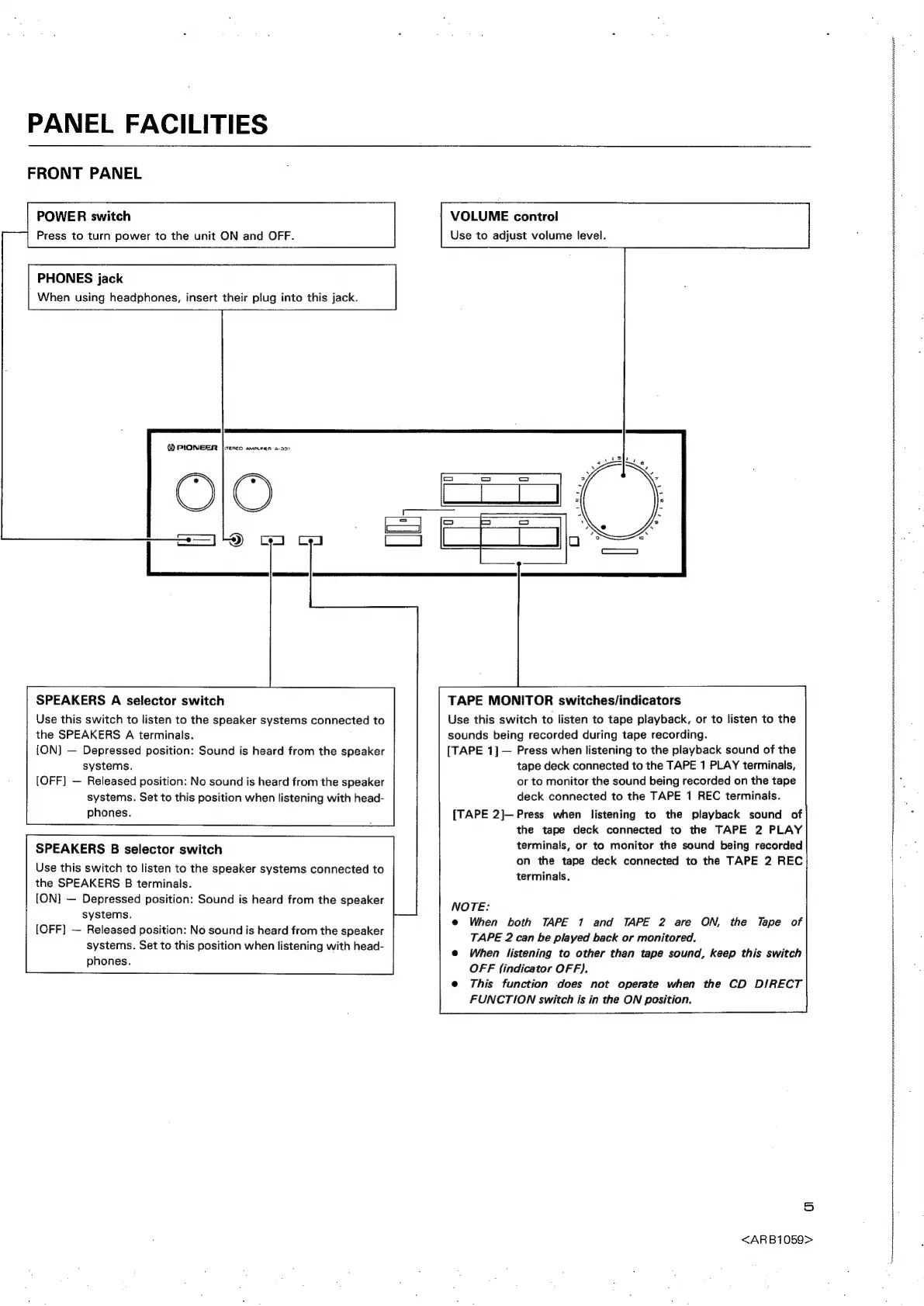
POWER
switch
VOLUME
control
Press
to
turn
power
to
the
unit
ON
and
OFF.
Use
to
adjust
volume
level.
PHONES
jack
When
using
headphones,
insert
their
plug
into
this
jack.
@
PIONEER
fitenco
amaeen
2931
SPEAKERS
A
selector
switch
Use
this
switch
to
listen
to
the
speaker
systems
connected
to
the
SPEAKERS
A
terminals.
[ON]
—
Depressed
position:
Sound
is
heard
from
the
speaker
systems.
{OFF]
—
Released
position:
No
sound
is
heard
from
the
speaker
systems.
Set
to
this
position
when
listening
with
head-
phones.
TAPE
MONITOR
switches/indicators
Use
this
switch
to
listen
to
tape
playback,
or
to
listen
to
the
sounds
being
recorded
during
tape
recording.
[TAPE
1]—
Press
when
listening
to
the
playback
sound
of
the
tape
deck
connected
to
the
TAPE
1
PLAY
terminals,
or
to
monitor
the
sound
being
recorded
on
the
tape
deck
connected
to
the
TAPE
1
REC
terminals.
[TAPE
2]—
Press
when
listening
to
the
playback
sound
of
the
tape
deck
connected
to
the
TAPE
2
PLAY
terminalis,
or
to
monitor
the
sound
being
recorded
on
the
tape
deck
connected
to
the
TAPE
2
REC
terminals.
SPEAKERS
B
selector
switch
Use
this
switch
to
listen
to
the
speaker
systems
connected
to
the
SPEAKERS
B
terminals.
[ON]
—
Depressed
position:
Sound
is
heard
from
the
speaker
systems.
[OFF]
—
Released
position:
No
sound
is
heard
from
the
speaker
systems.
Set
to
this
position
when
listening
with
head-
phones.
NOTE:
e@
When
both
TAPE
1
and
TAPE
2
are
ON,
the
Tape
of
TAPE
2
can
be
played
back
or
monitored.
e@
When
listening
to
other
than
tape
sound,
keep
this
switch
OFF
(indicator
OFF).
e
This
function
does
not
operate
when
the
CD
DIRECT
FUNCTION
switch
is
in
the
ON
position.
5
<ARB1059>