EasyManua.ls Logo

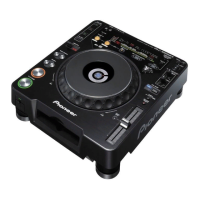
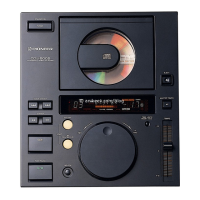
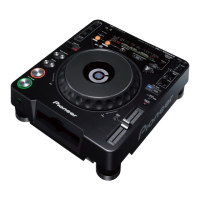
Pioneer CMX-3000 - User Manual

Pioneer CMX-3000
33 pages
Print Icon
To Next Page IconTo Next Page
Loading...
COMPACT DISC PLAYER
REPRODUCTOR DE DISCOS COMPACTOS
CMX-3000
Operating Instructions
Manual de instrucciones
雷射唱機
操作說明書

Table of Contents

Other manuals for Pioneer CMX-3000

Questions and Answers

  • A
    Andrea RandolphSep 4, 2025
    Why is my Pioneer CMX-3000 CD Player jog dial performing the wrong function?
    • M
      Michael FigueroaSep 4, 2025
      If the jog dial on your Pioneer CD Player is performing the wrong function, the jog mode may be incorrect. Press the JOG MODE button to select the desired function.
  • J
    jblackSep 18, 2025
    Why is the disc not rotating on my Pioneer CD Player?
    • T
      Todd BarronSep 18, 2025
      If the disc is not rotating on your Pioneer CD Player, it could be because disc rotation is automatically halted when no operation is performed for 80 minutes or longer in pause mode. Press the PLAY/PAUSE button (38) to begin playback, or press the EJECT button (0) to eject the disc. Also, when the last track on the disc is over the disc stops rotating, so press the PLAY/PAUSE button (38) to begin playback or the EJECT button (0) to eject the disc.
  • M
    Michael TorresSep 16, 2025
    Why are television pictures distorted or noise appears in FM broadcasts when using my Pioneer CMX-3000 CD Player?
    • B
      Bryan TravisSep 16, 2025
      If television pictures are distorted or noise appears in FM broadcasts while using your Pioneer CD Player, it may be due to interference caused by the CD player. Turn off the power to the CD player or move it further away from the radio or television set.
  • K
    Katrina SmithSep 14, 2025
    Why is HOT CUE data not stored on my Pioneer CMX-3000?
    • T
      theresatorresSep 14, 2025
      If HOT CUE data is not being stored on your Pioneer CD Player, it's because the HOT CUE data is stored in memory when the disc is ejected. Eject the disc, then turn off the power.
  • S
    Sally BowenSep 12, 2025
    Why is WAVE data not stored on my Pioneer CMX-3000 CD Player?
    • N
      Natasha MclaughlinSep 13, 2025
      If WAVE data is not being stored on your Pioneer CD Player, it's because the data is stored when playback of the current track is completed. Wait until the current track finishes playing.
  • R
    richardgrossSep 12, 2025
    Why are auto cue and other settings not stored on my Pioneer CD Player?
    • M
      Maria HooperSep 12, 2025
      If auto cue and other settings are not being stored on your Pioneer CD Player, it may be because the power was turned off too soon after making a setting. Wait 10 seconds before turning off the power after making a change.
  • M
    mmckinneySep 9, 2025
    Why can't I perform DJ operations on my Pioneer CMX-3000?
    • S
      Steven JohnsonSep 9, 2025
      If you are unable to perform DJ operations on your Pioneer CD Player, check if the DIGITAL MODE switch is set to ON. If it is, set the DIGITAL MODE switch to OFF.
  • A
    ambercarlsonSep 7, 2025
    Why can't I produce loop playback on my Pioneer CD Player?
    • C
      catherine23Sep 7, 2025
      If you are unable to produce loop playback on your Pioneer CD Player, a cueing point (starting point) may not have been defined. Also, check if the DIGITAL MODE switch is set to ON, and if so, set it to OFF.
  • B
    bradfordtimothySep 5, 2025
    Why does back cueing fail on my Pioneer CMX-3000?
    • R
      Raymond BrooksSep 6, 2025
      If back cueing fails to work on your Pioneer CD Player, a cueing point may not have been defined. Also, check if the DIGITAL MODE switch is set to ON, and if so, set it to OFF.
  • B
    Bryan GallegosAug 21, 2025
    Why is there no sound coming from my Pioneer CMX-3000 CD Player?
    • M
      Mr. Brandon Schneider DDSAug 21, 2025
      If no sound is coming from your Pioneer CD Player, check the following: ensure the audio cable is properly plugged in; verify the DJ mixer's switch and volume settings; clean any dust or dirt from the jacks and plugs; and confirm the player is not in pause mode by pressing the PLAY/PAUSE button (38).

Summary

Important Safety and Operating Guidelines

Electrical and Fire Hazard Warnings

Cautions regarding electric shock, fire, and general precautions.

Environmental and Installation Guidelines

Advice on placement, ventilation, and temperature for optimal operation.

Product Safety and Compliance

Laser Safety and Optical Hazards

Warnings about laser product safety and eye hazard.

FCC Regulations and User Information

FCC compliance, modification warnings, and cable requirements.

Power and Voltage Handling

Power Cord Safety

Instructions for handling the power cord to prevent damage or shock.

Line Voltage Selector Switch

Guide on setting the voltage selector switch for correct operation.

Key Features Overview

Jog Dial and Tempo Control

Explains Jog Dial functions, pitch bend, and tempo controls.

Cueing and Playback Functions

Details auto cue, cue point sampler, and back cueing.

Advanced Playback Capabilities

Loop Playback and Memory

Covers seamless loop, reloop, loop memory, and emergency loop.

Control Panel Layout

Remote Control Unit Interface

Identifies controls on the remote unit.

System Connections

Disc Insertion and Ejection

DJ Player Basic Operation

Basic Playback Control

Track Navigation and Searching

Cue Point Management

Tempo and Pitch Adjustment

Jog Dial Functionality

Advanced DJ Operations

Advanced Playback Techniques

Loop Control and Programming

Synchronization Features

Advanced Playback Modes

Troubleshooting Guide

Common Problems and Solutions

Lists common issues and recommended corrective actions.

Error Messages and Maintenance

Error Code Resolution

Explains error codes and how to fix them.

Pioneer CMX-3000 Specifications

General IconGeneral
BrandPioneer
ModelCMX-3000
CategoryCD Player
LanguageEnglish

Related product manuals