
 Need help?
Do you have a question about the Pioneer DEH-X3700S and is the answer not in the manual?
Important safety instructions, warnings, and health precautions for product use.
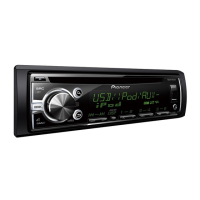
Overview of the unit's main controls and initial operation.
Common tasks performed using the remote control.
Procedure for safely removing and storing the front panel.
Instructions for replacing the remote battery and initial unit settings.
How to store and recall favorite radio stations using presets and BSM.
Instructions for playback from CD, USB devices, iPod, and AUX input.
Steps to connect Bluetooth-enabled devices like phones and audio players.
Using iPod control modes and accessing music library via link play.
Managing calls, accessing call history, and using the phone book.
Connecting and playing audio content from Bluetooth devices.
Guide to connecting and controlling smartphone applications via the unit.
Instructions for using the Pandora internet radio service with the unit.
Steps to set up and tune into SiriusXM channels.
Using category scan and manual search for SiriusXM channels.
Adjusting source selection, sound settings, and other operational features.
Customizing sound profiles with EQ, loudness, and bass boost.
Configuring clock, display brightness, illumination colors, and dimming.
Managing Bluetooth connections and application connection methods.
Adjusting MIXTRAX playback length, flash patterns, and special effects.
Instructions for connecting power, speakers, microphone, and tuner.
Details for front-mount and rear-mount installation in the dashboard.
Diagrams for connecting an optional external power amplifier.
Step-by-step guide to detach the unit from the dashboard.
Proper placement of the microphone for optimal voice recognition.
Solutions for common problems like display resets, intermittent sound, and Bluetooth issues.
Understanding and resolving various error messages for different sources.
Best practices for handling discs and maintaining the CD player.
Important advice for using USB storage and iPod devices safely.
List of compatible audio file types (MP3, WAV) and their specifications.
Information on trademarks for iPod, Bluetooth, Pandora, and MIXTRAX.
Technical details for power, dimensions, audio output, and tuner frequencies.
Technical data for CD player, USB interface, and Bluetooth module.
 General
| DIN Size | Single DIN |
|---|---|
| Channels | 4 |
| Subwoofer Output | Yes |
| MP3 Playback | Yes |
| WMA Playback | Yes |
| AAC Playback | Yes |
| HD Radio | No |
| Satellite Radio Ready | No |
| Steering Wheel Control Compatible | Yes |
| RDS | Yes |
| AM/FM Tuner | Yes |
| High-Pass Filter | Yes |
| Low-Pass Filter | Yes |
| Preamp Outputs | 2 Pairs |
| Preamp Voltage | 2V |
| USB Port | Front |
| AUX Input | Front |
| Max Power Output | 50 Watts x 4 Channels |



 To Next Page
