EasyManua.ls Logo

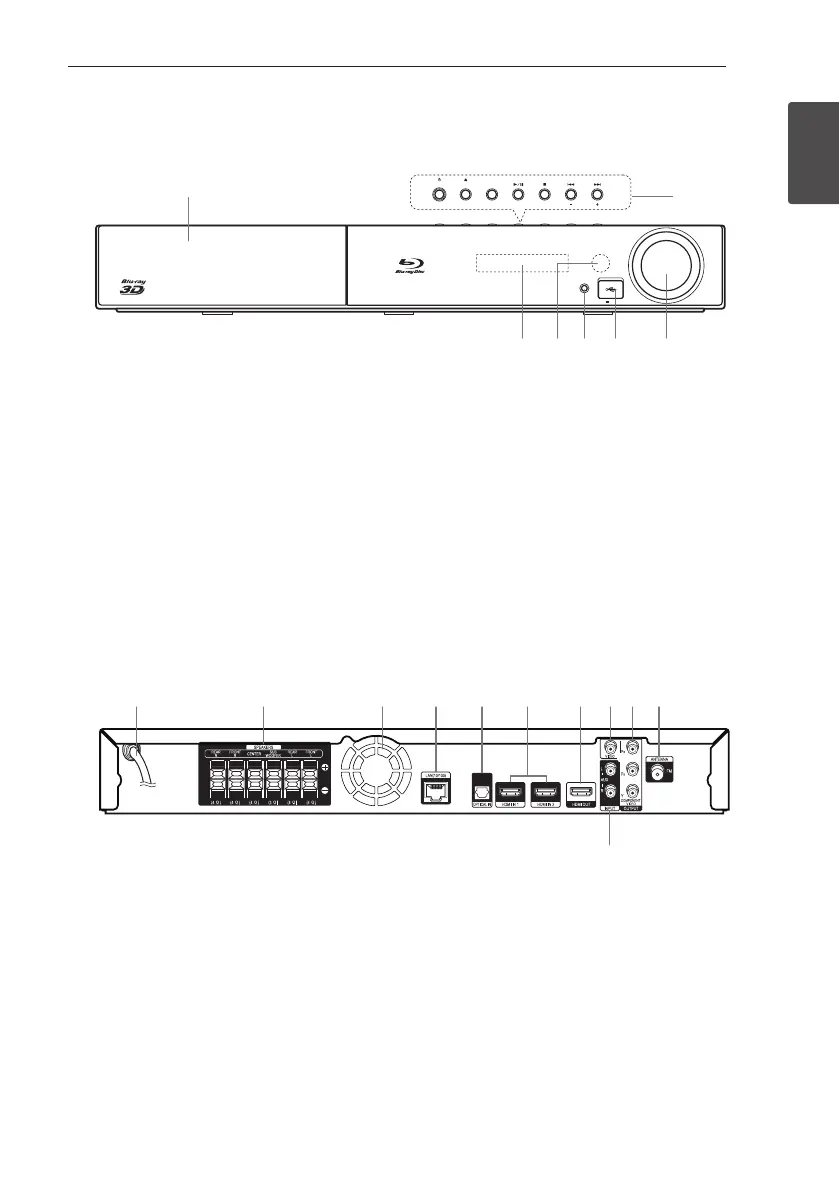
Pioneer S-BD310 - Unit Panels; Front Panel Controls and Indicators; Rear Panel Connections

Pioneer S-BD310
400 pages
Print Icon
To Next Page IconTo Next Page
To Previous Page IconTo Previous Page
Loading...
Getting Started 15
Getting Started
1
Front panel
a b c d e f g h i j
k
STANDBY/ON OPEN/CLOSE FUNCTION
TUNE
VOLUME
PORTABLE IN
5 V 500 mA
a
b
dc e f g
a
Disc Tray
b
Operation buttons
1
(STANDBY/ON) Button
Switches the player ON or OFF.
B
(OPEN/CLOSE)
FUNCTION
Changes the input source or function.
d
/
M
(PLAY / PAUSE)
Z
(STOP)
C/V
(SKIP)
- TUNE + (Radio tuning)
c
Display Window
d
Remote Sensor
e
PORTABLE IN
f
USB Port
g
Volume Control
Rear panel
a b c d e f g h i j
k
STANDBY/ON OPEN/CLOSE FUNCTION
TUNE
VOLUME
PORTABLE IN
5 V 500 mA
a
b
dc e f g
a
AC power cord
b
Speakers connectors
c
Cooling Fan
d
LAN port
e
OPTICAL IN
f
HDMI IN 1/2
g
HDMI OUT
h
VIDEO OUT
i
COMPONENT VIDEO (Y P
b Pr)
OUTPUT (PROGRESSIVE SCAN)
j
Antenna Connector
k
AUX (L/R) INPUT
HB916-DH0_BDEUPPK_ENG.indd 15 2011-05-12 �� 12:22:15

Table of Contents

Related product manuals