Connecting 23
Connecting
2
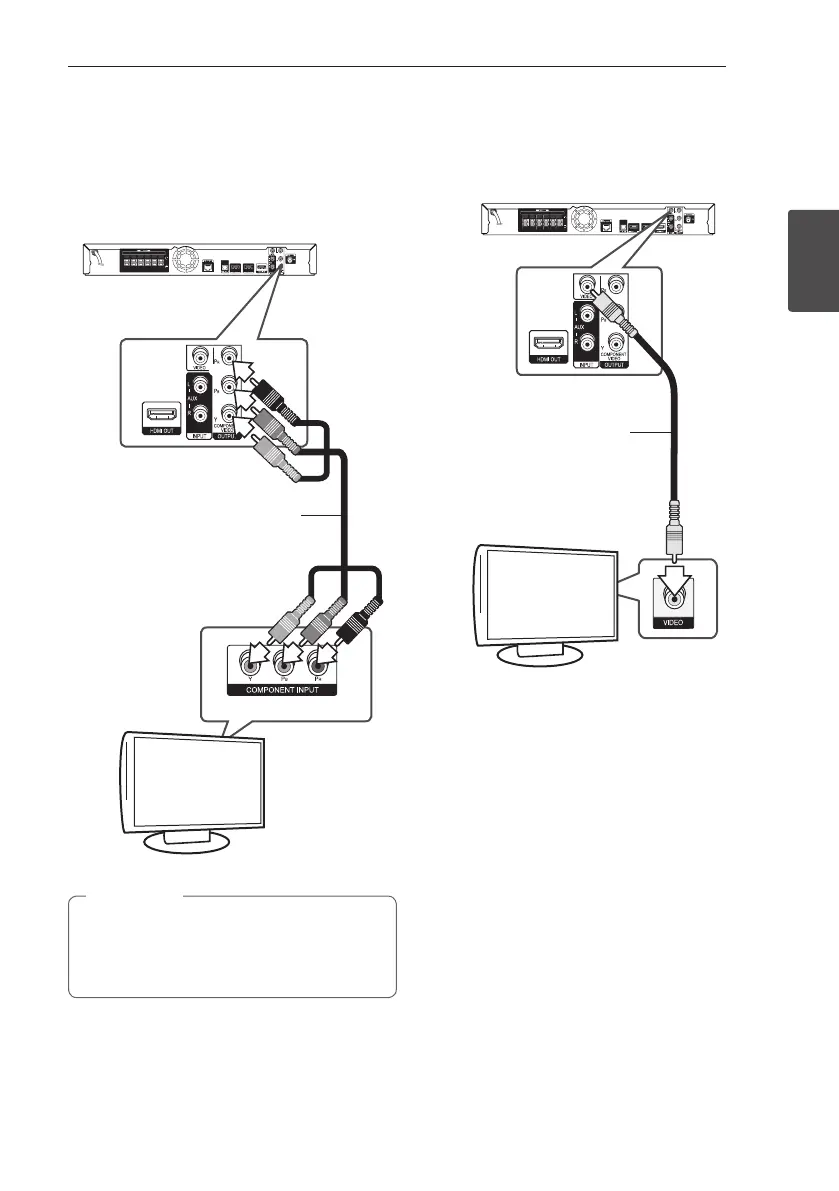
Component Video Connection
Connect the COMPONENT VIDEO OUT jacks on the
player to the corresponding input jacks on the TV
using component video cable. You can hear the
sound the through the system’s speaker.
Component
video cable
Rear of the unit
TV
When you use COMPONENT VIDEO OUT
connection, you can change the resolution for
the output. (Refer to “Resolution setting” on
page 24.)
,
Note
Video Connection
Connect the VIDEO OUT jack on the player to the
video in jack on the TV using a video cable. You can
hear the sound through the system’s speakers.
Rear of the unit
TV
Video cable
HB916-DH0_BDEUPPK_ENG.indd 23 2011-05-12 �� 12:22:18



 To Next Page