EasyManua.ls Logo

Pioneer SA-6300 - User Manual

Pioneer SA-6300
12 pages
Print Icon
To Next Page IconTo Next Page
Loading...
i
|
|
INTEGRATED
STEREO
AMPLIFIER
FP
SA-G3O00
.
OPERATING
INSTRUCTIONS
GN
PJ
i}
iT
Tete
et
eT
tT
Et
@Mpwneee
Question and Answer IconNeed help?

Do you have a question about the Pioneer SA-6300 and is the answer not in the manual?

Summary

Pioneer SA-6300 Features Overview

Power Output and Distortion

Highlights 20W per channel output and low distortion characteristics using pure complementary OCL circuitry.

Integrated Circuit Equalizer

Features an IC equalizer section for minimized RIAA deviation and advanced fidelity with transistorized circuits.

Line Voltage and Fuse Settings

Details line voltage compatibility and the process for changing voltage settings and replacing the fuse.

Program Source Compatibility

Explains connectivity for various program sources like turntables, tuners, and tape decks via rear panel input jacks.

Dual Speaker System Support

Describes the ability to connect and select between two sets of speaker systems using the speaker selector switch.

Front Panel Design and System Integration

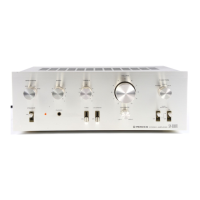
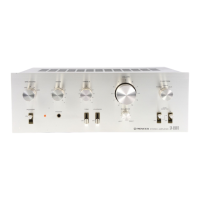
Notes the simple, elegant front panel for operational ease and availability of a matching stereo tuner.

Stereo System Setup and Installation

System Setup Requirements

Details the need for at least one pair of speakers and a program source of comparable quality to the SA-6300.

Installation Cautions

Advises against installing the unit in direct sunlight, humid/dusty areas, or on unstable supports to prevent damage.

Speaker Connection Guide

Room Acoustics Advice

Amplifier Connection Diagram and Outlets

Detailed Connection Diagram

Illustrates connections for turntable, tuner, tape deck, and speaker systems to the SA-6300.

Connection Precautions

Emphasizes observing channel and polarity for inputs/outputs and ensuring secure connections to prevent noise.

AC Convenience Outlet Usage

Explains the use of switched and unswitched AC outlets for powering other components up to 200W.

Component Connections

Turntable Connection

Connects turntable outputs to PHONO jacks and ground wire to GND terminal. Notes MM/MC cartridge compatibility.

Tuner Connection

Connects an AM/FM stereo tuner to the TUNER jacks using a connecting cord.

Auxiliary Input Terminals

Describes using AUX jacks for auxiliary inputs like cartridge tape players or second tuners.

Tape Deck Connections

Details connections for recording (TAPE REC) and playback (TAPE PB), including DIN connector options.

Front Panel Controls and Facilities

Power Switch and Pilot Lamp

Describes the POWER switch for turning the unit ON/OFF and the Pilot Lamp indicating power status.

Headphone Jack

Provides a PHONES jack for private listening, requiring the SPEAKERS switch to be OFF.

Speaker System Selector

Explains the SPEAKERS switch for selecting speaker systems A, B, or both, and OFF for headphone use.

Tone and Balance Controls

Details BASS & TREBLE controls for tone adjustment and BALANCE control for left/right volume balance.

Tape Monitor Switch

Instructs to set TAPE MONITOR to ON for tape playback or recording monitoring.

Before and During Operation

Pre-Operation Control Settings

Lists initial settings for controls like VOLUME, TAPE MONITOR, BALANCE, LOUDNESS, BASS/TREBLE, and SPEAKERS before powering on.

Playing Records

Step-by-step guide to playing records, including setting FUNCTION to PHONO and adjusting controls.

Tuner Operation

Instructions for using the tuner by setting FUNCTION to TUNER and adjusting volume and tone controls.

Auxiliary Component Operation

Guide for operating auxiliary sources connected to AUX jacks, setting FUNCTION to AUX and adjusting controls.

Tape Deck Operations

Tape Playback

How to play tape using the TAPE PB jacks by setting TAPE MONITOR to ON and adjusting controls.

Monitoring Recording Conditions

Explains monitoring recording through speakers/headphones by setting TAPE MONITOR to ON for 3-head decks.

Tape Duplication and Editing

Guide for duplicating tapes using two tape decks connected to AUX and TAPE terminals.

Tape Recording

Process for recording from sources like PHONO or TUNER to the TAPE REC jacks.

Operation Reference Guide

Record Playing Setup

Diagram and instructions for setting FUNCTION to PHONO and adjusting controls for record playback.

Broadcast Reception Setup

Diagram and instructions for setting FUNCTION to TUNER and adjusting controls for broadcast reception.

Auxiliary Terminal Usage

Diagram and instructions for setting FUNCTION to AUX and adjusting controls for auxiliary sources.

Tape Playback Setup

Diagram and instructions for tape playback, setting TAPE MONITOR to ON and adjusting controls.

Tape Recording Setup

Diagram and instructions for tape recording, setting FUNCTION and TAPE MONITOR for monitoring.

Troubleshooting Common Malfunctions

No Sound Troubleshooting

Checks for no sound: inspect power cord, connections, speaker connections, and switch positions.

Noise and Distortion Issues

Addresses high noise levels and distorted sound by checking ground wire, record condition, stylus, and turntable vibration.

Interference and Tuning Problems

Troubleshoots interference from power tools or radio stations and ensures proper station tuning.

Technical Specifications

Semiconductor Components

Lists the quantities of ICs, transistors, and diodes used in the amplifier.

Amplifier Section Specifications

Details power output, harmonic distortion, bandwidth, and damping factor for the amplifier section.

Input and Output Characteristics

Provides input sensitivity, impedance, output level, and impedance for various terminals.

Frequency Response and Tone Controls

Specifies frequency response for PHONO, TUNER/AUX/TAPE PB, and the range of BASS/TREBLE controls.

Hum, Noise, and Loudness Contour

Details Hum & Noise levels and the effect of the Loudness Contour control at -40dB volume.

Miscellaneous Specifications

Includes power requirements, consumption, dimensions, and weight of the unit.

Included Furnished Parts

Lists the items included with the amplifier, such as operating instructions and connection cords.

Summary

Pioneer SA-6300 Features Overview

Power Output and Distortion

Highlights 20W per channel output and low distortion characteristics using pure complementary OCL circuitry.

Integrated Circuit Equalizer

Features an IC equalizer section for minimized RIAA deviation and advanced fidelity with transistorized circuits.

Line Voltage and Fuse Settings

Details line voltage compatibility and the process for changing voltage settings and replacing the fuse.

Program Source Compatibility

Explains connectivity for various program sources like turntables, tuners, and tape decks via rear panel input jacks.

Dual Speaker System Support

Describes the ability to connect and select between two sets of speaker systems using the speaker selector switch.

Front Panel Design and System Integration

Notes the simple, elegant front panel for operational ease and availability of a matching stereo tuner.

Stereo System Setup and Installation

System Setup Requirements

Details the need for at least one pair of speakers and a program source of comparable quality to the SA-6300.

Installation Cautions

Advises against installing the unit in direct sunlight, humid/dusty areas, or on unstable supports to prevent damage.

Speaker Connection Guide

Room Acoustics Advice

Amplifier Connection Diagram and Outlets

Detailed Connection Diagram

Illustrates connections for turntable, tuner, tape deck, and speaker systems to the SA-6300.

Connection Precautions

Emphasizes observing channel and polarity for inputs/outputs and ensuring secure connections to prevent noise.

AC Convenience Outlet Usage

Explains the use of switched and unswitched AC outlets for powering other components up to 200W.

Component Connections

Turntable Connection

Connects turntable outputs to PHONO jacks and ground wire to GND terminal. Notes MM/MC cartridge compatibility.

Tuner Connection

Connects an AM/FM stereo tuner to the TUNER jacks using a connecting cord.

Auxiliary Input Terminals

Describes using AUX jacks for auxiliary inputs like cartridge tape players or second tuners.

Tape Deck Connections

Details connections for recording (TAPE REC) and playback (TAPE PB), including DIN connector options.

Front Panel Controls and Facilities

Power Switch and Pilot Lamp

Describes the POWER switch for turning the unit ON/OFF and the Pilot Lamp indicating power status.

Headphone Jack

Provides a PHONES jack for private listening, requiring the SPEAKERS switch to be OFF.

Speaker System Selector

Explains the SPEAKERS switch for selecting speaker systems A, B, or both, and OFF for headphone use.

Tone and Balance Controls

Details BASS & TREBLE controls for tone adjustment and BALANCE control for left/right volume balance.

Tape Monitor Switch

Instructs to set TAPE MONITOR to ON for tape playback or recording monitoring.

Before and During Operation

Pre-Operation Control Settings

Lists initial settings for controls like VOLUME, TAPE MONITOR, BALANCE, LOUDNESS, BASS/TREBLE, and SPEAKERS before powering on.

Playing Records

Step-by-step guide to playing records, including setting FUNCTION to PHONO and adjusting controls.

Tuner Operation

Instructions for using the tuner by setting FUNCTION to TUNER and adjusting volume and tone controls.

Auxiliary Component Operation

Guide for operating auxiliary sources connected to AUX jacks, setting FUNCTION to AUX and adjusting controls.

Tape Deck Operations

Tape Playback

How to play tape using the TAPE PB jacks by setting TAPE MONITOR to ON and adjusting controls.

Monitoring Recording Conditions

Explains monitoring recording through speakers/headphones by setting TAPE MONITOR to ON for 3-head decks.

Tape Duplication and Editing

Guide for duplicating tapes using two tape decks connected to AUX and TAPE terminals.

Tape Recording

Process for recording from sources like PHONO or TUNER to the TAPE REC jacks.

Operation Reference Guide

Record Playing Setup

Diagram and instructions for setting FUNCTION to PHONO and adjusting controls for record playback.

Broadcast Reception Setup

Diagram and instructions for setting FUNCTION to TUNER and adjusting controls for broadcast reception.

Auxiliary Terminal Usage

Diagram and instructions for setting FUNCTION to AUX and adjusting controls for auxiliary sources.

Tape Playback Setup

Diagram and instructions for tape playback, setting TAPE MONITOR to ON and adjusting controls.

Tape Recording Setup

Diagram and instructions for tape recording, setting FUNCTION and TAPE MONITOR for monitoring.

Troubleshooting Common Malfunctions

No Sound Troubleshooting

Checks for no sound: inspect power cord, connections, speaker connections, and switch positions.

Noise and Distortion Issues

Addresses high noise levels and distorted sound by checking ground wire, record condition, stylus, and turntable vibration.

Interference and Tuning Problems

Troubleshoots interference from power tools or radio stations and ensures proper station tuning.

Technical Specifications

Semiconductor Components

Lists the quantities of ICs, transistors, and diodes used in the amplifier.

Amplifier Section Specifications

Details power output, harmonic distortion, bandwidth, and damping factor for the amplifier section.

Input and Output Characteristics

Provides input sensitivity, impedance, output level, and impedance for various terminals.

Frequency Response and Tone Controls

Specifies frequency response for PHONO, TUNER/AUX/TAPE PB, and the range of BASS/TREBLE controls.

Hum, Noise, and Loudness Contour

Details Hum & Noise levels and the effect of the Loudness Contour control at -40dB volume.

Miscellaneous Specifications

Includes power requirements, consumption, dimensions, and weight of the unit.

Included Furnished Parts

Lists the items included with the amplifier, such as operating instructions and connection cords.

Pioneer SA-6300 Specifications

General IconGeneral
Total Harmonic Distortion0.1%
Input Sensitivity2.5mV (MM), 150mV (line)
Output150mV (line)
Speaker Load Impedance4Ω to 16Ω
TypeStereo Amplifier
Frequency Response20Hz to 20kHz
Signal to Noise Ratio90dB (line)
Channel Separation50dB

Related product manuals