EasyManua.ls Logo

Pioneer SC-LX78 - User Manual

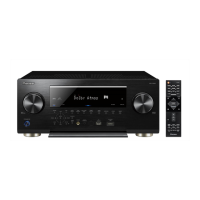
Pioneer SC-LX78
141 pages
Print Icon
To Next Page IconTo Next Page
Loading...
SC-LX78
SC-LX88
Operating Instructions
AV Receiver

Table of Contents

Other manuals for Pioneer SC-LX78

Questions and Answers

  • R
    Russell DanielsAug 9, 2025
    How to fix Pioneer Stereo Receiver PC Setup if it cannot be installed?
    • S
      Spencer BeckerAug 9, 2025
      If Pioneer Stereo Receiver PC Setup can't be installed, it could be due to insufficient system resources or incompatibilities with other applications. Try restarting the computer and then opening the installation file (2014Pioneer PC Setup.exe) with no other applications running. If the problem persists, quit other applications and relaunch the installation file.
  • S
    Stefanie HicksAug 16, 2025
    Why are some functions unavailable on my Pioneer Stereo Receiver?
    • M
      Micheal RichardsAug 17, 2025
      Some functions may be disabled when “Stand-alone” is selected in Select Protocol/ Demo/File. These functions become available for use on models SC-89, SC-87, SC-85, SC-LX88, SC-LX78, and SC-LX58 when the PC is connected to an AV receiver.
  • N
    Nancy DavisAug 25, 2025
    What to do if Pioneer Stereo Receiver PC Setup does not interact well with the receiver?
    • B
      brownmichaelAug 25, 2025
      If Pioneer Stereo Receiver PC Setup isn't interacting well with the receiver, try the following: * Ensure the receiver's power is on and wait about 60 seconds for network functions to start, then restart PC Setup. * Verify the receiver or computer is connected to the LAN with a LAN cable, then restart PC Setup. * Check that the router's power is on, then restart PC Setup. * If your router doesn't support DHCP, set the receiver's IP address in both the receiver and PC Setup, then restart PC Setup. * Review the computer's network and security settings, then restart PC Setup. * If another device is using Port 4 at Port Number Setup on the AV receiver, stop using that device to release the connection.
  • S
    Stephen NunezAug 31, 2025
    Why is connecting not possible in a WAN environment with my Pioneer Stereo Receiver?
    • J
      Joan BennettAug 31, 2025
      If connecting in a WAN environment isn't possible with your Pioneer Stereo Receiver, the issue might stem from problems with the router's performance or settings, or incorrect PC Setup settings. Use a UPnP-compatible router. Connection is possible even with routers that are not UPnP-compatible. The WAN IP address displayed on the GUI when the receiver is set to the maintenance mode must be set with PC Setup. From “Settings”, select “Protocol/Demo/ File”, then select “Internet” and make the settings there. If the TCP port has been changed on the receiver, connections must be made to that same TCP port.

Summary

Safety and Precautions

Voltage Selector

Instructions on how to set the voltage selector for your region.

01 Before you start

Initial Setup Procedures

Covers checking box contents, installing the receiver, and loading batteries.

02 Controls and displays

Remote Control Operation

Detailed explanation of the buttons and functions of the remote control unit.

Display Indicators

Describes the various indicators and displays on the receiver's front panel.

Front Panel Controls

Explains the buttons, dials, and terminals located on the receiver's front panel.

03 Connecting your equipment

Rear Panel Connections

Overview of the terminals and connections available on the receiver's rear panel.

04 Basic Setup

AVNavigator Usage Guide

Guide to using the AVNavigator for initial setup and configuration.

Full Auto MCACC Setup

Step-by-step instructions for automatic speaker setup and room calibration.

05 Basic playback

Playing Various Sources

Basic instructions for playing audio/video from connected sources like DVD players.

08 Control with HDMI function

Control with HDMI Functionality

Explains synchronized operations between compatible HDMI devices.

09 Using other functions

10 Controlling the rest of your system

11 The MCACC PRO menu

MCACC PRO Menu Operations

Introduction to the MCACC PRO system for advanced acoustic calibration.

Automatic MCACC (Expert) Setup

Detailed automatic sound tuning and room calibration procedures.

Manual MCACC Setup Procedures

Step-by-step guide for manually adjusting speaker settings and EQ.

12 The System Setup and Other Setup menus

Manual Speaker Setup

Detailed manual adjustments for speaker size, distance, and levels.

13 FAQ

Troubleshooting Guide

Common issues and solutions for malfunctions and incorrect operations.

Power and Sound Issues

Troubleshooting steps for power and sound problems.

Pioneer SC-LX78 Specifications

General IconGeneral
Receiver typeSurround
Speaker selectorA+B
Input sensitivity400 mV
4Ω speaker supportYes
Audio output channels9.2 channels
Audio A/D Converter (ADC)24-bit/192kHz
Signal-to-Noise Ratio (SNR)103 dB
Total Harmonic Distortion (THD)1 %
Power output per channel (1KHz@6 Ohm)210 W
Power output per channel (20-20KHz@8 Ohm)250 W
HDMI in8
Ethernet LAN (RJ-45) ports1
Component video (YPbPr/YCbCr) in2
Number of HDMI outputs3
Multichannel audio output typeTerminals
Speakers connectivity type-
Audio formats supportedAAC, AIFF, FLAC, M4A, MP3, WAV, WMA
Supported radio bandsAM, FM
Preset stations quantity63
Optical drive includedNo
Supported video modes1080i, 1080p, 480p, 720p
Product colorBlack
Audio decodersDolby Digital, Dolby Digital Plus, Dolby TrueHD, DTS, DTS Neo:X, DTS-ES, DTS-HD Master Audio
Volume controlRotary
Apple docking compatibilityNot supported
On Screen Display (OSD) languagesDEU, DUT, ENG, ESP, FRE, ITA, RUS
AC input voltage220-230 V
AC input frequency50 - 60 Hz
Power consumption (standby)0.1 W
Power consumption (typical)370 W
Weight and Dimensions IconWeight and Dimensions
Depth441 mm
Width435 mm
Height185 mm
Weight15300 g

Related product manuals