EasyManua.ls Logo

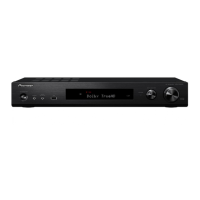
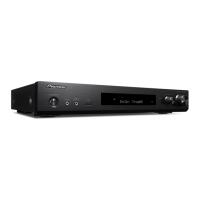
Pioneer VSX-S300-k - User Manual

Pioneer VSX-S300-k
36 pages
Print Icon
To Next Page IconTo Next Page
Loading...
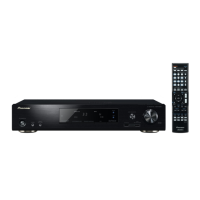
AUDIO/VIDEO MULTI-CHANNEL RECEIVER
Operating Instructions
Discover the benefits of registering your product online at http://www.pioneer.co.uk (or http://www.pioneer.eu).
VSX-S300-K
VSX-S300_SYXCN_En.book 1 ージ 201年月8 金日 後810

Table of Contents

Other manuals for Pioneer VSX-S300-k

Questions and Answers

  • H
    Heather WiseAug 16, 2025
    How to fix no sound on my Pioneer VSX-S300-k Receiver?
    • J
      James HopkinsAug 16, 2025
      If no sound is coming from your Pioneer Receiver after selecting an input function, try these steps: * Use the VOL +/– buttons to increase the volume. * Press the MUTE button to ensure muting is off. * Ensure the selected component is correctly connected.
  • A
    Alyssa WebbAug 19, 2025
    What to do if my Pioneer VSX-S300-k remote control is not working?
    • T
      Tracy LopezAug 19, 2025
      If you're having trouble operating the remote control for your Pioneer Receiver: * Replace the batteries. * Make sure you are within 7 meters and 30 degrees of the remote sensor. * Remove any obstacles between the remote and the receiver. * Avoid direct light on the remote sensor.
  • R
    Ricky SalasAug 22, 2025
    Why is there no image on my Pioneer VSX-S300-k?
    • C
      Cheryl BergAug 22, 2025
      If there's no image output when you select an input function on your Pioneer Receiver: * Ensure the component is connected correctly. * Use the same type of video cables for both the source component and the TV when connecting to the receiver. * Check the Input Assign menu to make sure it’s configured correctly.
  • B
    bramseyAug 26, 2025
    What to do if my Pioneer Receiver shows OVERHEAT and turns off?
    • R
      Ruben PriceAug 26, 2025
      If 'OVERHEAT' is displayed and the power turns off on your Pioneer Receiver, it means the unit's internal temperature is too high. Try moving the unit to a location with better ventilation. Also, try lowering the volume level.
  • M
    Megan MendezAug 28, 2025
    How to brighten the display on my Pioneer VSX-S300-k Receiver?
    • M
      Michael BurnsAug 28, 2025
      If the display on your Pioneer Receiver is dark or off, press the DIMMER button repeatedly to return to the default brightness.
  • H
    hardyjenniferAug 31, 2025
    How to troubleshoot Bluetooth connection issues with Pioneer Receiver?
    • R
      rodriguezjenniferAug 31, 2025
      If you're having trouble connecting or operating a Bluetooth device with your Pioneer Receiver, or if the sound is interrupted, check for any devices emitting electromagnetic waves in the 2.4 GHz band (like microwave ovens or wireless LAN devices) nearby. If there are any, move the receiver farther away or stop using those devices.
  • B
    Bianca MorrisonSep 3, 2025
    What to do if there is no picture on my Pioneer Receiver?
    • E
      Elizabeth ThompsonSep 3, 2025
      If you're not getting a picture on your Pioneer Receiver, note that video signals from the analog video terminal will not output from the HDMI terminal. Also, depending on the output settings of the source component, it may be outputting a video format that can’t be displayed. This receiver is HDCP-compatible, so check that the components you are connecting are also HDCP-compatible. Depending on the connected source component, it’s possible that it will not work with this receiver (even if it is HDCP-compatible).
  • W
    Wayne MorenoSep 6, 2025
    Why does my Pioneer Receiver display TEMP and lower the volume?
    • R
      rebecca54Sep 6, 2025
      If 'TEMP' appears on the display and the volume drops on your Pioneer Receiver, the unit's internal temperature has exceeded the allowable value. Try improving ventilation by moving the unit. Alternatively, lower the volume level.
  • A
    amber80Sep 9, 2025
    Why does my Pioneer Receiver display keep changing?
    • M
      Michelle HallSep 9, 2025
      If the front panel display on your Pioneer Receiver is switching randomly, the demo display mode might be active. To turn it off, press any button to return to the original display, or set the FL Demo Mode to OFF.
  • H
    Holly BrownSep 12, 2025
    Why is Control with HDMI not working on my Pioneer VSX-S300-k Receiver?
    • A
      Andrea SalasSep 12, 2025
      If synchronized operation isn't working with the Control with HDMI function on your Pioneer Receiver: * Check the HDMI connections. * Select ON for the Control with HDMI setting. * Turn the TV on before turning on the receiver. * Ensure the TV's Control with HDMI setting is also turned on.

Summary

Important Safety Information

General Cautions and Warnings

Covers critical safety warnings and precautions for operating the unit.

01 Controls and Displays

Front Panel Overview

Details the controls and indicators on the receiver's front panel.

Remote Control Functions

Explains the functions of buttons on the remote control for operating the receiver.

02 Connecting Your Equipment

Speaker Placement and Connection

Guidance on speaker placement and connecting speakers for optimal surround sound.

Cable Connections and Types

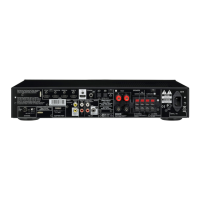
Instructions for making various audio/video cable connections including HDMI.

03 Basic Setup

Automatic Surround Sound Setup (MCACC)

Guide to using the automatic MCACC calibration for speaker setup.

MCACC Setup Troubleshooting

Troubleshooting tips for issues encountered during MCACC setup.

04 Basic Playback

Playing Sources and Bluetooth Audio

Basic steps to play sources and enjoy wireless Bluetooth audio.

Wireless Music Playback and Pairing

Steps for wireless music playback and pairing Bluetooth devices.

07 Control with HDMI Function

08 Additional Information

Troubleshooting Common Issues

Solutions for common operational problems like no sound, no picture, or power issues.

Pioneer VSX-S300-k Specifications

General IconGeneral
HDMI Inputs4
HDMI Outputs1
3D ReadyYes
Audio Return Channel (ARC)Yes
Dolby TrueHDYes
DTS-HD Master AudioYes
DAC192 kHz/24-bit
Input Sensitivity and Impedance200 mV/47 kΩ
Signal-to-Noise Ratio98 dB
Network FeaturesNo
Power Output per Channel80W (6 ohms, 1 kHz, THD 1.0 %, 1ch driven)
Audio Inputs/OutputsDigital Coaxial Input (1)
BluetoothNo

Related product manuals