2-2 SV61503 Rev. A
2 • Getting to Know Your Postage Meter
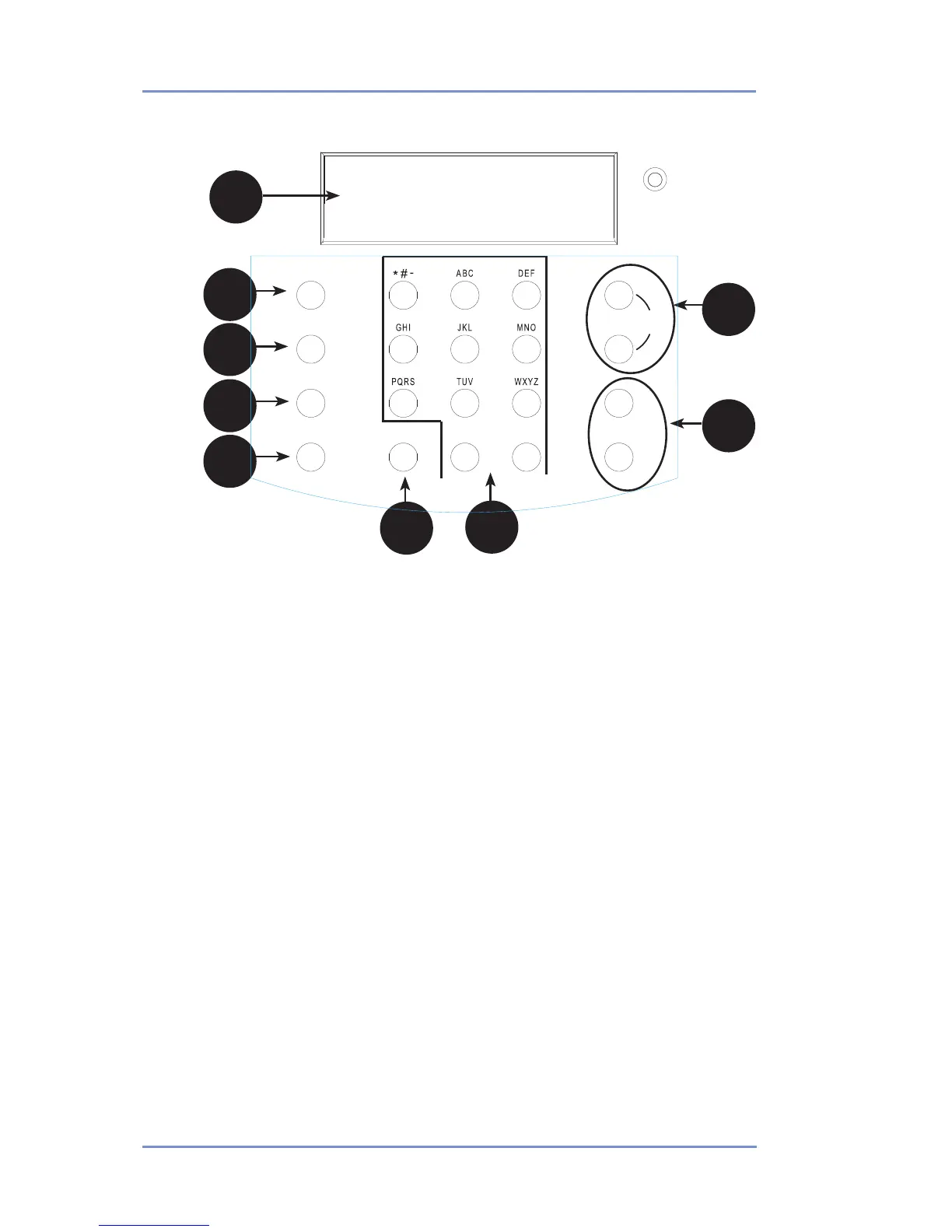
Control Panel
1. LCD Display—shows the current status of your postage meter
and prompts you through all setup operations in a two-line LCD.
2. Lock Key—Prevents unauthorized use of your postage meter if
lock feature is set up and postage meter is in "sleep mode"; en-
tering your four-digit password unlocks (awakens) the meter.
3. Class—allows you to select class and calculate postage based on
the service selected when using the internal rating system feature.
See Section 3 - Running Mail for details.
4. Funds—allows you to check and add postage funds to your
postage meter. See Section 5 - Adding Postage for details.
5. Menu—allows you access to the setup options of the postage
meter, such as date, time, etc. See Section 6 - Machine Settings
for details.
6. Clear/Back—allows you to clear or cancel an entry or return to the
previous screen/level of menu.
7. Alpha/Numeric Keypad—allows you to type in numbers and
letters for account names, postage values, and other information.
See Appendix A - Entering Text for more information.
8. Review Keys—allows you to scroll through choices in the LCD
display or review the current settings.
9. Enter/Yes and No Keys—allows you to confirm an operation or
answer “Yes” or "No" to a prompt. The Enter/yes key also func-
tions as the Enter key for data entry.
1
4
8
7
3
9
2
5
6


 To Next Page