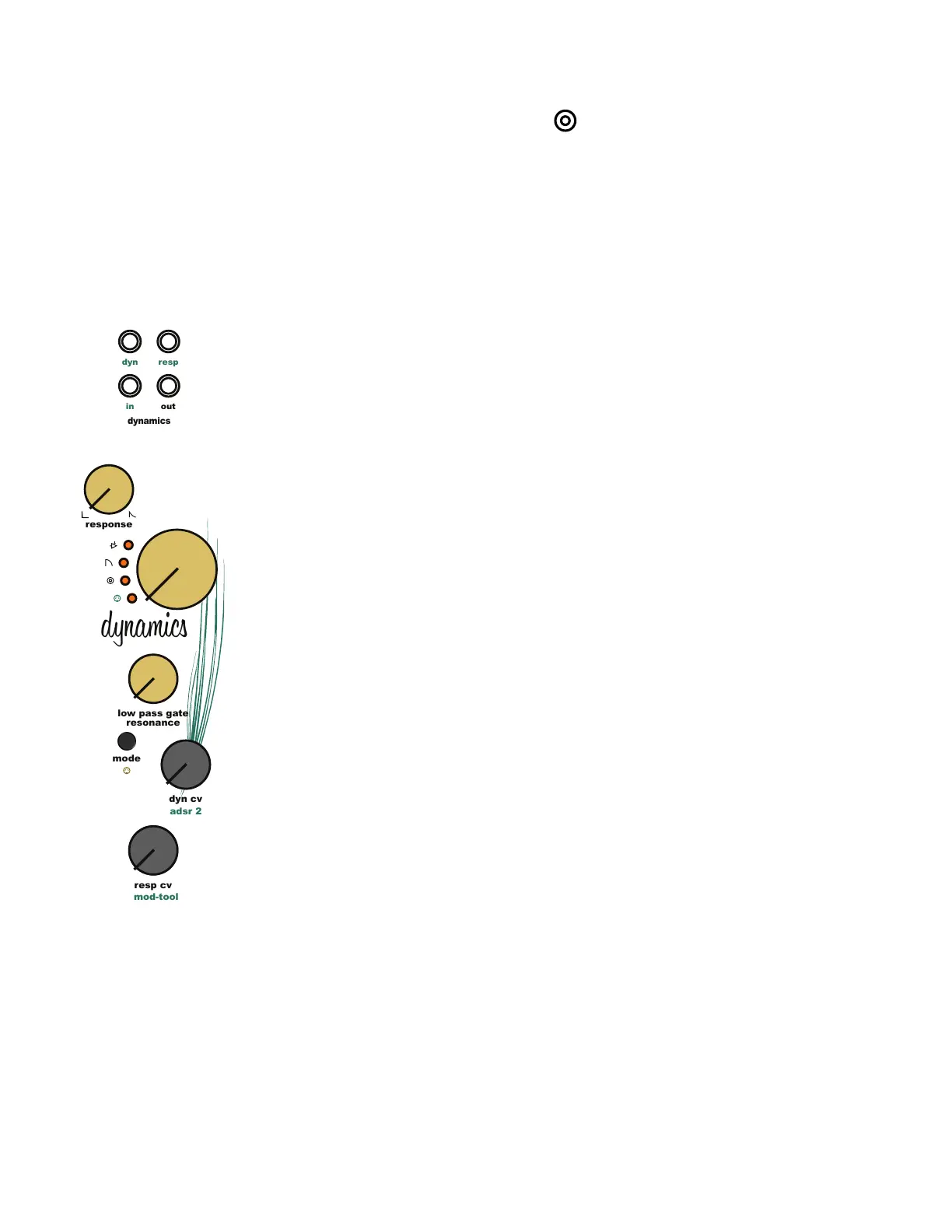
11.6 Dynamics Pluck Response
Utilize a sharp gate or envelope signal to pluck or strike the Dynamics module in a percussive
way. Pluck uses the [Dynamics CV Input Jack] to create the percussive effect. Turn the
[Dynamics CV Knob] full left to hear just the plucked response. Turn the [Dynamics CV Knob] to
the right to blend the pluck response with the incoming CV or gate signal.
The [Dynamics Response Knob] controls the decay time of the incoming [Dynamics CV Input
Jack] signal. In low pass gate mode, this control uses modern, analog circuitry to expand on
the functionality of the outdated components used in vintage low pass gate circuits. This allows
the Dynamics module to create natural sounding envelopes to shape sounds. Redesigning the
low pass gate with modern, analog circuitry offers precise and reproducible control over the
response of the Dynamics module.
Turning the [Dynamics Response Knob] to the right increases the decay time. When using the
[Dynamics Response CV Input Jack] and [Dynamics Response CV Knob], the [Dynamics
Response Knob] acts as the starting point for the incoming signal.
11.7 Dynamics Input Jacks:
[Dynamics CV Input Jack] Amplitude modulation input jack. The [Dynamics CV Input Jack] is
normaled to the ADSR 2 output. Plugging a patch cable into the [Dynamics CV Input Jack] will
remove the ADSR 2 from the signal path.
[Dynamics Response CV Input Jack] Response modulation input jack. The [Dynamics Response
CV Input Jack] is normaled to the [Multi Output Jack]. Plugging a patch cable into the
[Dynamics Response CV Input Jack] will remove the LFO triangle wave from the signal path.
[Dynamics Input Jack] Dynamics audio input jack. The [Dynamics Input Jack] is normaled to
the lter output. Plugging a patch cable into the [Dynamics Input Jack] will remove the lter
output from the signal path.
11.8 Dynamics Output Jacks:
[Dynamics Output Jack] Dynamic audio output jack.
11 Dynamics Module
adsr 2
dynamics
out
resp
dyn
in
resp cv
dyn cv
response
mod-tool
low pass gate
resonance
dynamics
mode



 To Next Page