8
Slightly press CH SET and GP SET button to check the current status and enter
setting mode.
Setting: Press CH SET and GP SET to change the channel and group after
entering setting mode; LED will turn off and exit from setting mode after 3sec.
Op era tio n in dic ato r is a 2 col or L ED.
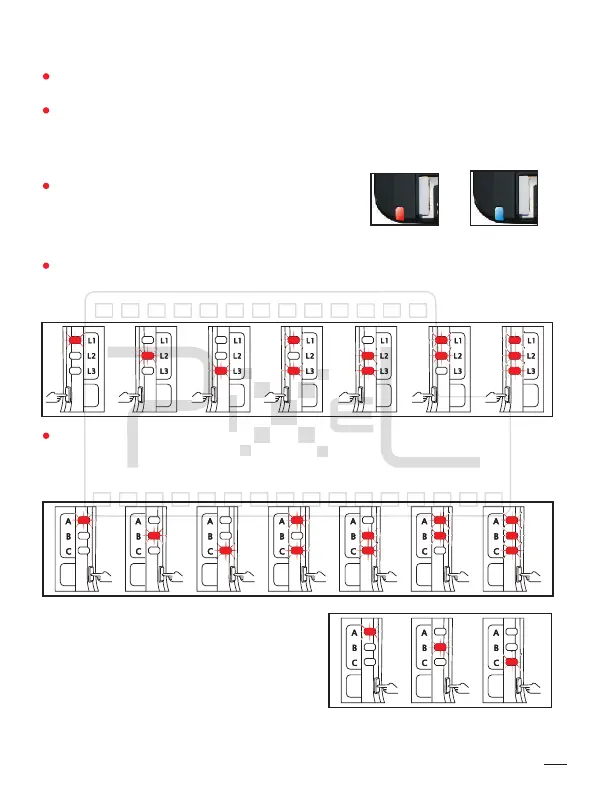
Indicator will show red when the receiver is
under standby mode; indicator will show blue
when communicating with camera.
Channel indicator has 3 red indicators which are L1, L2, and L3. Transmitter
and receiver use the same setting method and can be set as 7 different
channels. [L1]、[L2]、[L3]、[L1、L3]、[L2、L3]、[L1、L2]、[L1、L2、L3].
Group indicator are 3 red indicators which are A, B and C. Transmitter
andreceiver use the same setting method and transmitter can be set as
7different groups. [A]、[B]、[C]、[A、C]、[B、C]、[A、B]、[A、B、C].
2. Channel or Group:
3、Operation Indicator
CH
SET
CH
SET
CH
SET
CH
SET
CH
SET
CH
SET
CH
SET
GP
SET
GP
SET
GP
SET
GP
SET
GP
SET
GP
SET
GP
SET
GP
SET
GP
SET
GP
SET
Receiver can be set as 3 different groups.
[A]、[B]、[C].
Standby
Communicating


 To Next Page