9
5、Hot Shoe
Hot Shoe:
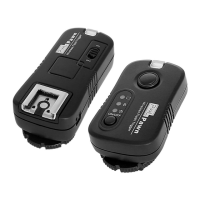
Transmitter hot shoe is not support for flashgun. This is for PIXEL product N-
ETTL accessory which can be controlled flash power for each group. Please
kindly to ready this accessory instruction for more information.
Attach the flash on receiver hot shoe which can be adjusted flash output through
the hot shoe pins.
Flashgun attached on receiver hot shoe. When using non compatible flash, this is
only manual trigger and shutter speed up to 1/250S.
Hot Shoe Foot
Attach transmitter hot shoe foot on camera. When using with Canon EOS camera
which can be controlled the flash by E-TTL or manually to adjust the flash power.
When not using Canon EOS camera which cannot be controlled the flash by E-
TTL; only manually trigger and the shutter speed up to 1/250S.
4、Socket
PC Sync Socket:
PC sync socket on receiver is for connecting with studio or outdoor light. Some
flashes can work with high speed sync (we will indicate the compatible flashes on
our website).PC sync socket on transmitter is not functioning at this moment; we
will update the information on the website http://www.pixelhk.com
USB Socket
A. Upgrade the firmware through this socket
B. 5V DC power supply through this socket
C. The socket on receiver also works with shutter control, compatible cables are
shown on http://www.pixelhk.com


 To Next Page