Control panel – Instruction
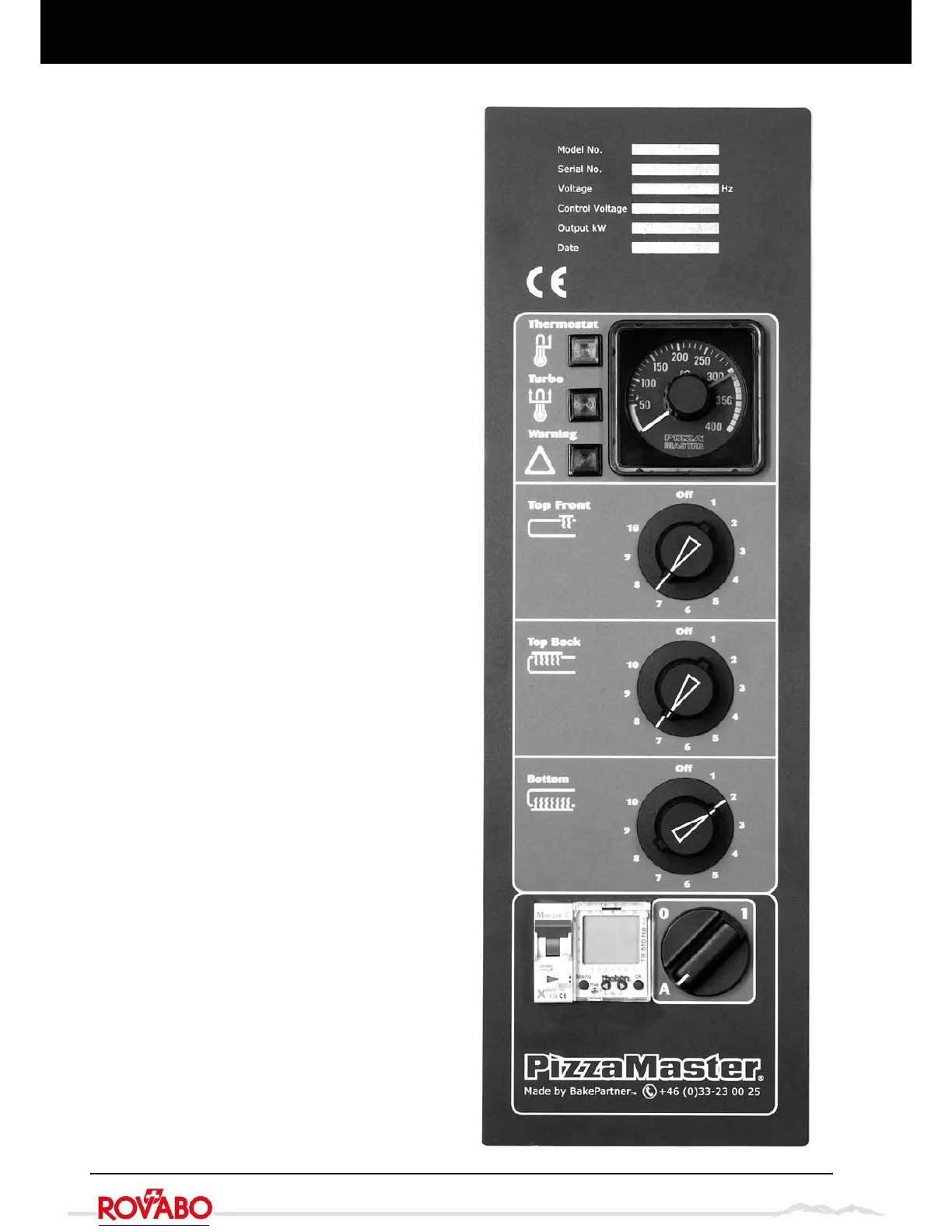
Thermostat
Regulates the baking temperature. A yellow lamp indi-
cates that the heating element is on.
Turbo – quick start up function
The turbo-start function, engaged automatically at start
up, brings the oven up to temperature very quickly.
When the desired temperature has been reached, the
turbo-start shuts off automatically. A green light indi-
cates that the turbo is in operation.
Warning – Overheating cut-off
If the oven overheats, it is turned off automatically. Call
an authorised electrician. A red light will show when the
overheating cut-off has been activated. The oven can
be reset by turning off the main switch and turn it on
again, when the temperature have gone down below
400 °C.
Top Front – Adjusts and distributes power to front
overhead heat
Off = Heat zone turned off
10 = Maximum output
Top Back – Adjusts and distributes power to overhead
heat
Off = Heat zone turned off
10 = Maximum output
Bottom – Adjusts and distributes power to bottom heat
Off = Heat zone turned off
10 = Maximum output
Timer – option
A timer to automatically start and stop the oven can be
programmed for different starting and stopping times for
each day of the week. See separate instructions.
Circuit breaker
For the control circuit
Main switch
A = Automatic ON/OFF activated with optional timer
0 = Off
1 = On
Control panel


 To Next Page