Setting Up the Display 11
Connecting the Digital Input
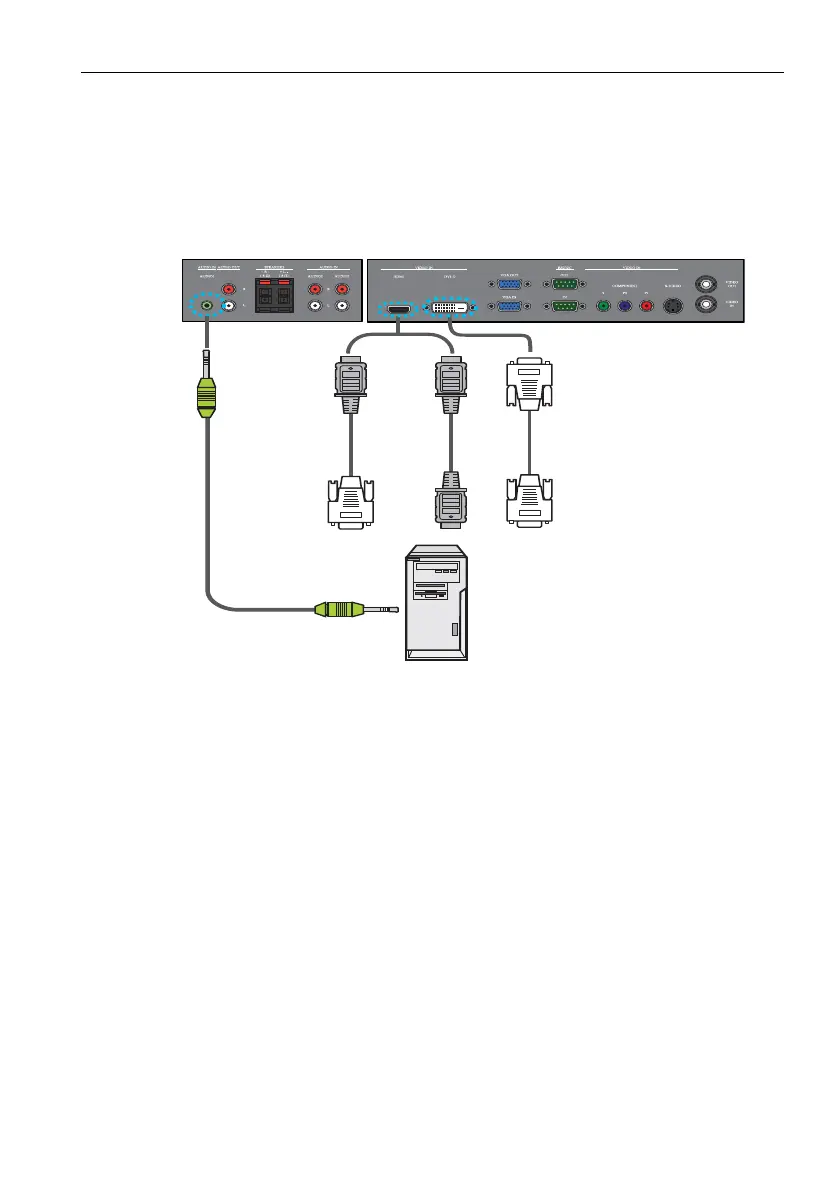
1. Connect the VIDEO IN (DVI-D) jack on the display to the DVI-D output jack on a computer
using a DVI-D cable. If the computer has an HDMI output jack, connect the computer’s HDMI
output jack to the VIDEO IN (HDMI) input jack on the display using an HDMI cable or a
DVI-D to HDMI conversion cable.
2. Connect the computer’s audio output jack to the AUDIO IN jack on the display using a
suitable audio cable.
3. To view video image from this input, press the
DVI or HDMI button on the remote control.
Audio cable
Computer
*The cables are not supplied and should be purchased separately.
DVI-D cable
DVI-D to
HDMI
conversion
cable
HDMI
cable
Note:
Connector locations on the control panel may differ depending on the model.



 To Next Page