

EasyManua.ls Logo

Planer PCT2435 - User Manual

Planer PCT2435
28 pages
Print Icon
To Next Page IconTo Next Page
Loading...
PCT2435
Touch LED LCD Monitor
Question and Answer IconNeed help?

Do you have a question about the Planer PCT2435 and is the answer not in the manual?

Summary

For Your Safety

FCC Class B Radio Frequency Interference Statement

Statement on FCC Class B compliance and measures to correct interference.

Compliance Notices

Notices regarding modifications, cables, and manufacturer's responsibility for interference.

Electrical Safety Warning

Warning against exposure to rain/moisture and opening the monitor due to high voltages.

Precautions

Special Notes on LCD Monitors

Notes and Cleaning

Information on normal LCD symptoms, screen flicker, pixel blemishes, afterimages, and cleaning instructions.

Before You Operate the Monitor

Monitor Features

Key features of the PCT2435 monitor including size, resolution, and connectivity.

Package List

Lists the items included in the product package, such as monitor, cables, and user's guide.

Adjusting the Height

Controls and Connectors

Power Cord and Source

Details on connecting the power cord, power source requirements, and universal voltage support.

Signal Cable Connections

Instructions for connecting signal cables (VGA, HDMI) and USB cable for touch functionality.

Adjusting the Viewing Angle

Viewing Angle Adjustment Notes

Important notes regarding screen touch and finger safety during angle adjustment.

Operating Instructions

General Operating Instructions

Basic steps to turn the monitor on/off, connect cables, and adjust settings via control buttons.

Front Panel Control

Front Panel Controls Overview

Details on power button, indicator, menu navigation, ECO, volume, source, and lock functions.

Front Panel Installation Notes

Notes on installation environment, shipping carton, and repackaging for protection.

How to Adjust a Setting

Adjusting the Picture

Luminance Settings

Adjusts contrast levels and backlight levels, with options for different picture modes.

Image Setup Options

Settings for clock, phase, position, aspect ratio, overdrive, color range, and USB power.

Color Temperature and OSD Settings

Adjustments for color temperature (Warm, Normal, Cool, User, sRGB) and OSD settings (position, timeout, language).

Extra Settings

Options for input selection, DDC/CI, reset, and displaying information like resolution and timing.

Plug and Play

Plug & Play DDC2 B Feature

Explanation of VESA DDC2B capabilities for monitor identification and communication.

Requirement for Video Input Signal

Emphasizes the need for a video input signal for the monitor to function correctly.

Using the Right Power Cord

Guidance on selecting and using appropriate power cords for different regions (North America, Europe).

Technical Support (FAQ)

Calibration and Reset Instructions

Technical Support - Advanced Troubleshooting

Clock Adjustment Explanation

Explanation of clock (pixel frequency) and its effect on screen display (vertical stripes).

Focus Adjustment Explanation

Explanation of focus (phase adjustment) and its effect on screen display (horizontal disturbances).

Error Messages and Solutions

Troubleshooting steps for 'NO SIGNAL' and 'INPUT NOT SUPPORT' error messages.

Appendix

Specifications

Detailed technical specifications of the PCT2435 monitor, including LCD panel, input, colors, resolution, and power.

Factory Preset Timing Table

Table listing factory preset timing modes with resolutions, horizontal, and vertical frequencies.

Connector Pin Assignment

15-Pin D-Sub Connector Pinout

Detailed pin assignment for the 15-pin D-Sub color display signal cable.

19-Pin HDMI Connector Pinout

Detailed pin assignment for the 19-pin display signal cable (likely HDMI or DisplayPort related).

Wall Mounting (Optional)

Planar Support

Cables and Accessories

Information on finding cables and accessories through the Planar online store.

Technical Support

Details on accessing online support, manuals, drivers, and contacting customer support.

European Product Database (EPREL)

Registration number for the European Product Database for Energy Labeling.

Overview

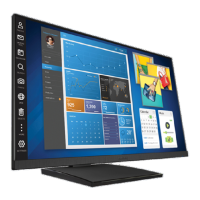
The Planar PCT2435 is a 23.8-inch (60.4 cm) Wide Screen TFT Color Touch LED LCD Monitor designed for crisp, clear display, particularly suited for Windows environments. It features a 16:9 widescreen aspect ratio and supports recommended resolutions of 1920x1080 at 60Hz. The monitor utilizes LED backlighting, making it energy-efficient. Its ergonomic and compact case design contributes to space-saving. The device also includes USB 3.0 connectivity.

Function Description:

The PCT2435 functions as a touch-enabled LED LCD monitor, providing visual output and interactive input capabilities for a computer system. It is designed for general computing tasks, offering a clear display and touch functionality for enhanced user interaction, especially with operating systems like Microsoft Windows 7, 8, and 10, which are HID (Human Interface Device) compatible. The monitor can be adjusted in height and viewing angle to suit user preferences. It supports both analog (VGA) and digital (HDMI) video input signals, allowing for versatile connectivity with various computer systems and video sources. The touch screen operates via a USB connection, eliminating the need for additional software drivers for compatible Windows operating systems.
Important Technical Specifications:

  • Display Size: 23.8 inches (60.4 cm)
  • Aspect Ratio: 16:9 Widescreen
  • Panel Type: TFT Color LCD
  • Pixel Pitch: 0.2745(H) x 0.2745(V)
  • Display Colors: 16.7M Colors
  • Max. Resolution: 1920x1080 @ 60Hz
  • Dot Clock: 170MHz
  • Horizontal Frequency: Analog & Digital: 30kHz – 83kHz
  • Vertical Frequency: Analog & Digital: 50-75Hz
  • Input Connectors: D-Sub 15 pin (VGA), HDMI
  • Input Video Signal: Analog: 0.7Vp-p (Standard), 75Ω, Positive; Digital: HDMI
  • Power Source: 100~240VAC, 50/60Hz (internal universal power supply)
  • Power Consumption: ≤28W (TYP) in ON Mode, ≤0.5W in OFF Mode
  • USB: USB 3.0 (for touch functionality)
  • Dimensions (W x H x D): 543.7mm x 385.5mm x 211.2mm
  • Weight (w/stand): 5.32kg
  • Weight (w/o stand): 3.03kg
  • Operating Temperature: 0°C to 40°C
  • Storage Temperature: -25°C to 55°C
  • Operating Humidity: 10% to 85%
  • Regulatory Compliance: cTUVus, CE, FCC B
  • VESA DDC2BTM: Equipped with DDC2B capabilities for host system communication.
  • EPREL Registration Number: 451487

Usage Features:

  • Adjustable Height: The monitor's height can be adjusted from 4.96 inches (126.19mm) to 14 inches (355.11mm) for ergonomic viewing.
  • Adjustable Viewing Angle: The monitor's angle can be adjusted from -5° to 90°, allowing users to set it to their preferred viewing position.
  • Front Panel Controls: The monitor features several control buttons on the front panel for easy access to settings:
    • Power Button: To switch the monitor ON/OFF.
    • MENU / ENTER Button: Activates the OSD menu or confirms function adjustments.
    • ECO / (-) Button: Activates ECO control (when OSD is OFF) or navigates/adjusts functions (when OSD is ON).
    • Volume / Blue Light Reducer / (+) Button: Activates volume control (when OSD is OFF) or navigates/adjusts functions (when OSD is ON). A long press (3 seconds) activates the Blue Light Reducer function.
    • Source / Auto Adjust / Exit Button: Toggles between input sources (when OSD is OFF), performs auto-configure (VGA input only, long press for 2 seconds when OSD is OFF), or acts as an Exit Key (when OSD menu is ON).
  • OSD Lock Function: Allows locking all 4 buttons (excluding Power) by holding the MENU key for 5 seconds. A Power & OSD Lock function locks all 5 buttons (including Power) by holding the POWER key for 5 seconds.
  • On-Screen Display (OSD) Menu: Provides comprehensive settings for picture adjustment, color temperature, OSD setup, and extra functions.
    • Luminance: Adjusts Contrast, Brightness, Eco Mode (Standard, Text, Internet, Game, Movie, Sports presets), and DCR (Dynamic Contrast Ratio).
    • Image Setup: Adjusts Clock, Phase, H. Position, V. Position, Image Ratio, OD (Overdrive Adjustment), Color Range (for HDMI), and USB Power.
    • Color Temp.: Offers Warm, Normal, Cool, User (R.G.B gain adjustment), and sRGB presets.
    • Blue Light Reducer: Provides various reduction levels (15%, 30%, 50%, 70%) optimized for different viewing activities (Video, Web Browsing, Reading, Low Light).
    • OSD Setup: Adjusts H. Position, V. Position, Timeout, and Language of the OSD.
    • Extra: Allows selecting Input Source, DDC/CI on/off, Reset to default status, and displaying Information (resolution, H/V, video timing).
  • Plug & Play DDC2B Feature: Automatically communicates display capabilities to the host system, ensuring proper configuration.
  • Green Monitor Standards: Designed to conserve electrical energy by automatically switching to an OFF mode when no video input signal is present, reducing power consumption.
  • Touch Screen Calibration: Calibration is a simple process accessible through Tablet PC Settings in the Control Panel for Microsoft Windows 7, 8, and 10. A "Reset" button is available to restore factory calibration settings.

Maintenance Features:

  • Cleaning: The monitor can be cleaned periodically with a soft cloth. Stubborn stains can be removed with a cloth lightly dampened with a mild detergent solution. Strong solvents, thinners, benzene, or abrasive cleaners should not be used. Always unplug the monitor before cleaning.
  • Ventilation: Slots and openings in the cabinet are provided for ventilation to prevent overheating. These openings should not be blocked or covered.
  • Servicing: Do not attempt to service the monitor yourself. Refer all servicing to qualified personnel to prevent exposure to dangerous voltages and other hazards.
  • Packaging: Retain the original shipping carton and packing materials for safe transport if the monitor ever needs to be shipped.
  • Operational Limits: Do not operate the product for over 16 hours per day.

Planer PCT2435 Specifications

General IconGeneral
BrandPlaner
ModelPCT2435
CategoryMonitor
LanguageEnglish