14
ADJUSTING THE PICTURE
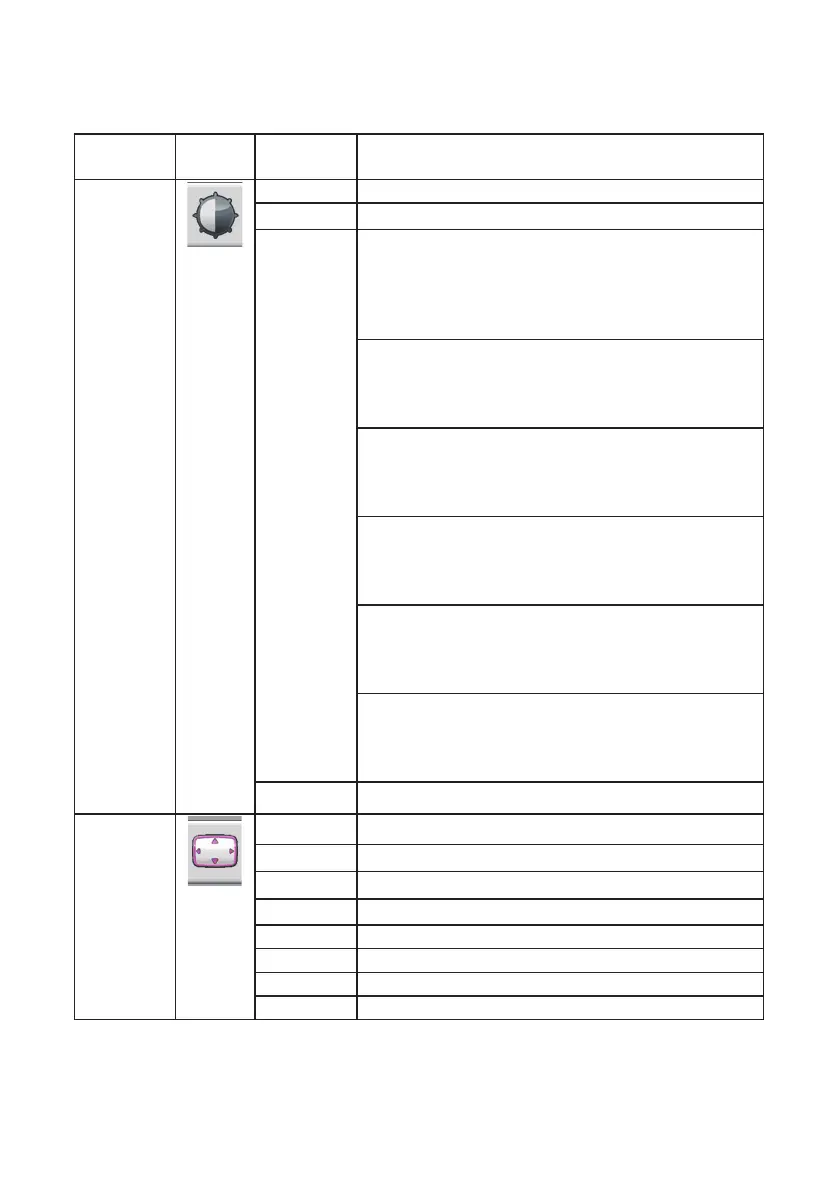
Main Menu
Item
Main Menu
Icon
1
st
Sub
Menu Item
Description
Luminance Contrast Adjusts contrast levels.
Brightness Adjusts backlight levels.
Eco Mode Picture Adjustment,
Standard:
Brightness = 90,
Contrast = 50.
Brightness, Contrast Adjustable
Text:
Brightness = 20,
Contrast = 50.
Brightness, Contrast Grayed.
Internet:
Brightness = 40,
Contrast = 50.
Brightne ss, Contrast Grayed.
Game:
Brightness = 60
Contrast = 50,
Brightness, Contrast Grayed.
Movie:
Brightness = 80,
Contrast = 50,
Brightness, Contrast Grayed.
Sports:
Brightness = 100,
Contrast = 50,
Brightness, Contrast Grayed.
DCR Dynamic contrast ratio.
Image
Setup
Clock Adjust picture Clock to reduce Vertical-Line noise.
Phase Adjust Picture Phase to reduce Horizontal-Line noise.
H. Position Adjust the horizontal position of the picture.
V. Position Adjust the vertical position of the picture.
Image Ratio Select Image Aspect Ratio.
OD Overdrive Adjustment.
Color Range Select color range only for HDMI.
USB Power Select USB Power on or o.


 To Next Page