9
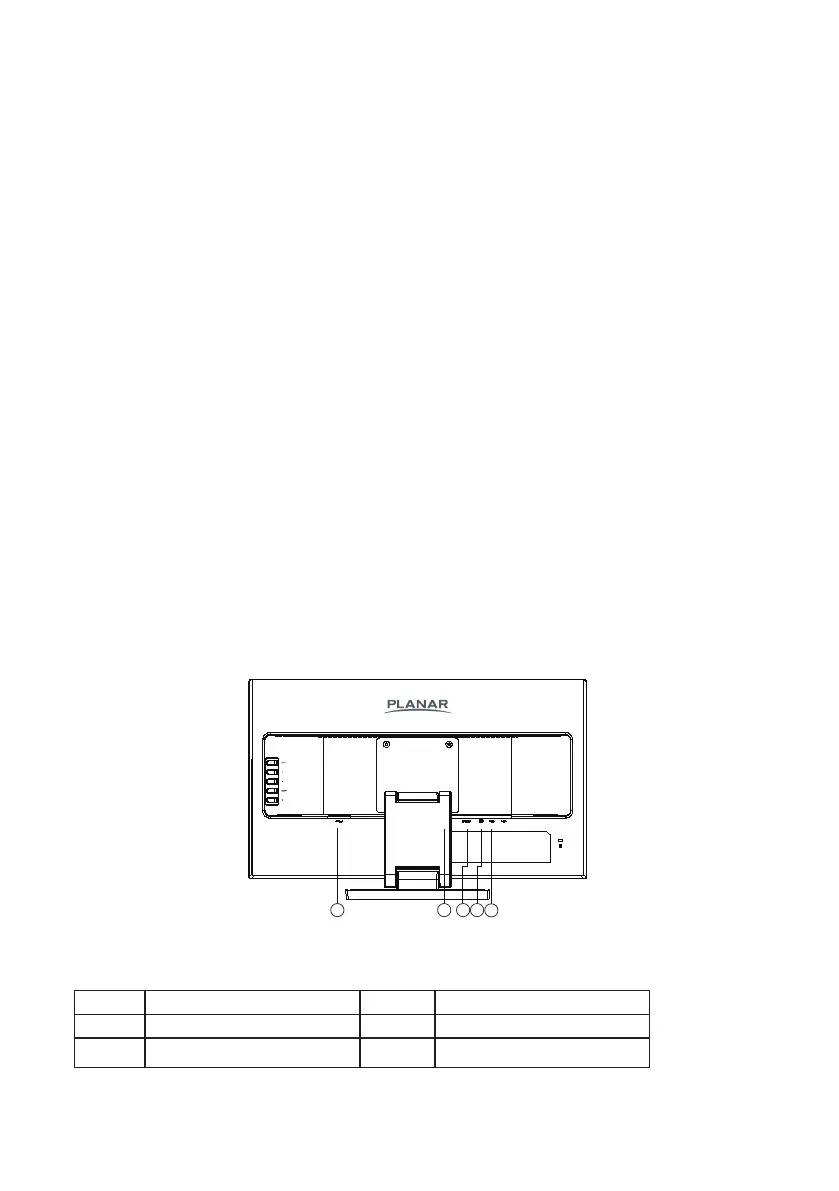
CONTROLS AND CONNECTORS
POWER CORD
Power Source:
1. Make sure that the power cord is the correct type required in your area.
2. This monitor has an internal universal power supply that allows operation in either
100/120V AC or 220/240V AC voltage area (No user adjustment is required.)
3. Connect the AC-power cord into the monitor’s power input socket, The AC-power cord
may be connected to either a wall power outlet or the power outlet socket on your PC,
depending on the type of power cord supplied with your monitor.
SIGNAL CABLE
Connecting the Signal Cable : Plug one end of the signal cable to the LCD monitor and the
other end to a computer or a video source.
USB Cable – A to B
The USB Cable – A to B – must be connected from the monitor to the computer for the touch
screen to operate.
Connecting the USB Cable: Plug one end of the cable to the monitor – USB Cable (upstream)
slot - and the other end to a USB port on the computer. Refer to page 17 for Calibration and
Reset Instructions.
Caution: If the AC outlet is not grounded (with three holes), install the proper grounding adapter
(not supplied).
Figure 2 Connecting Cables
1. Power Cable 4. Audio cable
2. HDMI Cable 5. USB Cable
3. D-SUB Cable


 To Next Page