INSTRUCTIONS
04
INSTRUCTIONS
15
11. Number Button 5 /
In playback mode, press the button to adjust the angle of screen.
12. Number Button 6 /
In playback mode, press the button to adjust the angle of screen.
13. Dual (front and rear)AUX
To input external audio.
Warning :You can only use either front or rear AUX at a time. Never connect both front
and rear AUX at the same time.
14. Dual (front and rear)USB
Insert USB removable advice so as to read audio/video files.
Warning :You can only use either front or rear USB at a time. Never connect both front
and rear USB at the same time! This could cause malfunctions.
15. IR
To receive infrared signal from the remote control.
16.
When there is a disc in the unit, press the button to eject the disc.
17. SD
Insert SD card, the unit will play the files automatically.
18. RESET
Press this button and this unit will be restored to the initial state.
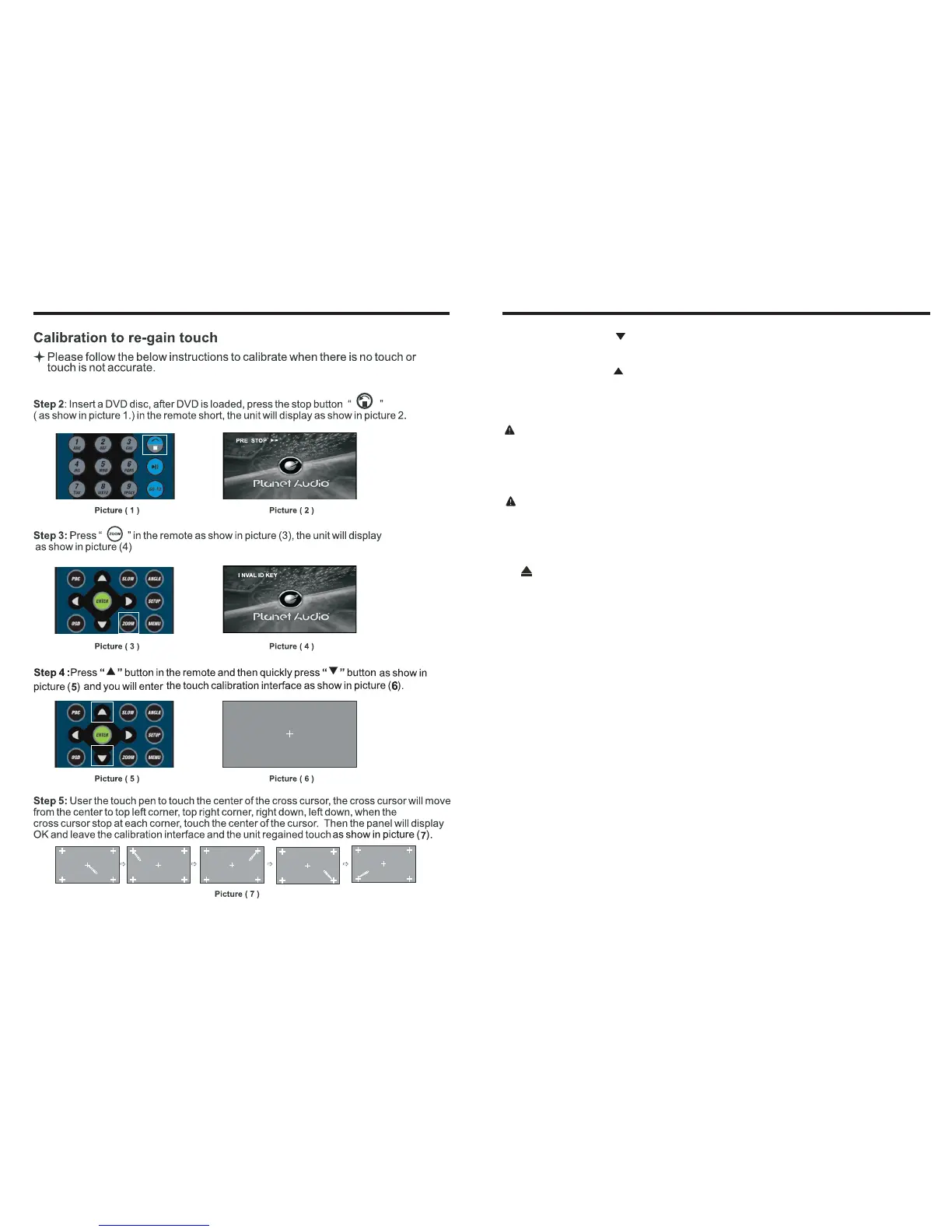
Step 1: Press the mode button in the unit to switch to DVD mode.





 To Next Page