
 Need help?
Do you have a question about the Planet IFGS-1022HPT and is the answer not in the manual?
Explains the function, color, and meaning of system, port, and PoE LEDs for status indication.
Guides users on connecting DC power wires to the terminal block for redundant power inputs.
Comprehensive list of specifications including port types, PoE, power requirements, dimensions, weight, and environmental ratings.
Provides visual instructions for mounting the industrial PoE+ switch onto a DIN rail.
Illustrates the process of attaching the switch to a wall using a mounting plate.
Addresses why the switch might not connect to the network, recommending port and cable checks.
 General
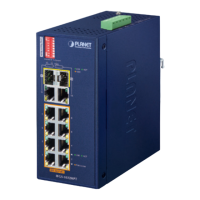
| Model | IFGS-1022HPT |
|---|---|
| Ports | 8 x 10/100/1000BASE-T RJ45 |
| Additional Ports | 2 x 100/1000BASE-X SFP |
| Uplink Ports | 2 x 100/1000BASE-X SFP |
| Power over Ethernet (PoE) | Yes |
| Total PoE Power Budget | 240 Watts |
| MAC Address Table | 8K entries |
| Jumbo Frame | 9K |
| Type | Managed Switch |
| PoE Standard | IEEE 802.3af/at |
| Management | Web, SNMP |
| Power Consumption | Max. 260 Watts |
| Operating Temperature | -40 to 75°C |
| Storage Temperature | -40°C to 70°C |
| Humidity | 5 to 95% (non-condensing) |
| Operating Temperature Range | -40 to 75°C |
| Power Supply | 48~56V DC, redundant power with polarity reverse protect function |










 To Next Page