Button Action Description
Reset
Press less than 5 secs. System reboot
Press over 6 secs. Reset to Factory Default
2.2.4 Placement
Make sure the device is placed in a safe environment to avoid equipment failure.
DONOTplaceanythingontopofthedevice.Excessiveweightcoulddamageit.
DO NOT obstruct ventilation slots on each side of the IPX-2100 or expose it
to direct sunlight or other heat source. Be sure that there is adequate air ow
around the IPX-2100.
PlacetheIPX-2100onaatsurfacetoavoidanydamage.
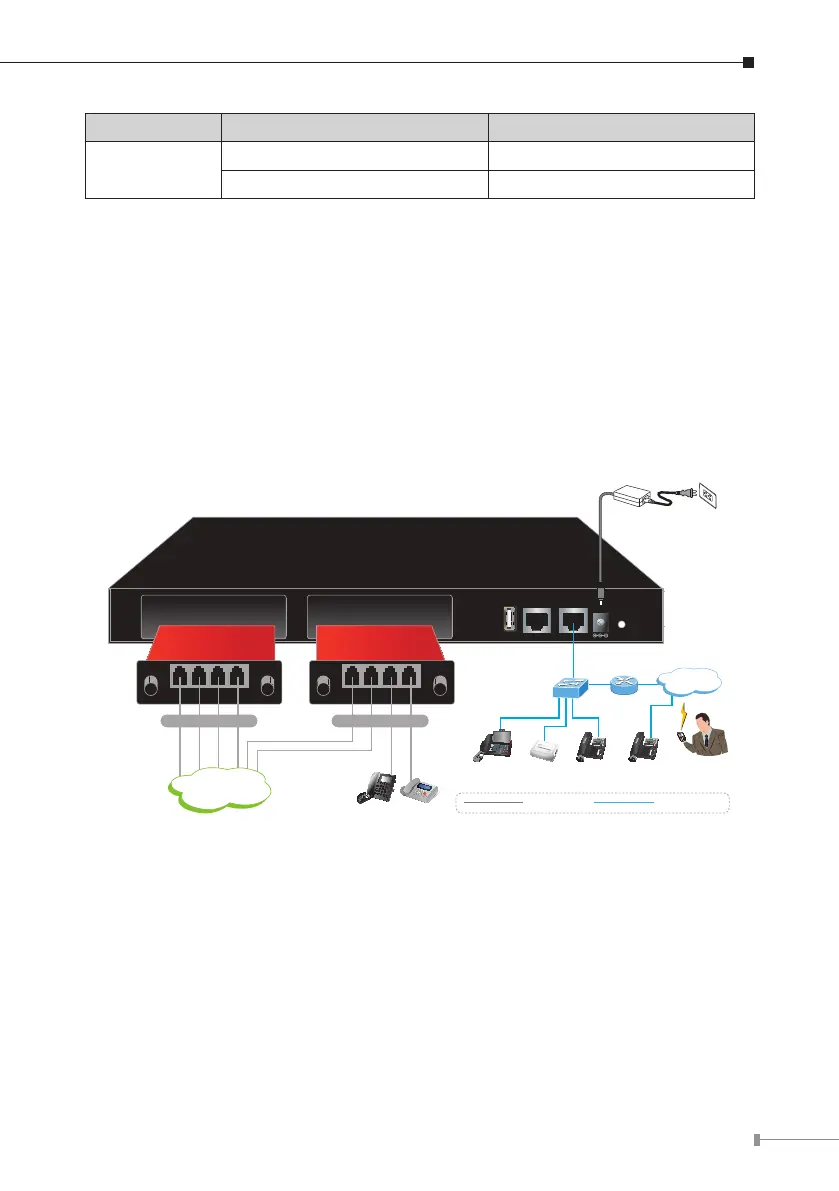
2.2.5 Physical Connection
USB Console ETH
Reset
SLOT 2
12V DC
SLOT 1
FXO Card Life Line Card
Internet
Video Phone IP Phone
SLT Phone FAX
IP Phone
Switch
Router
ATA
100Base-TX UTP
Telephone wire
PSTN
Mobile
SIP Phone
2xFXO + 2xFXS4 x FXO
Physical Connection Topology of the IPX-2100



 To Next Page