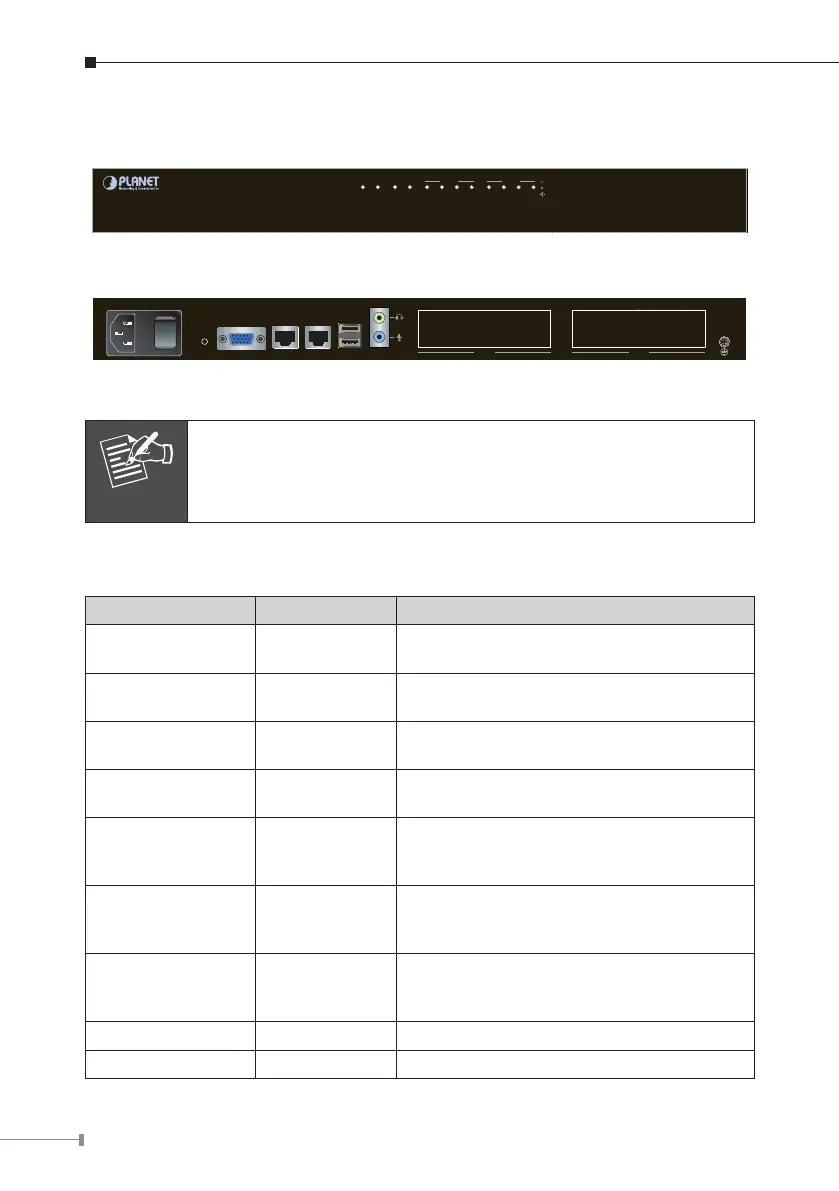
3.2.2 Physical Introduction
SLOT 2
IPX-2500
Internet Telephony PBX System
Ringing
FXO/GSM
FXS
34 2 1
SLOT 1
34 2 1PWR SYS LANWAN
Front Panel of the IPX-2500
100~240V AC
PWR
VGA WAN LAN USB AUDIO
SLOT 2 SLOT 1
Rear Panel of the IPX-2500
Supporting 2 slots, user can buy expansion module like VIP-21FO
(4 x FXO), VIP-21SL (2 x FXO + 2 x FXS) or VIP-21GS (4 x GSM)
for extending port service.
3.2.3 LED&Buttondenitions
LEDdenitions
Front Panel LED Status Description
PWR
Steady Green
Off
PBXPowerON
PBX Power OFF
SYS
Blinking Green
Off
System is working
System is off
WAN
Blinking Green
Off
PBX network connection is established
Waiting for network connection
LAN
Blinking Green
Off
Data transfer
Waiting for network connection
FXO
Steady Red
Flashing
Off
Ready / Standby
Ringing
Module not available
GSM
Steady Red
Flashing
Off
Ready / Standby
Ringing
Module not available
FXS
Steady Green
Flashing
Off
Ready / Standby
Ringing
Module not available
USB Void Future Feature
Audio Void Future Feature



 To Next Page