Need help?
Do you have a question about the Planet PAX IM30 and is the answer not in the manual?
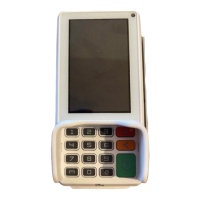
Includes the main device for transactions.
Plastic bracket for securing the terminal.
Cable to connect the power adapter to the mains.
Converts AC power to DC for the terminal.
Distributes power from the adapter.
Enables cellular network connectivity.
Cable for connecting peripherals or data transfer.
Provides initial setup instructions.
Guides users through configuring Wi-Fi using DHCP for network connection.
Guides users through configuring Wi-Fi using static IP settings for network connection.
 General
| Operating System | Android |
|---|---|
| Connectivity | Bluetooth |
| Card Reader | Magnetic Stripe |
| Battery | 2600mAh |
| Processor | Quad-core |
| Memory | 8GB Flash |
| Security | PCI PTS 5.x |
| Payment Methods | NFC |
| Supported Cards | Visa, Mastercard, American Express, UnionPay |
| Display Type | TFT |

 To Next Page