4
|
Action Light
Charging Flashes Red
Fully charged Solid blue
Power/battery status
3 red flashes =
2 red flashes =
1 red flash =
NOTE: Flashes red
when headset is
initially powered on.
Pairing/connect Flashes red and blue
Bluetooth pendant connected
to headset
Flashes blue
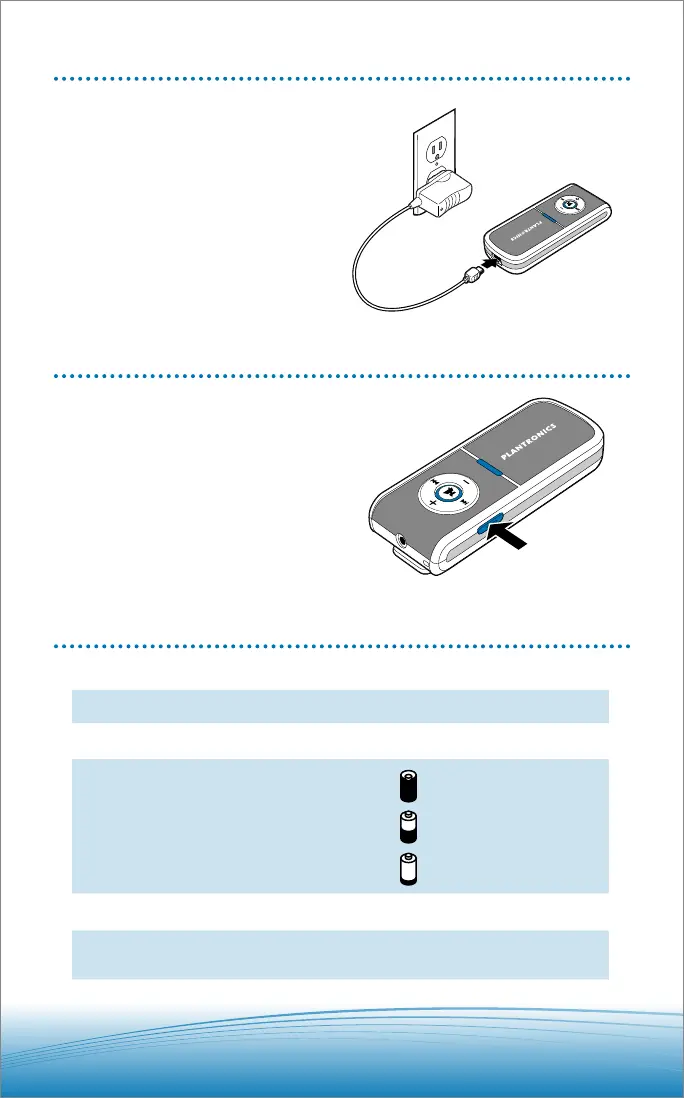
CHARGING
You must charge for 3 hours before first use.
To charge, connect AC charger to pendant
mini-USB socket.
Pendant indicator light flashes red when
charging and changes to solid blue when fully
charged.
POWERING ON/OFF
Press and hold power on/off switch for >2 seconds.
PENDANT INDICATOR LIGHTS






 To Next Page