|
5
PAIRING
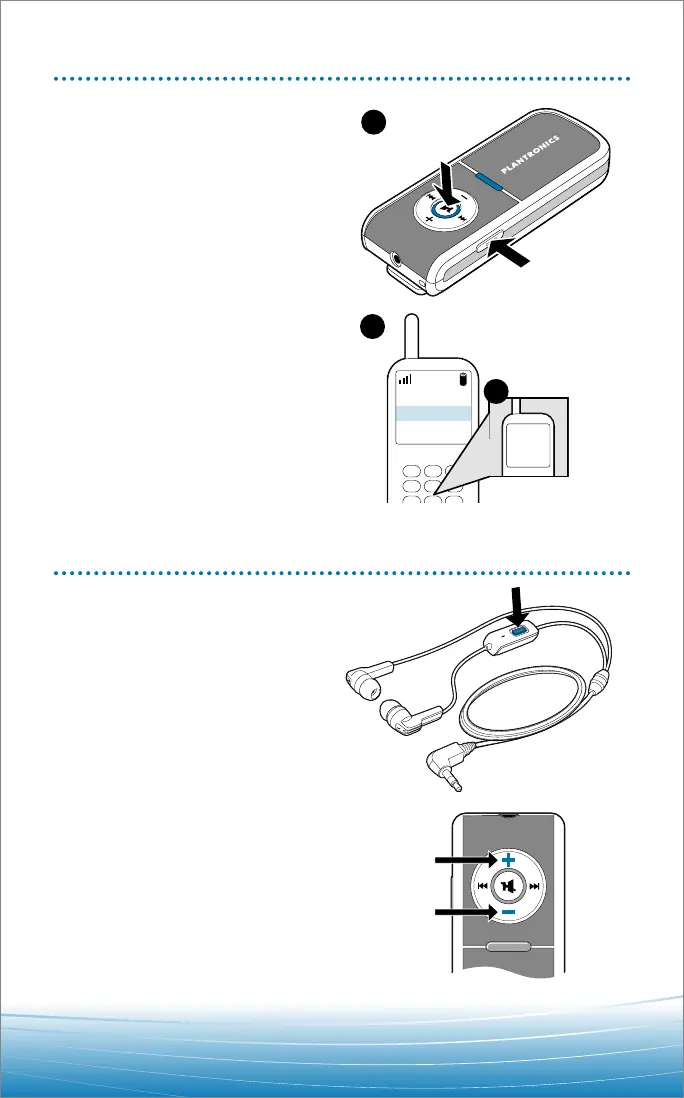
To pair pendant with phone:
Begin with pendant powered on.
1. Press and hold both the
mute/play/pause button and the
power on/off/pairing button
simultaneously. When the
indicator light flashes red and
blue, release buttons.
2. While pendant is flashing red and
blue, use the phone menu to search
for Bluetooth devices and select
“260 Plantronics.”
3. When prompted for passkey,
enter 0000.
Pendant flashes blue when paired
successfully.
For set up and pairing instructions with
Bluetooth devices other than mobile
phones, please consult your Bluetooth
device user guide.
260Plantronics
M3000 Plantronics
M2500 Plantronics
2
0000
Enter
Passkey
3
MAKING/ANSWERING/ENDING CALLS
To make a call:
Dial on phone; call transfers
automatically to headset.
To answer or end a call:
Briefly press call control
button on headset.
To adjust volume:
Short press
+
or
–
buttons on
pendant for incremental change,
hold for continuous change.






 To Next Page