6
|
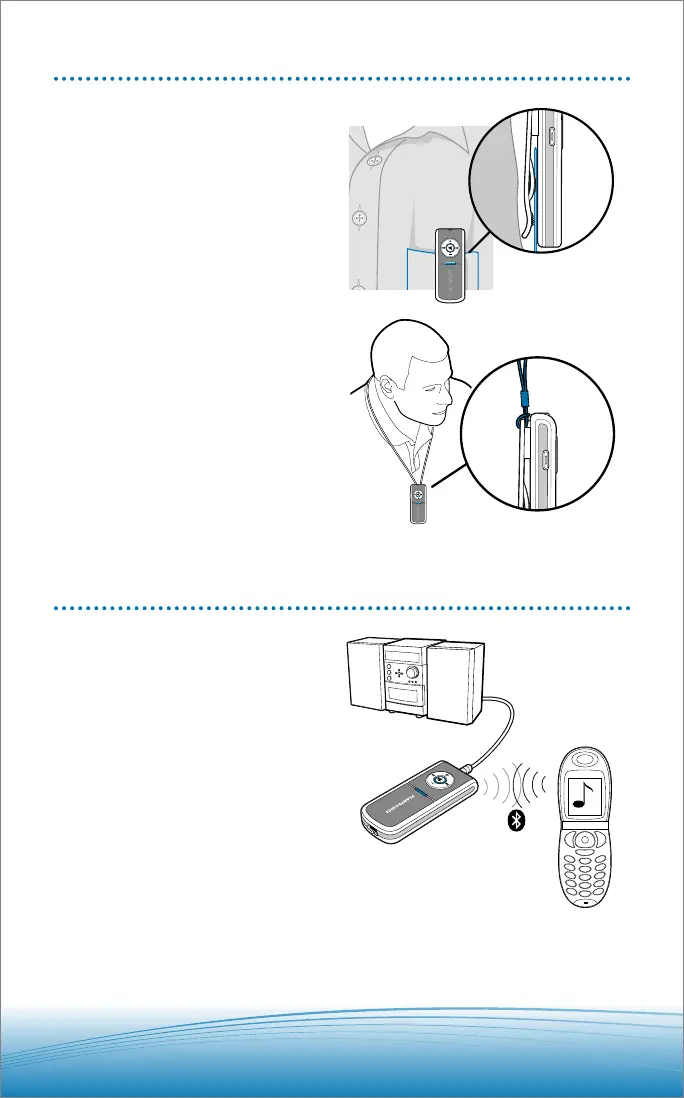
WEARING OPTIONS
Pulsar 260 can be worn in two ways:
• Clipped to your belt or clothing
• Around your neck using the
lanyard
POWERED SPEAKER & STEREO USES
For public listening you can connect the
stereo Bluetooth pendant directly to pow-
ered speakers or your home stereo with
the included audio-out cable (provided
your speakers/ home stereo is fitted with
a Line-in or Auxiliary 3.5mm audio sock-
et). Please consult your equipment guide.
1. Ensure the stereo Bluetooth
pendant and your speakers/home
stereo are powered off.
2. Connect the audio-out cable
2.5mm plug to the stereo Bluetooth
pendant and the 3.5mm plug to to
the powered speakers/home ste-
reo Line-in or Auxiliary 3.5mm au-
dio socket as shown below.
3. Power on both the stereo
Bluetooth pendant and your
speakers/home stereo.






 To Next Page