|
9
TROUBLESHOOTING
Problem Solution
My headset does not work
with my phone.
• See page 5 “Pairing.”
• Perform a reset on Pulsar 260 as described below.
Callers cannot hear me.
• Headset is muted. Press the mute button on the
pendant to unmute the microphone.
• Be sure pendant is powered on and headset is
paired with audio device. See page 5 “Pairing.”
Callers say my voice is
too quiet.
Ensure that microphone is pointing towards
your mouth.
I cannot hear caller/dial
tone or audio sound.
• Pendant is turned off. Check the indicator light for
status.
• Headset is out of range. Walk to within 10 metres of
the phone and check the Bluetooth link on your
phone’s display.
• Battery is dead. Charge your battery using the AC
charger supplied.
• Listening volume is too low. Press the volume up
button to increase the sound heard in the headset.
I cannot hear music from
my powered speakers/
Hi-Fi when using the audio-
out cable.
• Pendant must be turned on and connected to the
powered speakers/Hi-Fi with the audio-out cable.
• Check music player on
Bluetooth phone is switched
on and Pulsar 260 is the active Bluetooth device.
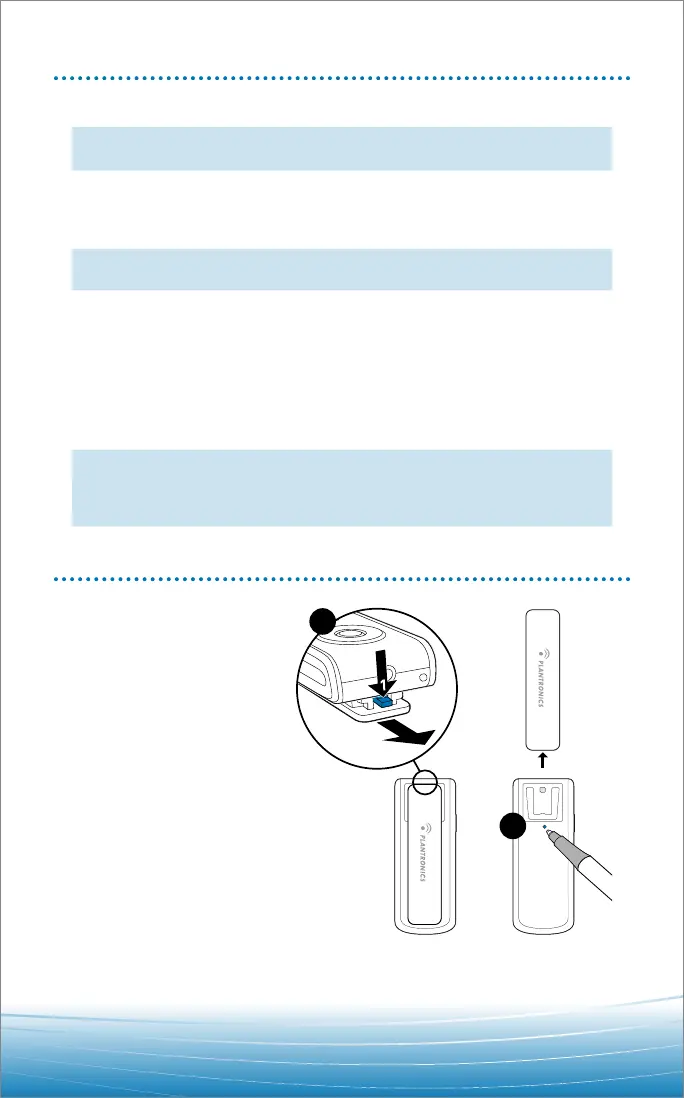
SYSTEM RESET
A reset button is located
(recessed) behind the
clothing clip.
To reset:
1. Remove clip as shown
at right.
2. Press and release
button using a pen.




 To Next Page