Rev 6.3.0 12.09.16PL Reference Manual
16
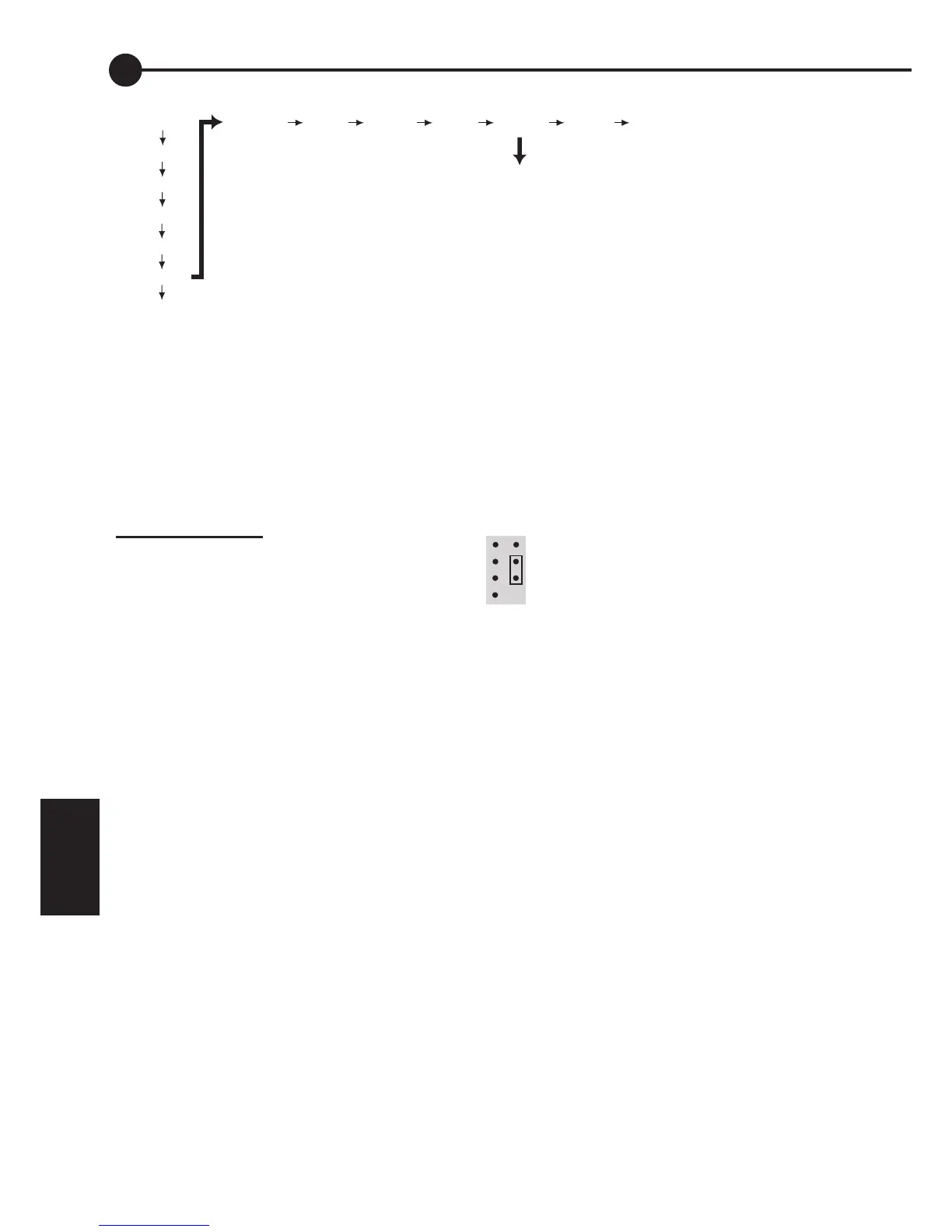
Fig. 6C - Lockout link on early PLs
6
Fig. 6.5A - Toggle setting lockout
6.5 TEMP (External Battery
Temperature Sensor Display and
Setting Lockout)
In addition to showing the external battery
temperature (if a sensor is attached), this menu
is also used to adjust Setting Lockout (see figure
6.5A).
Setting Lockout
In some cases it is desirable to restrict the ability
to adjust settings, so as to prevent unwanted
tampering. Setting lockout is done via the TEMP
screen under the DATA menu. (The TEMP
screen shows the battery temperature if the
optional external temperature sensor is installed,
or “0.0” if it’s not.)
To disable settings, long push on the TEMP
screen, the “A” indicator will disappear. (A useful
memory aid is to consider that “A” stands for
“Adjust” on this screen.). Note that the same
“A” indicator is used on other screens to mean
Amps.
To enable adjustment of settings again, long
push on the TEMP screen again. If you have
successfully enabled settings adjustment, the “A”
will reappear while TEMP is showing.
Lockout on early regulators
Note that some very early models of the PL had
a physical link under the cover, which achieved
the same purpose. If your PL is an early model
and you are still unable to change your settings
after following the above procedure, you may
need to obtain the settings lockout link. Contact
your dealer.
If you wish to obtain the link yourself, the Part#
is Farnell 510-920 (2mm pitch).
You will need to temporarily disconnect the
cable of any accessory installed in the system.
The link is installed on the 8 way pin header
under the lid of the PL controller (under lower
left corner of display).
6.6 SOLV (Solar Voltage Display)
This screen displays the solar panel voltage (open
circuit).
Note that the charge current to the battery is
turned off while the PL is displaying this screen,
but if the view is left on the SOLV screen, the
panels will be reconnected when the screen goes
to sleep (failsafe) after 16 minutes.
6.7 HIST (History display)
Six pieces of data are recorded each day. These
are IN, OUT, VMAX, VMIN, FTIM and SOC.
These records are available for the past 30 days.
At the start of each day record is the DAY
screen. This shows which day’s data you are
looking at (DAY 1 = yesterday, DAY 2 = the day
before yesterday, etc.)
For help with navigating through the History,
refer to Fig.6A. Note that a short push on the
EXIT screen will take you back to the beginning
of that day’s record.
BATV
CHRG
LOAD
IN
OUT
DATA
SET
VMAX VMIN FTIM SOC TEMP SOLV HIST
Toggle setting lockout
("A" showing means setting adjustable)
NOTE: Incorrect installation can
permanently damage your PL
Controller. Do not use a metal tool.


 To Next Page