4
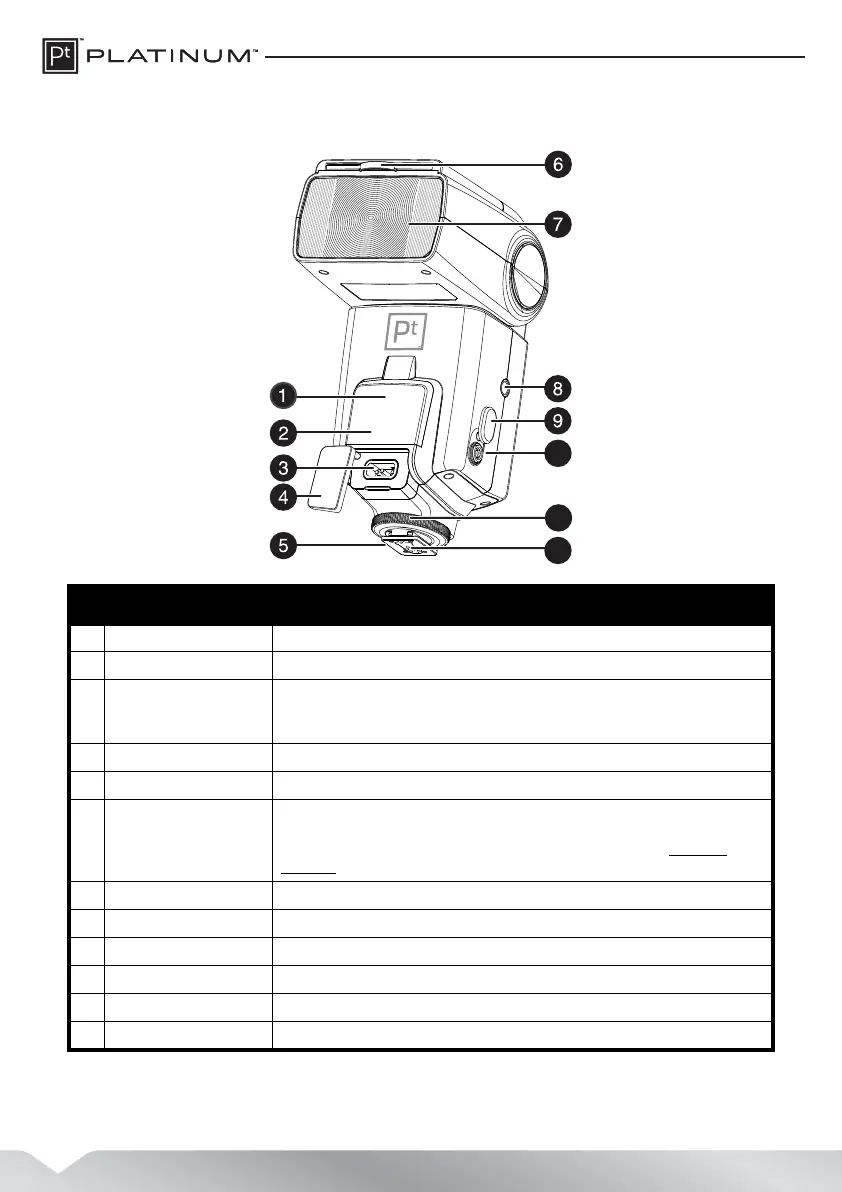
Front view
# Item Description
1 AF-assist beam emitter Projects a red light beam to help the camera focus in darker settings.
2 Optic slave sensor Detects light from a camera’s built-in flash or other flash source to trigger the flash.
3 External power port Plug an external high-power battery pack or other external power supply into this socket
to supplement the flash’s internal batteries. Can also be used instead of the internal
batteries.
4 Power port cover Covers and protects the external power port.
5 Mounting foot Connect to the camera’s hot shoe to mount and connect the flash on the camera.
6 Built-in wide angle panel
and white reflector card
Use the wide angle lens to spread the flash light over a wider angle or to reduce its direct
intensity. Pull out the white reflector card with the flash head pointed up to create a more
diffused light and a catchlight in a subjetc's eye for portrait shots. See “Creating a
catchlight” on page 15.
7 Flash head Provides the light (flash) for the photograph.
8 Tripod mount socket Use with the flash in slave mode to mount the flash to a tripod or similar device.
9 PC sync terminal cover Covers the PC sync terminal.
10 PC sync terminal Connect a PC sync cord (not included) to this jack to control the flash remotely.
11 Locking knob Tighten this knob to secure the flash to the camera.
12 Contacts Provides electrical contact to a camera’s hot shoe.
PT-DFLEXT1N_14-0805_MAN_V2_ENG.fm Page 4 Friday, August 22, 2014 12:36 PM



 To Next Page