Home
Platinum
Camera Flash
PT-DPF500C
Platinum PT-DPF500C - User Manual
52 pages
Manual
Specs
Ask a question
Save Page as PDF
To Next Page
To Next Page
Loading...
F
i
na
l s
i
z
e
3.5x8
.
5 in. 88
.9x21
5
.9m
m
Ad
van
ced On-camer
a
T
TL F
lash
PT
-DPF500C / PT
-DPF500N
User Guide
Before using y
our new produc
t, please
read these instructions to prevent any
damage.
Note:
Camera flashes are designed for
specific camera makes. For example, you
cannot use the Canon flash
(PT
-DPF500C
)
with a Nikon camera.
2
Table of Contents
Main Page
Default Chapter
2
Table of Contents
2
Introduction
3
Important Safety Instructions
3
Features
4
Package Contents
4
Flash Body
4
Control Panel
5
LCD (Canon)
6
Auto-Flash (E-TTL) Mode
6
Manual (M) Mode
6
Stroboscopic (MULTI) Mode
6
Optical Transmission Shooting
7
LCD (Nikon)
7
Auto-Flash (I-TTL) Mode
7
Manual (M) Mode
8
Stroboscopic (RPT) Mode
8
Radio Transmission Shooting/Optical Transmission Shooting
8
Installing Batteries
9
Low Battery Warning
10
Attaching Your Flash to the Camera
10
Attaching Your Flash to the Stand
11
Turning Your Flash on and off
11
Power Management
11
Master Flash
11
Slave Flash
11
Selecting a Flash Mode
12
Using Auto-Flash Mode
12
Taking a Picture
13
Using Flash Exposure Compensation
13
Using Flash Exposure Bracketing (Canon Only)
14
Locking the Flash Exposure (Canon Only)
15
Using High-Speed Sync (Canon)
15
Using High-Speed Sync (Nikon)
16
Using Second-Curtain Sync (Canon)
17
Using Second-Curtain Sync (Nikon)
17
Modeling Flash
17
Using Manual Mode
18
Flash Output Range
18
Using the Optical S1 Secondary Flash Setting
19
Using the Optical S2 Secondary Flash Setting
19
Manual Off-Camera High-Speed Setting (Nikon Only)
19
Using Stroboscopic Mode
19
Calculating the Shutter Speed
20
Maximum Stroboscopic Flashes (Canon)
21
Maximum Stroboscopic Flashes (Nikon)
21
Using Wireless Flash Shooting: Optical Transmission
22
Canon Flash Overview
22
Nikon Flash Overview
22
Slave/Master Positioning and Operating Range
23
Switching between Normal Flash and Wireless Flash (Canon)
23
Switching between Normal Flash and Wireless Flash (Nikon)
23
Turning the Master Flash on or off (Canon)
24
Turning the Master Flash on or off (Nikon)
24
Setting the Communication Channel (Canon)
25
Setting the Communication Channel (Nikon)
25
Using Fully Automatic Wireless Flash Shooting (Canon)
26
Using One Slave Flash
26
Using Multiple Slave Flashes
27
Using Fully Automatic Wireless Flash Shooting in Auto-Flash Mode (Nikon)
27
Using Automatic Wireless Flash with a Single Slave Flash
27
Using Fully Automatic Wireless Flash
29
Using Multiple Master Flashes
29
Setting the Wireless Flash Ratio for Multiple Slave Flashes (Canon Only)
29
About Slave Group Control
30
Using Wireless Flash Shooting in Manual Mode (Canon)
30
Manually Setting the Slave Flashes
31
Using Wireless Flash Shooting in Manual Flash Mode (Nikon)
31
Using Wireless Flash Shooting in Stroboscopic Mode (Canon)
32
Using Manual Wireless Flash Shooting in Stroboscopic Mode (Nikon)
32
Using Wireless Flash Shooting: Radio (2.4G) Transmission
33
Positioning and Operating Range Using a Single Slave Flash
33
Positioning and Operating Range Using Multiple Slave Flashes
34
Auto Shooting with Using Different Flash Modes for each Group (Canon Only)
35
Shooting with a Different Flash Mode for each Group (Canon Only)
35
Using Other Applications
37
Using Sync Triggering
37
Using Auto-Focus Assist Beam
37
Using Bounce Flash
37
Creating a Catchlight
38
Setting the Flash Coverage in Manual Zoom Mode
38
Using the Wide Panel to Extend the Flash Coverage
39
Customizing Function Settings
39
Canon Functions
40
Nikon Functions
40
Controlling Your Flash from the Camera's Menus (Canon)
41
Flash Function Settings Menu
41
Flash C.fn Settings Menu
41
Understanding Protection Functions
42
Over-Temperature Protection
42
Protection Error Messages
43
Maintaining
43
Troubleshooting
43
Upgrading Firmware
44
Specifications
45
Legal Notices
46
One-Year Limited Warranty
47
Need help?
Do you have a question about the Platinum PT-DPF500C and is the answer not in the manual?
Ask a question
Platinum PT-DPF500C Specifications
General
Brand
Platinum
Model
PT-DPF500C
Category
Camera Flash
Language
English
Related product manuals
Platinum PT-DFLEXT1N
29 pages

 Need help?
 General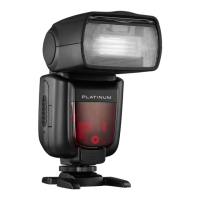

 To Next Page
