16
• You cannot use Stroboscopic mode when using high-speed
sync mode.
• Over-temperature protection may be activated after 15
consecutive high-speed sync flashes.
• When the over-temperature protection is started, is
displayed on the LCD.
Using high-speed sync (Nikon)
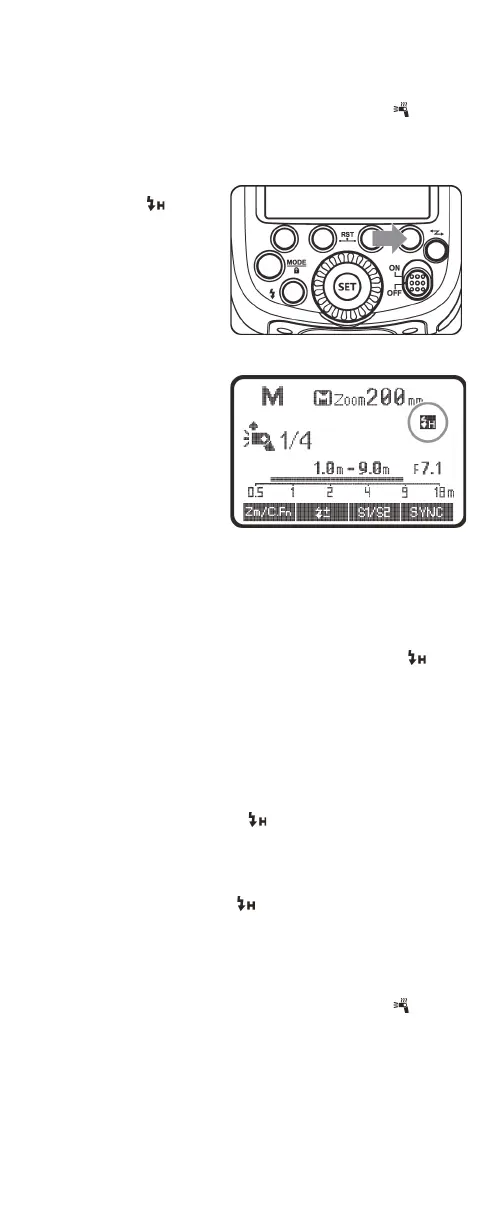
1 Press the FN 4 (SYNC)
button. The
(high-speed sync) icon
is displayed on the
LCD.
Note: When you set the
camera to high-speed
sync, your flash is
automatically set to
high-speed sync.
2 Use the camera’s menu to set the flash sync speed to 1/320s
or 1/250s.
OR
Turn the camera control dial to set the shutter speed to
1/250s or higher.
3 Press the camera shutter button halfway. When the icon
is displayed on your flash’s LCD, it indicates that the
high-speed sync function on your flash is turned on.
4 To make sure that the high-speed sync function is turned on,
look for the shutter speed in the camera viewfinder. If the
speed is 1/250s or faster, the high-speed sync function is
turned on.
Notes:
• If you set the shutter speed to 1/320s (Auto FP) or 1/250s (Auto
FP) in the camera settings, is displayed on your flash's LCD
regardless of the practical shutter speed.
• With high-speed sync, the faster the shutter speed, the shorter
the effective flash range.
• To return to normal flash, set the flash sync speed to an option
other than Auto FP. The icon disappears when you press
the shutter button halfway.
• You cannot use Stroboscopic mode when using high-speed
sync mode.
• Over-temperature protection may be activated after 15
consecutive high-speed sync flashes.
• When the over-temperature protection is started, is
displayed on the LCD.


 To Next Page