18
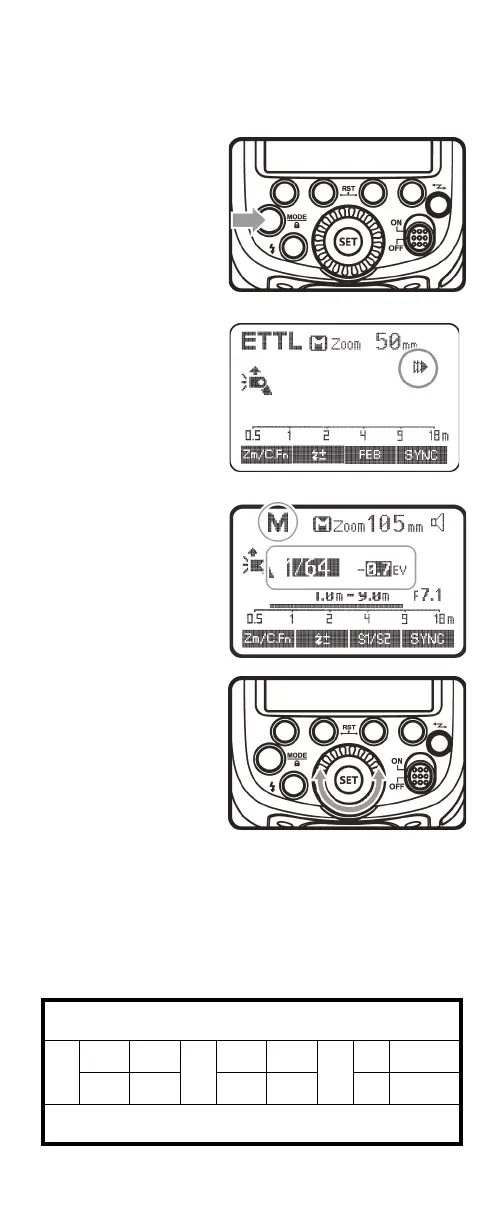
Using Manual mode
In Manual mode, you can manually adjust the flash output from
1/1 full power to 1/128th power in one-third stop increments.
Use a hand-held flash meter to determine the flash output you
need.
1 Press the MODE
button one or more
times to select M
(Manual mode).
2 Turn the select dial to
choose the flash
output amount you
want.
3 Press the SET button to save the setting.
Flash output range
The following table shows how the stop changes in terms of the
f/stop when you increase or decrease the flash output.
For example, when you decrease the flash output to 1/2, 1/2-0.3,
or 1/2-0.7, then increase the flash output to more than 1/2,
1/2+0.3, 1/2+0.7, or 1/1 are displayed.
Figures displayed when reducing flash output level
1
1/1-0.3 1/1-0.7
1/2
1/2-0.3 1/2-0.7
1/4
**** ****
1/2+0.7 1/2+0.3 1/4+0.7 1/4+0.3 **** ****
Figures displayed when increasing flash output level


 To Next Page