30
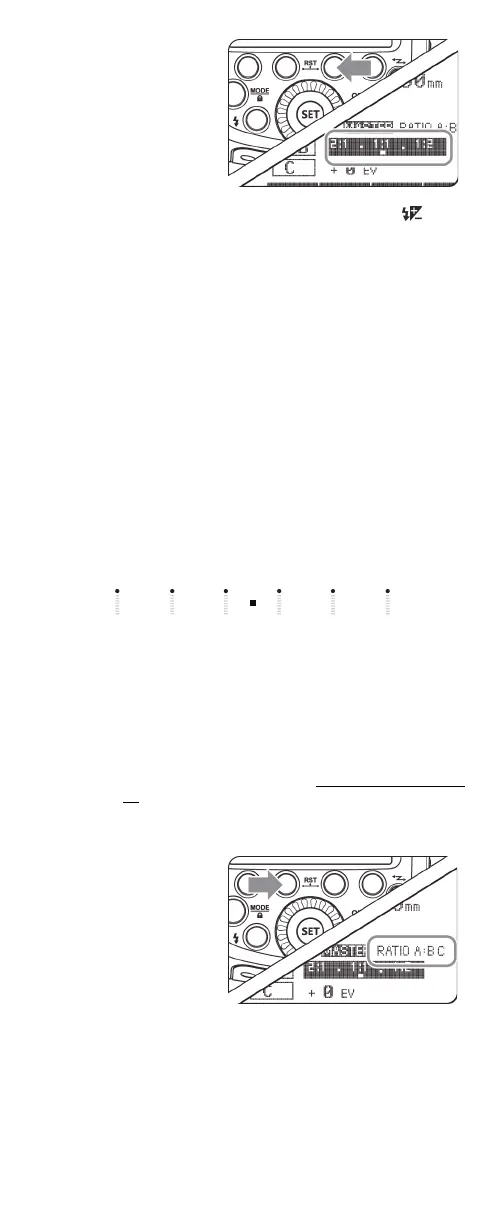
4 On the master flash,
press the FN 3 (Gr)
button, turn the select
dial to set the amount
of flash ratio (from 0 to
+/-3 in +/-0.3
increments), then
press the SET button
to confirm.
5 If you are using three slave flashes, press the FN 2 ()
button, turn the select dial to the flash exposure
compensation amount, then press the SET button to
confirm.
When you take a picture, the flashes will fire according to the
flash ratio.
About slave group control
If you set three slave flashes to group A, all three slave flashes are
controlled as if they were one camera flash.
Notes:
• When you use the RATIO A:B C setting, group A, B, and C fire
flashes synchronously. When you use the RATIO A:B setting,
group C does not fire a flash.
•If group C is facing the shooting subject, over exposure may
occur.
• Some EOS film cameras that support Auto-flash (E-TTL
(Canon)), do not support multiple flash wireless shooting
using a flash ratio setting.
The flash ratio of 8:1 to 1:1 to 1:8 is equivalent to 3:1 to 1:1 to 1:3
(1/2 step increment).
Using wireless flash shooting in Manual
mode (Canon)
If you are using multiple slave flashes and you want each slave
flash to output at a different level, use Manual flash mode and
assign a different group and flash output to each flash.
On the master flash:
1 Set the flash mode to Manual (M). See Selecting a flash mode
on page 12.
2 Press the FN 4 button one or more times until MENU 1 is
displayed on the LCD.
3 Press the FN 2 (RATIO)
button one or more
times to select the
firing groups. You can
select:
• RATIO OFF: All slave
flashes fire with the
same flash output.
• RATIO A/B: Two
slave flashes that fire
with different flash
outputs.
• RATIO A: B C: Three
slave flashes that fire
with different flash
outputs.
8:1 4:1 2:1 1:1 1:2 1:4 1:8
5.6:1 2.8:1 1.4:1 1:1.4 1:2 .8 1:5.6


 To Next Page