9
Installing batteries
Note: Using premium batteries, such as non-rechargable
lithium or high-output rechargable batteries, will noticeably
reduce flash recycle time and improve battery life.
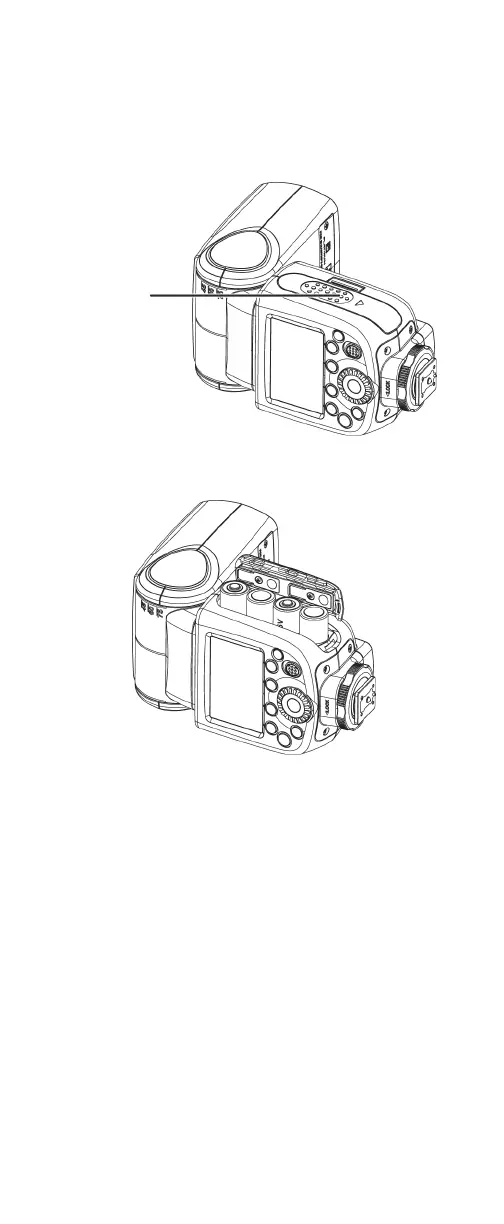
1 While pressing in on the battery compartment cover, slide
the cover down, then lift the cover to open the
compartment.
2 Insert four AA batteries (not included) into the battery
compartment. Make sure that the + and – symbols on the
batteries match the symbols in the battery compartment.
3 Close the battery compartment cover.
Cautions:
• Batteries should not be exposed to excessive heat, such as
sunshine, heat registers, or fire.
• Battery chemicals can cause a rash. If the batteries leak, clean
the battery compartment with a cloth. If chemicals touch
your skin, wash immediately.
• Make sure that batteries are disposed of correctly. Do not
burn or incinerate.
Notes:
• Do not mix batteries of different types.
• Do not mix old and new batteries.
• Remove batteries when the charge is depleted.
• If your flash is not going to be used for an extended period of
time, remove the batteries.


 To Next Page