23
Slave/master positioning and operating
range
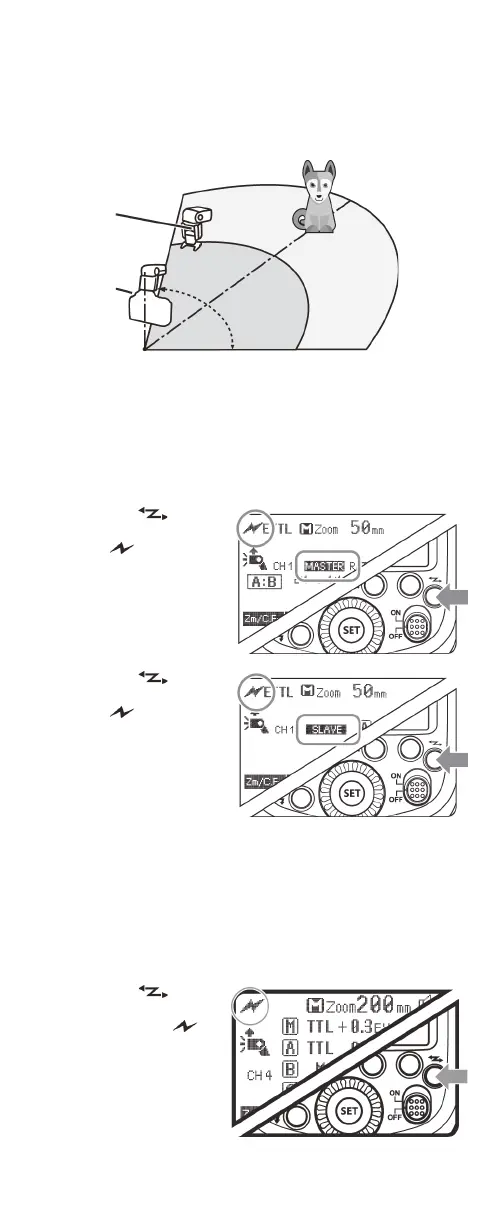
For wireless flash shooting in optical transmission mode, position
the master flash and one slave flash as shown below:
Switching between normal flash and
wireless flash (Canon)
Master flash setting
• Press the button
one or more times
until (optical
transmission) and
MASTER is displayed
on the LCD.
Slave flash setting
• Press the button
one or more times
until (optical
transmission) and
SLAVE is displayed on
the LCD.
Note: To return to
normal flash shooting, set the wireless setting to OFF. You can
also reset your flash to normal settings by pressing and
holding the FN 2 and FN 3 buttons simultaneously for two
seconds.
Switching between normal flash and
wireless flash (Nikon)
Master flash setting
• Press the
button one or more
times to select . If
RPT is displayed,
Stroboscopic mode
is on. The LCD
backlight turns
green.
Indoor
Slave
Outdoor
Master
49.2 ft.
(15 m)
32.8 ft.
(10 m)
80°
26.2 ft.
(8 m)
39.4 ft.
(12 m)


 To Next Page