33
Using wireless flash shooting:
radio (2.4G) transmission
Important: When a Canon camera’s shooting mode is set to a
fully automatic mode or an Image Zone mode, the operations
in this section are not available. Set the camera’s shooting
mode to P/Tv/Av/M/B (Creative Zone Mode).
Using a master or slave flash with a radio transmission wireless
shooting function makes it easy to shoot with advanced wireless
multiple flash lighting, in the same way as TTL auto-flash
shooting.
Wireless shooting using radio transmission has advantages over
wireless shooting using optic transmission. For example, radio
transmission is less affected by obstacles and the slave flash's
wireless sensor does not have to point to the master flash. The
main functional differences are:
You can perform wireless i-TTL auto-flash shooting by setting the
master flash to i-TTL (Auto-flash mode). See Using Auto-flash
mode on page 12.
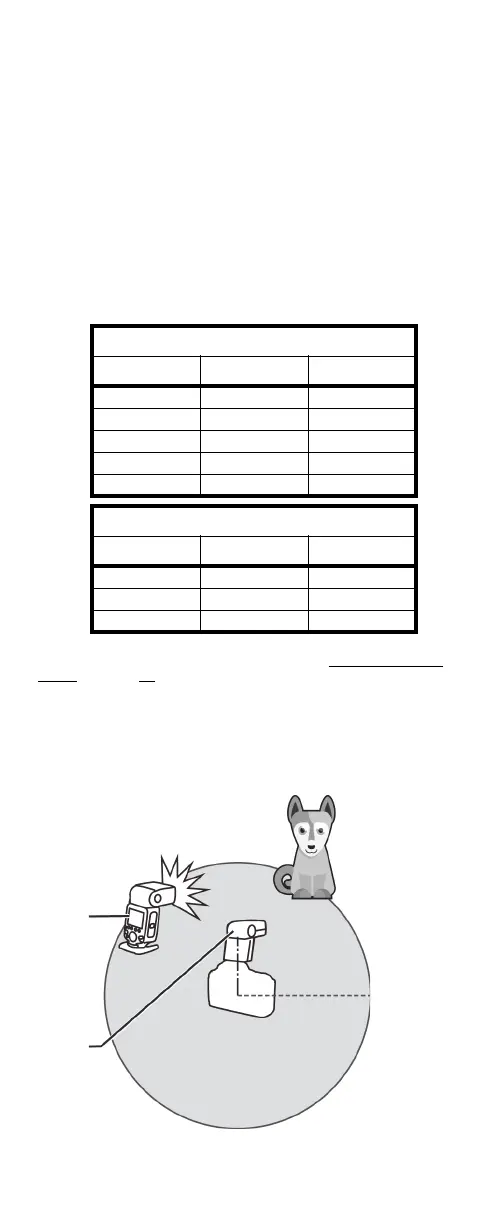
Positioning and operating range using a
single slave flash
For wireless flash shooting in radio transmission mode, position
the master and slave flashes as shown below:
Canon
Function Radio Optic
Distance 100 m 15 m
Channels 1 to 32 1 to 4
A/B/C power OFF, 1/128 ~ 1/1 1/128 ~ 1/1
Interference Low High
Group A/B/C/D/E A/B/C
Nikon
Function Radio Optic
Distance 100 m 15 m
Channels 1 to 32 1 to 4
Interference Low High
Slave
Master
Transmission
distance is about
328 ft. (100 m).


 To Next Page