41
Controlling your flash from the
camera’s menus (Canon)
If you attach your flash to an EOS camera which has a speedlite
control function, you can control your flash using the camera’s
menus. For more information, see the documentation that came
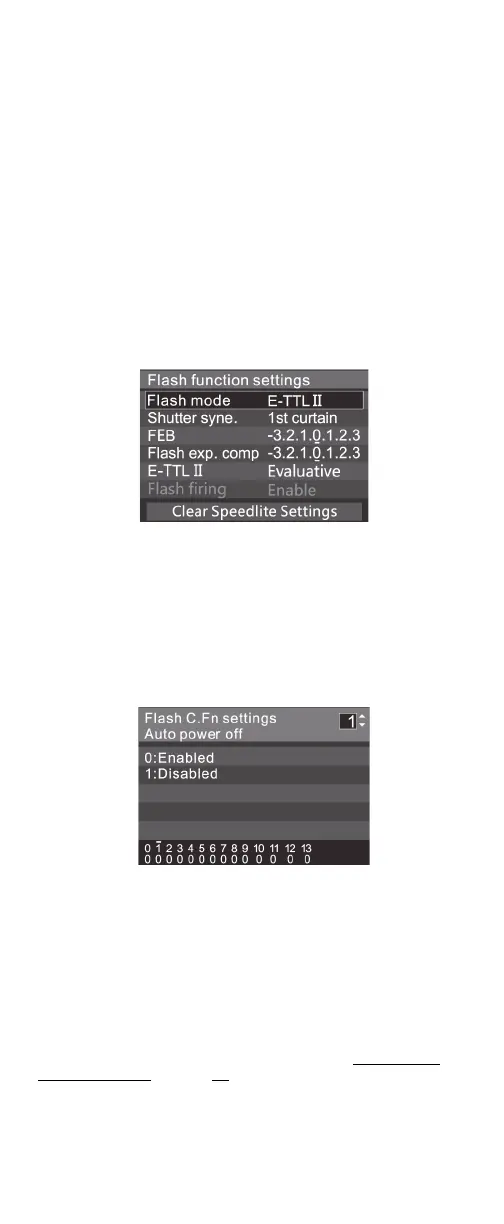
with the camera. The camera has two menus: Flash function
settings and Flash C.Fn settings.
Note:
• If you set the flash exposure compensation (FEC) on your
flash, you cannot set the flash exposure compensation on the
camera. To set FEC on the camera, set FEC on your flash to
0(zero).
• If you set any custom functions and flash settings, other than
FEC, on both your flash and the camera, the most recent
settings take effect.
Flash function settings menu
From the Flash function settings menu, you can control:
• Flash mode
• Shutter sync (first and second curtain and high speed sync)
•FEB
• Flash exposure compensation
•Flash firing
You can also clear all settings.
Flash C.Fn settings menu
From the Flash C.Fn settings menu, you can adjust the custom
functions:
•C.Fn-00
•C.Fn-01
•C.Fn-03
•C.Fn-04
•C.Fn-08
•C.Fn-10
•C.Fn-20
•C.Fn-22
For more information on custom functions, see Customizing
function settings on page 39.


 To Next Page