7
i-TTL AUTO FLASH FOR NIKON™
Setting up your flash
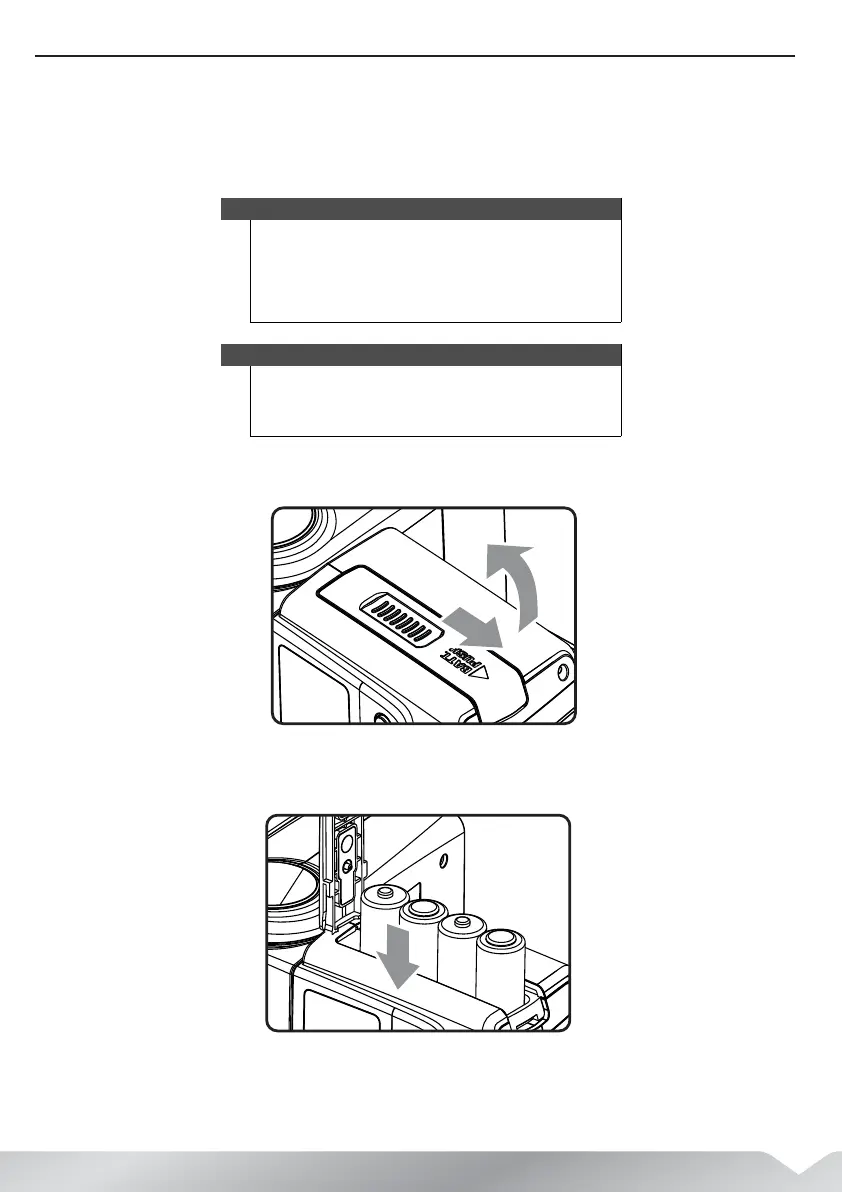
Installing the batteries
1 Open the battery compartment cover by pressing it with your thumb, sliding
the compartment down, then lifting it open.
2 Insert four (4) AA batteries (not included), making sure to match the + and –
symbols.
Cautions
• Using AA batteries other than Alkaline or NiMH may
cause improper battery contact due to the irregular
shape of the battery contacts.
• If you change the batteries after firing many flashes
continuously, be aware that the batteries might be hot.
Notes
• Replace all four at one time.
• Make sure all four batteries are the same brand and type.
• Batteries are not included with this flash.
PT-DFLEXT1N_14-0805_MAN_V2_ENG.fm Page 7 Friday, August 22, 2014 12:36 PM



 To Next Page