5
STEP 4. POWER UP THE MC500 MEDIA PLAYER
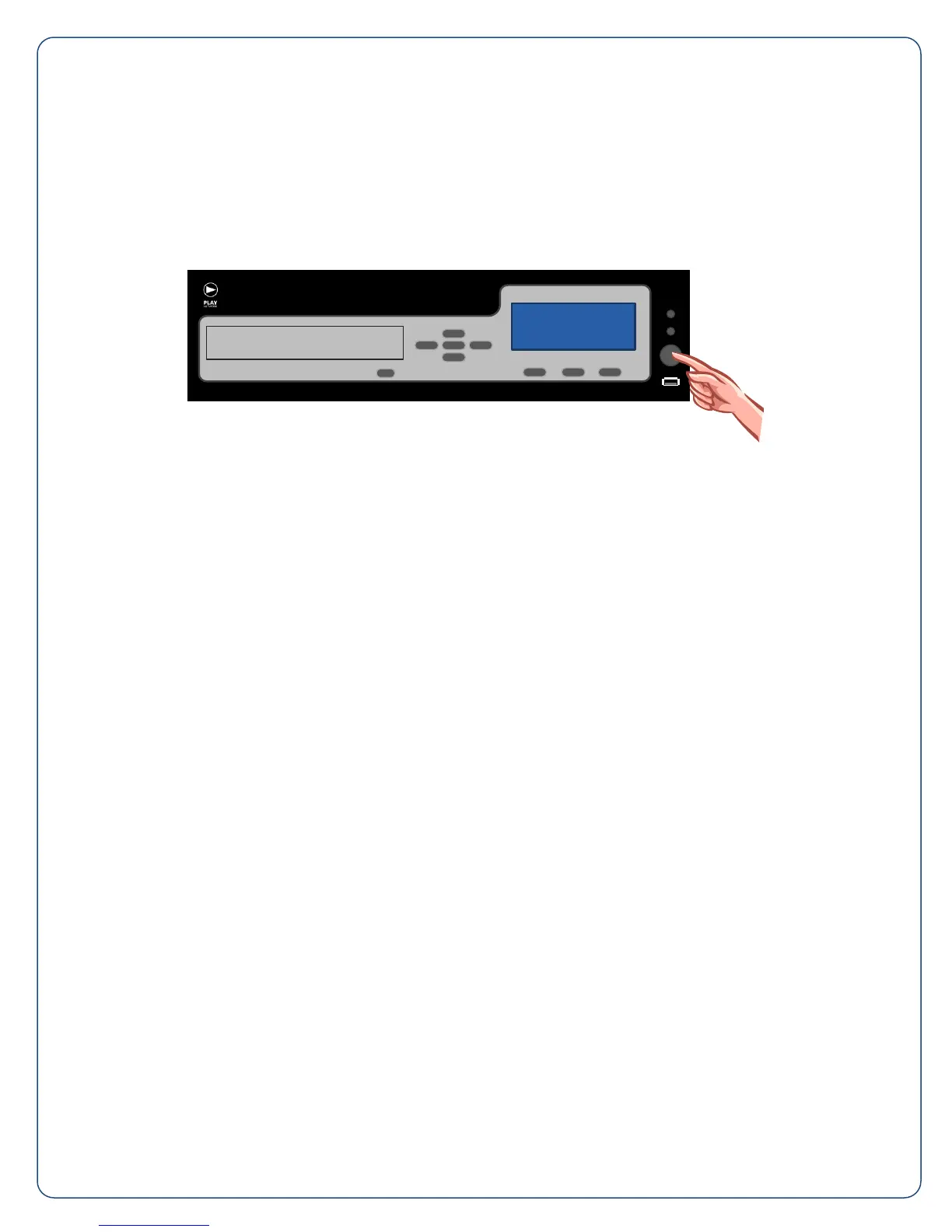
First, power up your amplifier and then power up your player by pushing the Power/Standby Button (C)
on the front panel. It will take 2 minutes for the MC500 to boot up. Then, adjust the volume of your
amplifier equipment to the desired listening level. You are in business, enjoy the music!
NOTE: If you are not hearing any music, check to ensure that your amplifier is on and that you have
correctly followed steps 1 – 4. If you are still experiencing problems contact your service provider.
To Find Your Service Provider’s Contact Information:
1. Press enter or an arrow button to open the Main Menu.
2. Scroll down using the arrow buttons to Help and press enter.
3. Scroll down until you see your Customer Service Number, this is who to call for service.
Put the MC500 To Sleep At Night
1. PlayNetwork advises not turning the power off at night (this also ensures nightly updates are
delivered for players on network connection).
2. Put the MC500 into “Stand-by” mode by pressing the silver power button once.
3. To “wake-up” the player, simply press any key.


 To Next Page