12
Only one wireless room panel should be
paired at this time, analogously as described
during pairing from the main controller menu
level. After correct pairing of the panel, end
the pairing mode by briefly pressing the P
button or wait until the active pairing time
expires.
After establishing the radio connection with
the room panel in the main controller
Information menu, the wireless room panel
will be visible as ecoSTER TOUCH, with the
given version of the software.
The pairing method with the P
button can also be used when the
radio module program is fully
compatible with the main controller.
11.3 Resetting the memory of the radio
module pairing
The radio module stores data about paired
wireless room panels in its memory, so after
replacing any wireless room panel it is
necessary to reset the memory of the radio
module by setting the parameter in the main
controller menu:
MENU → General settings → Radio
module → Pairing mode → Deleting
paired devices = Yes.
Memory reset can also be performed by
pressing the P button of the radio module for
about 8 seconds. Confirmation of removing
the pairing memory is to turn off the LED for
a moment, immediately after releasing the P
button.
The reset radio module requires re-
pairing with wireless room panels.
11.4 Cooperation of the radio module
with several wireless room panels
The cooperation of the main
controller with more than one
wireless room panels is possible
only when the radio module
program is fully compatible with the
main controller.
To check if the main controller program is
fully compatible with the radio module, select
the tab in the main controller menu:
MENU → Information → Programs
versions and if ISM information is visible,
with the displayed version of the program,
the radio module will work with up to three
wireless room panels, if there is no
information, the radio module can work with
only one wireless room panel. In order to
check if it is possible to get full cooperation
with subsequent room panels, contact the
manufacturer of the main controller, who will
determine if it will be possible to update the
software of the main controller so that this
cooperation will be ensured.
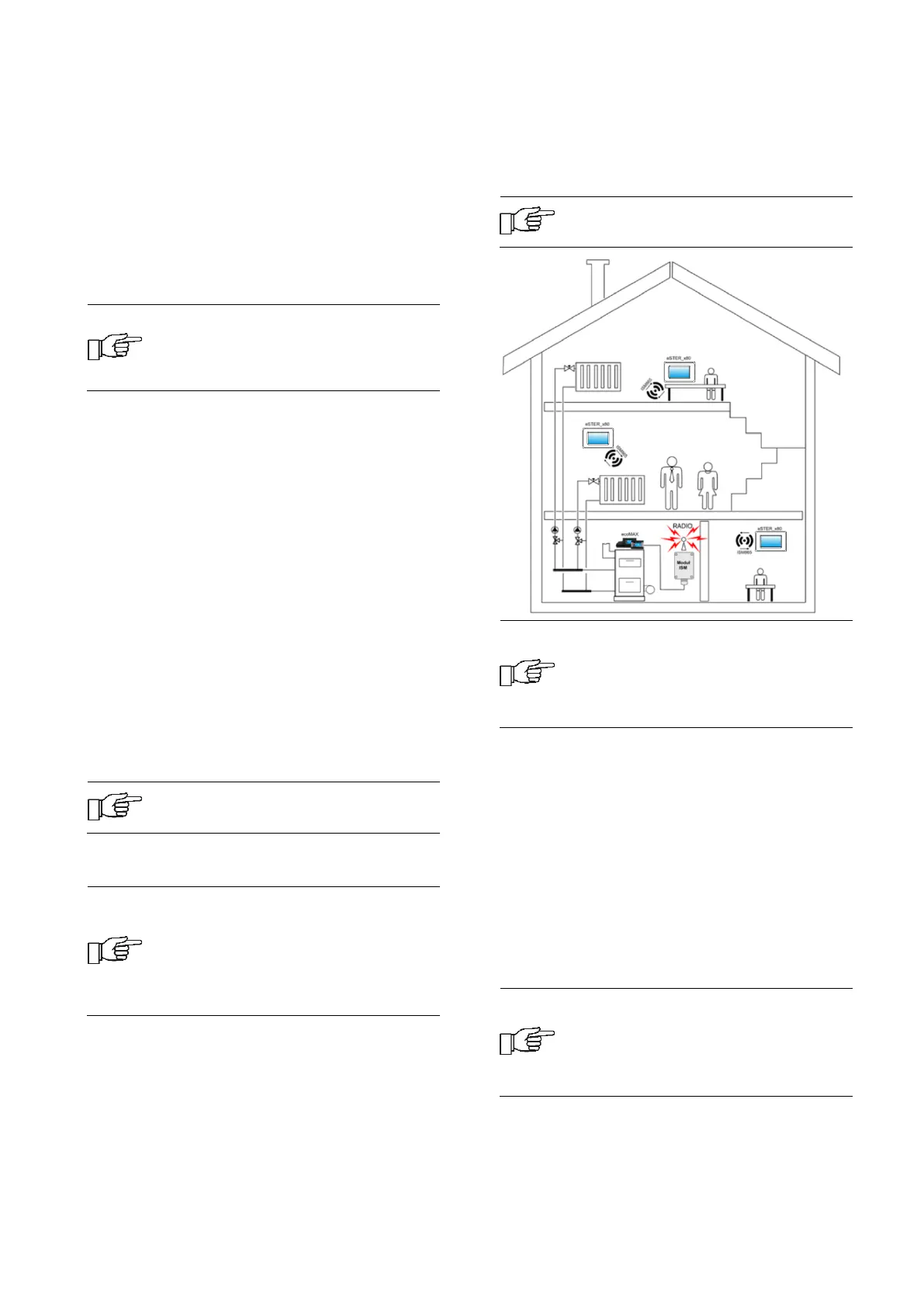
The radio module can operate with
up to three wireless room panels.
Correctly paired wireless room
panels with a radio module require
setting an individual address for
each of the room panels, in
accordance with point 8.11.11
The structural elements of the building, the
layout and equipment of rooms, the amount
of electronic equipment, the distance
between the installation place of the radio
module and the wireless room panel affect
the level of the received radio signal - RSSI,
therefore when choosing a place to install the
wireless room panel, take into account the
obtained signal level in the selected location.
The value of the radio signal strength can be
read in the: MENU → Settings →
Information
If the radio connection to the
wireless room panel is lost, the
main controller will go into
operating mode without a room
panel after a few minutes.


 To Next Page