4
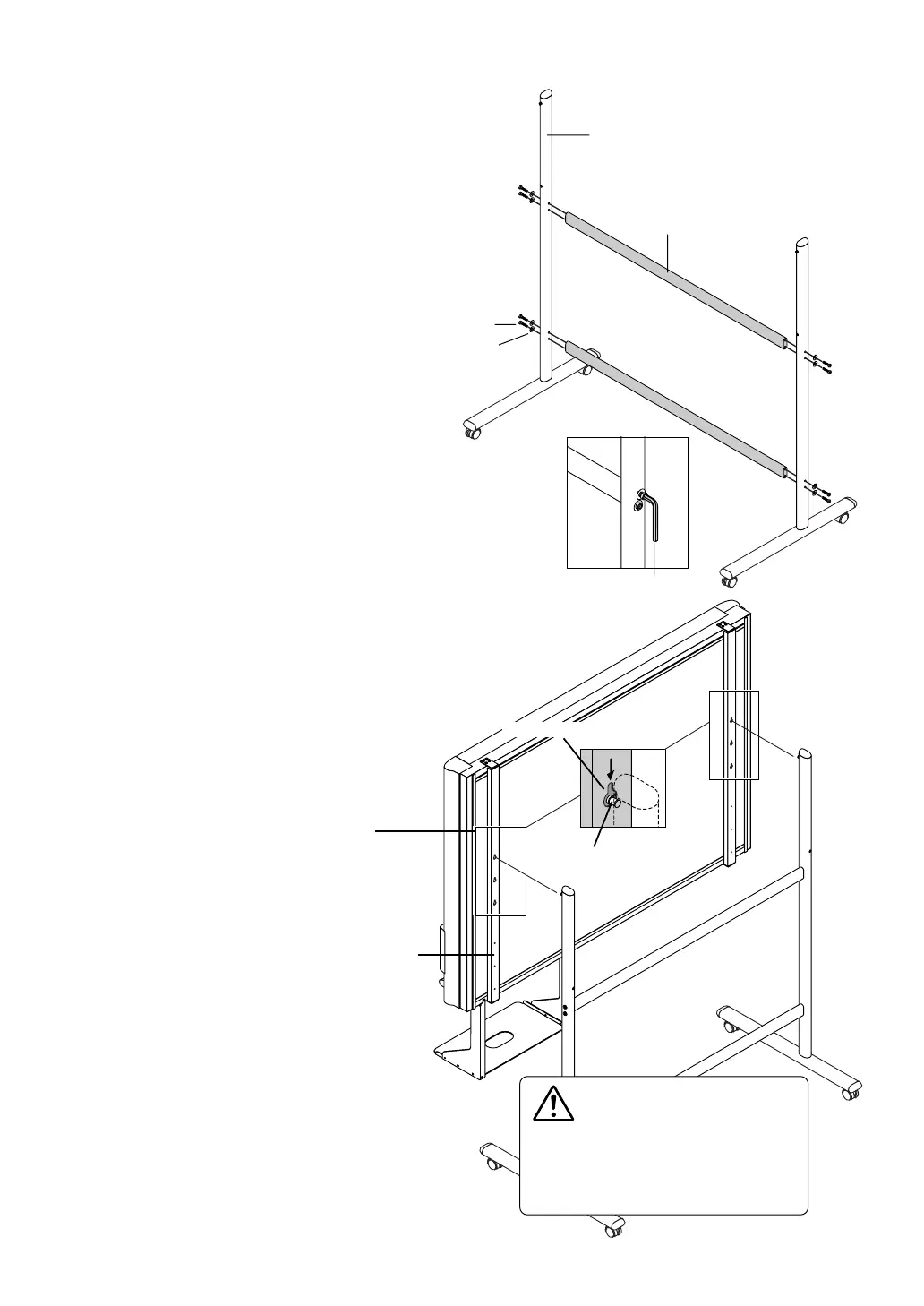
Mounting hole
Hook
The rear frame
(3) Attach the two horizontal bars to the
T-shape legs.
Use hexagonal socket screws and flat washers to
attach.
Partially fasten using the supplied hexagonal wrench,
then tighten securely after the upper and lower hori-
zontal bars have been attached.
(4) Mount the printer tray to the Copy-
board.
See Page 9 for information about the assembly and
installation of the printer tray.
* Installation of the printer tray is not required when
the Copyboard is used only for memory storage.
(5) Place the stand’s hooks in the mount-
ing holes in the support fittings and
insert the grooves in the hooks se-
curely.
There are 3 hole positions. By changing the
position, the installation height can be
changed among 3 levels in 100 mm units
(1770, 1870, and 1970 mm (the maximum
height)).
Hexagonal wrench
T-shaped leg
Horizontal bar
Hexagonal socket screw
Flat washer
CAUTION
Please have 2 or more persons lift the
Copyboard when installing it or making a
height adjustment. If the unit is dropped or
falls over, this could cause unforeseen in-
jury.



 To Next Page