33
f. Ölçümden sonra, monitör otomatik olarak 1 dakika çalışma olmadığı takdirde kapanacaktır. Alterna-
tif olarak, “BAŞLAT” tuşuna basarak monitörü kapatabilirsiniz.
g. Ölçüm esnasında, “BAŞLAT” tuşuna basarak monitörü kapatabilirsiniz.
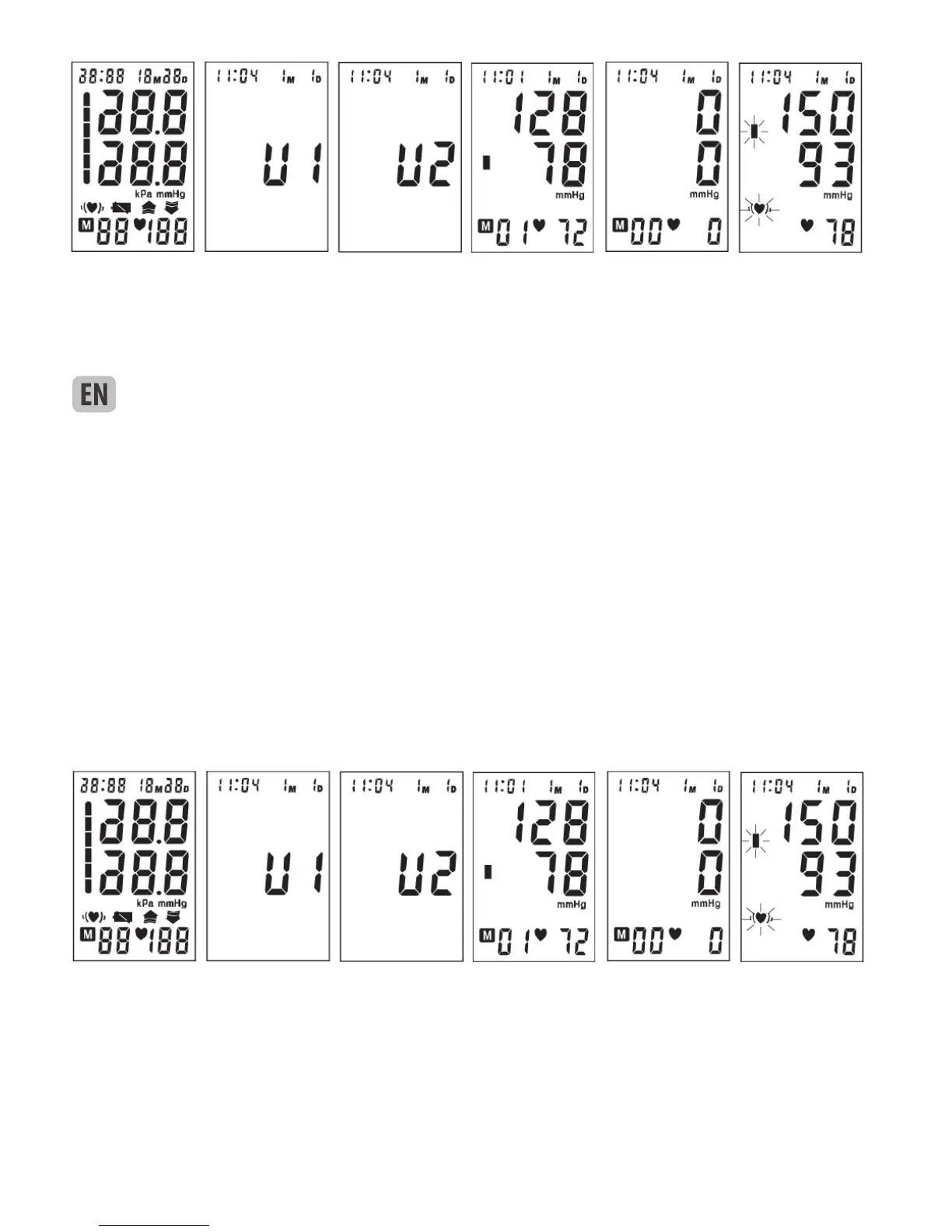
a. After applying the cuff and your body is in a comfortable position, press the “START” button, all display
characters are shown for self-test. See picture 7. Please contact the service center if segment is missing.
b. Then the current memory bank (U1 or U2) is displayed. See picture 7-1. Press “MEM” button to change
over to other bank. See picture 7-2. Confirm your selection by pressing “START” button. The current bank
can also be confirmed automatically after 5 seconds with no operation.
c. After selecting the memory bank, the LCD will momentarily display the last measurement stored in the
memory. See picture 7-3. If the monitor has no measurement stored in the memory, the LCD will display
“0” for blood pressure and pulse rate. See picture 7-4.
d. If the voice function is switched on, the monitor will speak out measurement tips.
e. Then the monitor inates the cuff until sufficient pressure has built up for a measurement. Then the
monitor slowly
Picture 7 Picture 7-1 Picture 7-2 Picture 7-3 Picture 7-4 Picture 7-5
releases air from the cuff and carries out the measurement. Finally the blood pressure and pulse rate will
be calculated and displayed on the LCD. See picture 7-5. The irregular heartbeat symbol (if any) and blood
pressure classification indicator will blink on the screen. The result will be automatically stored in the me-
mory. If the voice function is on, it will announce the measurement result.
f. After measurement, the monitor will turn off automatically after 1 minute of no operation. Alternatively,
you can press the “START” button to turn off the monitor manually.
g. During measurement, you can press the “START” button to turn off the monitor manually.
7. TAKING YOUR BLOOD PRESSURE READING
Resim 7 Resim 7-1 Resim 7-2 Resim 7-3 Resim 7-4 Resim 7-5
Picture 7 Picture 7-1 Picture 7-2 Picture 7-3 Picture 7-4 Picture 7-5



 To Next Page