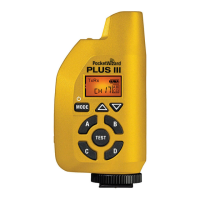
Incred
ble Range and Rel
ab
l
ty
With the new E
eries technolo
y, the Plus IIIe can tri
er remote cameras and fl ashes in the tou
hest
situations
rom thousands o
meters
yards
away
uto
ensin
Transceiver
e
us
e w
automat
ca
y sw
tc
etween transm
tt
ng an
rece
v
ng as nee
e
w
t
our patente
auto sensin
technolo
y. Simply make connections and start workin
with near zero confi
uration time
32 E
hannels and 80 LR
Lon
Ran
e
hannels
Choose
our own Channel so there’s no interference from other shooters.
uad Zone Tri
erin
Now available on all 112 Channels. Wirelessl
activate or deactivate
our remote fl ashes or cameras in
4 separate
y contro
a
e
ones
Remote
amera Tri
erin
et up as many remote cameras as you want to catch a different an
le from one sin
le tri
er. Two sta
tri
erin
ives you
aster response time to catch the action
uto Rela
ri
er remote
ashes in sync with your remote camera
or even more creative and pro
essional ima
es
PocketWizard
ompatibilit
The Plus IIIe will work with all PocketWizard E Series radios and you can down
rade the fi rmware to
work with all Le
acy PocketWizards as well.
note: F
and
E PocketWizard radios work on different
requencies-all o
your radios must have the same
requency to be compatible.
Camera & Flash Compatibilit
The Plus IIIe will work with virtually any camera or
ash capable o
tri
erin
rom a center pin tri
er
or with the a
ro
riate s
nc cable and can s
nc a
ash in manual mode, u
to
our camera’s X-s
nc
s
ee
.
t
oes not su
ort
commun
cat
on.
imple User Inter
ac
Everythin
is ri
ht at your
n
ertips with the intuitive so
t touch keypad. Press any button
except test
to illuminate the L
D if you’re in low li
ht
Fast and Eas
Setu
On the camera, slide it into the hot shoe and ti
hten the lockin
rin
. Connect the fl ash to your remote
radio by usin
the secure miniphone connection. Turn on the radios, match the Channels and Zones,
an
you
re rea
y to
o
Key Features
t
z
r
.
m



 To Next Page