8
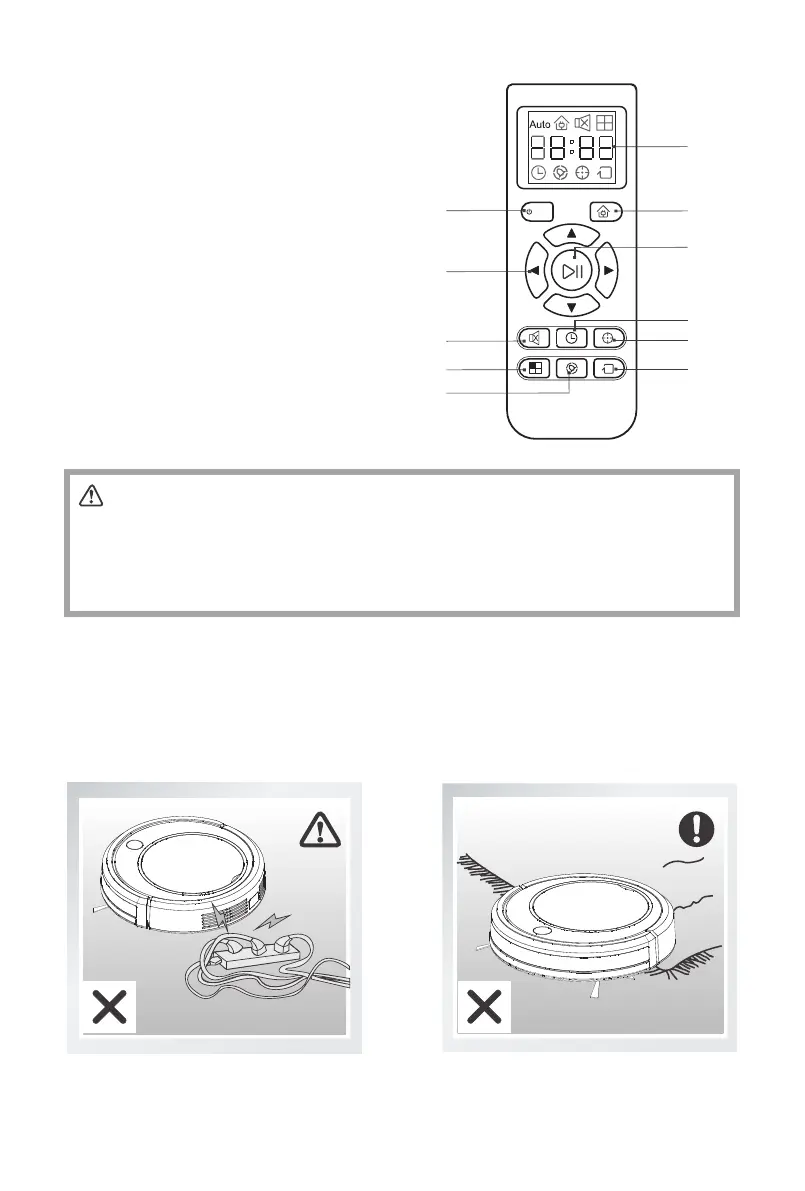
3. Operations
<1> Start/Stop Button
<2> Direction Control Buttons
<3> Low Noise Cleaning Button
<4> Single Room Cleaning Button
<5> Schedule Button
<6> LCD Screen
<7> Return to Charging Dock Button
<8> Current Time Setting Button
<9> Spot Cleaning Button
<10> Edge Cleaning Button
<11> Stop/Confirmed Button
• Remote Control
3.1 Cautions
<1>
<6>
<7>
<8>
<9>
<10>
<11>
<2>
<3>
<4>
<5>
AUTO
Caution
Install 2pcs of AAA/R03P batteries before using the remote control.
Remove batteries if the remote control is not to be used for a long time.
To operate the appliance with remote control, aim the remote control at the appliance within a
distance of 6 meters.
*
*
*
Remove all cables and debris scattered on
the ground which may obstruct the appliance
before operating.
Roll up any fringe edges of the carpets when
operating.
Refer to the guide below and check the cleaning area before using.



 To Next Page