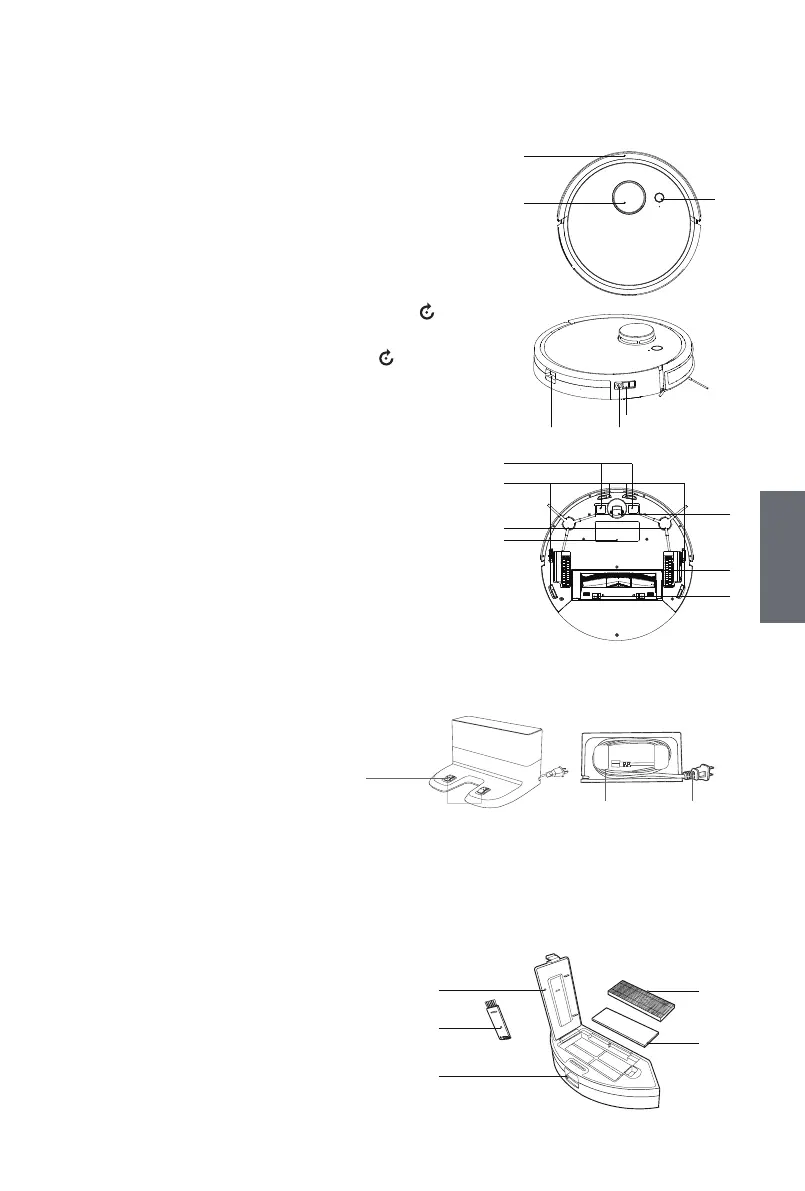
Product Components
Part’s name
■ Main body
■ Charging Dock Assembly
■ Dustbin Assembly
1. Front Bumper Sensors Assembly
2. Laser Scanning Module (LDS)
3. AUTO Button (Start/Stop)
4. Dustbin Release Button
5. Reset Button
- Start network setup button: Shortly press the button ,
Voice broadcast “I’m ready for network setup”;
- Restore factory setting: Long press the button for three seconds,
Voice broadcast" Reset to default settings",
(Use this key with cautions)
6. Power Switch
7. Charging Dock Pins
8. Anti-drop Sensors
9. Side Brush
10. Battery
11. Universal Wheel
12. Driving Wheel
13. Roll Brush Assembly Release Button
1. Charging Dock Pins
2. Mains power cable storage groove
3. Mains power plug
1. Dustbin Cover
2. Cleaning Tool
3. Dustbin Release Button
4. HEPA
5. Sponge filter
1
2
3
4 5
6
7
8
11
12
13
9
10
1
2 3
2
3
4
5
1
7
GB
GB



 To Next Page