USING YOUR DISHWASHER
Control Panel
31
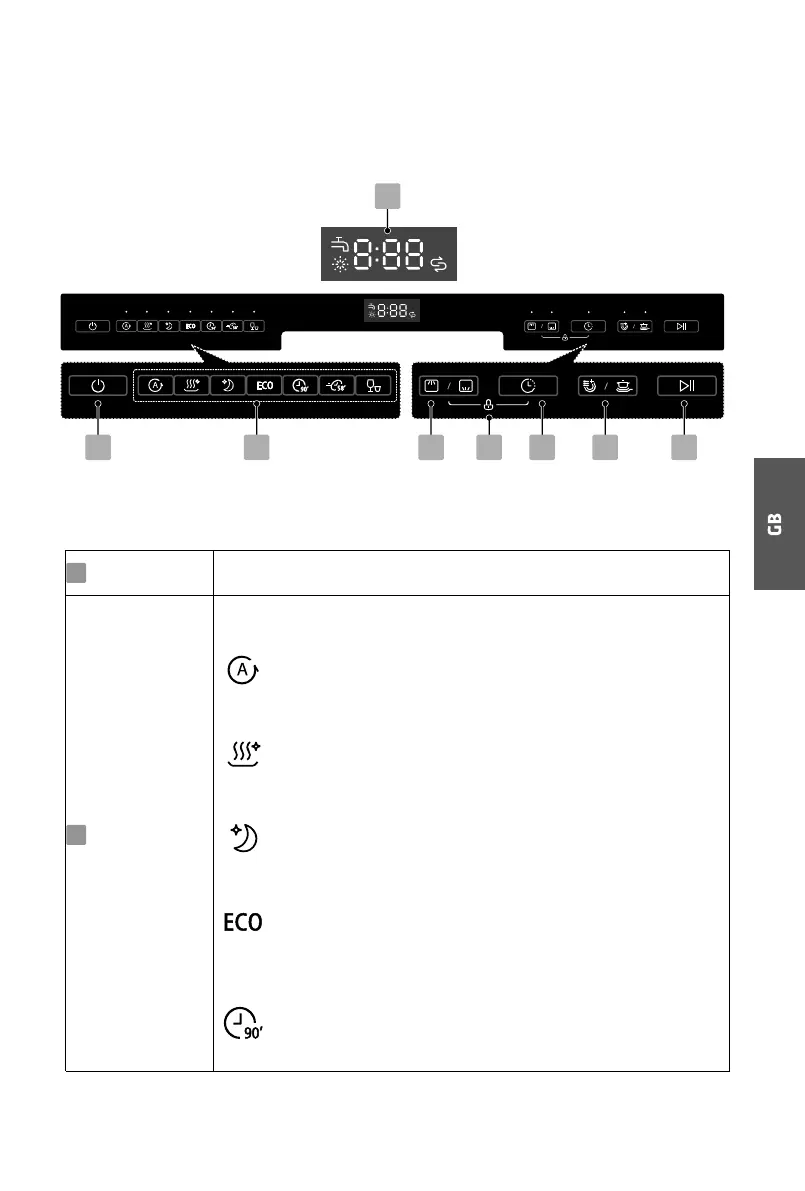
Operation (Button)
3 45 6 72
8
1
Press this button to power on or power off your dishwasher.
Press the buttons to select the appropriate washing program, the
selected program indicator will be lit.
Power
Program
1
2
Auto
For lightly, normally or heavily soiled crockery with or
without dried-on food.
Hygiene 72°
With the Sanitize option selected, the water temperature is
increased to 72 ˚C for high temperature sanitization.
Whisper
Lower noise and normal energy consumption, used for
washing in evening.
ECO
This is the standard program suitable for normally
soiled loads, such as pots, plates, glasses and lightly soiled
pans.
90 min
For normally soiled loads that need 90 min wash.



 To Next Page