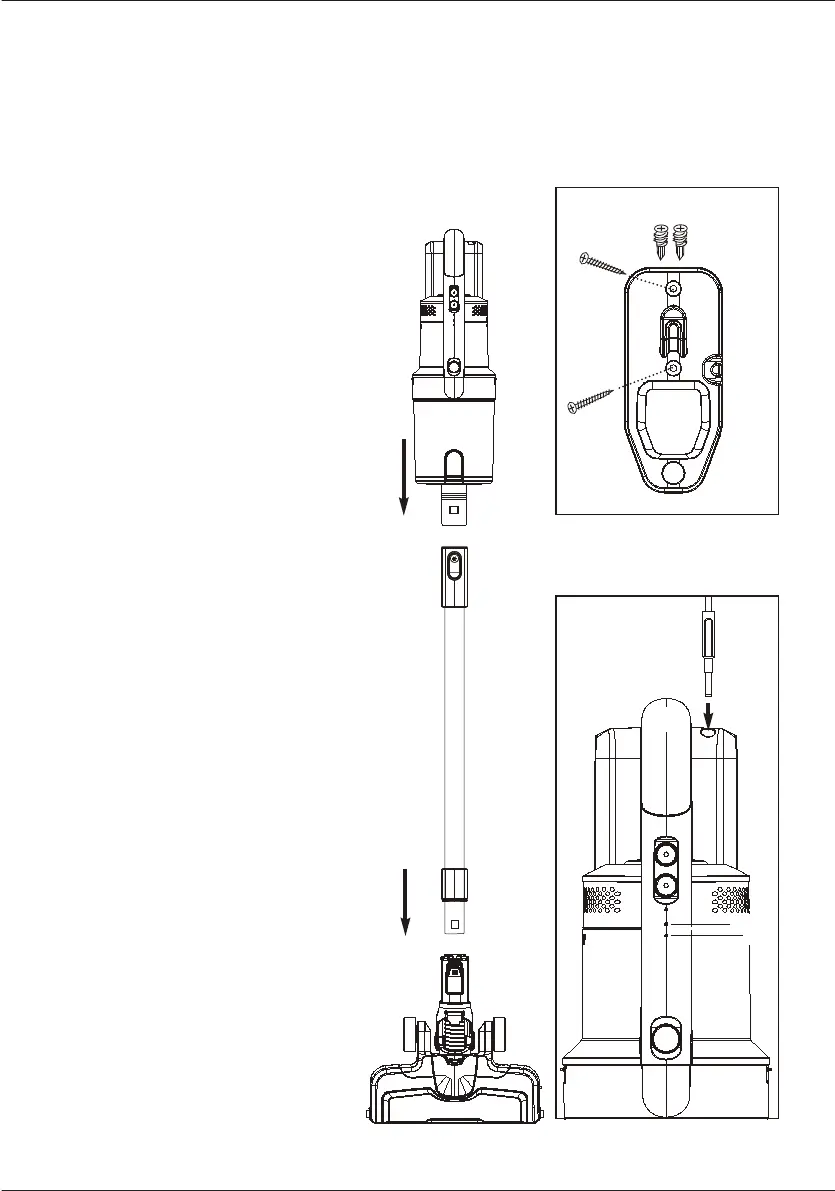
1. Slide wand onto hand vacuum until it clicks (Fig. 1).
2. Push wand into motorized floor nozzle until it clicks (Fig. 2).
How to install wall mount
• Choose location near mains power outlet.
Locate point high enough on wall
to allow wand and motorized floor
nozzle to hang freely.
• Place mount against wall and use
pencil to mark drill holes.
• Drill holes (with 1/4” bit) and insert
drywall anchors. Insert screws
through holes on mount and
tighten until firmly attached
(Fig. 3).
How to charge battery and
store accessories
• Place assembled vacuum cleaner
on wall mount.
• Plug charger into mains power outlet
and then into charger port on handle
(Fig. 4).
• Loop charger cable into the clips on
the sides of the wall mount.
Battery indicator lights show
level of charge (Fig. 4):
A. Half charged
B. Fully charged
• Indicator lights stop blinking when
fully charged.
• Charge battery fully before using
forthe first time. This may take up
to six hours.
ASSEMBLY
10
4
A
B
1
Click!
2
Click!
3
Drywall anchors
Cord
clip



 To Next Page