27
USING YOUR DISHWASHER
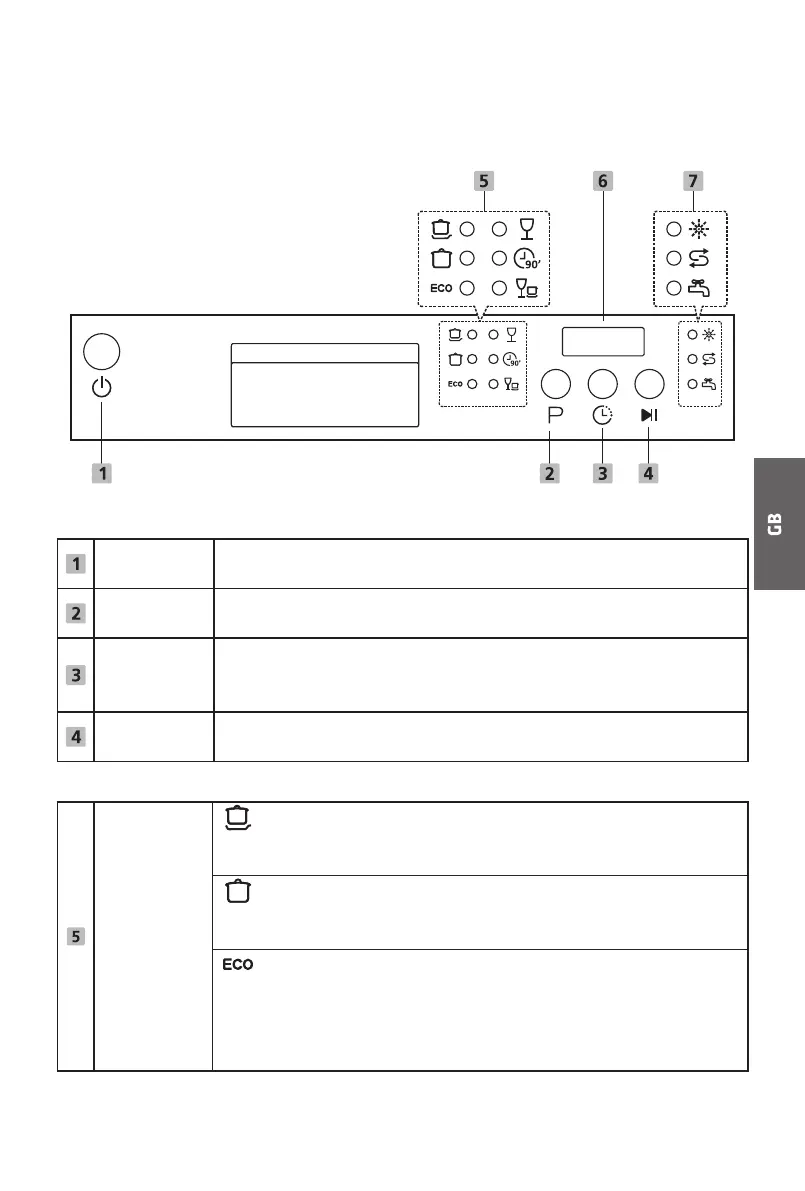
Control Panel
Operation (Button)
Power
Press this button to turn on your dishwasher, the screen lights
up.
Program
Press this button to select the appropriate washing program,
the selected program indicator will be lit.
Delay
Press this button to set the delayed hours for washing. You can
delay the start of washing up to 24 hours. One press on this
button delays the start of washing by one hour.
Start / Pause
To start the selected washing program or pause it when the
dishwasher is working.
Display
Program
indicator
Intensive
For heaviest soiled crockery, and normally soiled pots,
pans, dishes etc. With dried-on food.
Universal
For normally soiled loads, such as pots, plates, glasses
and lightly soiled pans.
ECO
This is a standard program, which is suitable to clean
normally soiled tableware and it is the most efficient
program in terms of its combined energy and water
consumption for that type of tableware.


 To Next Page